10
ENGLISHDEUTSCHFRANÇAISITALIANOESPAÑOLNEDERLANDSSVENSKA
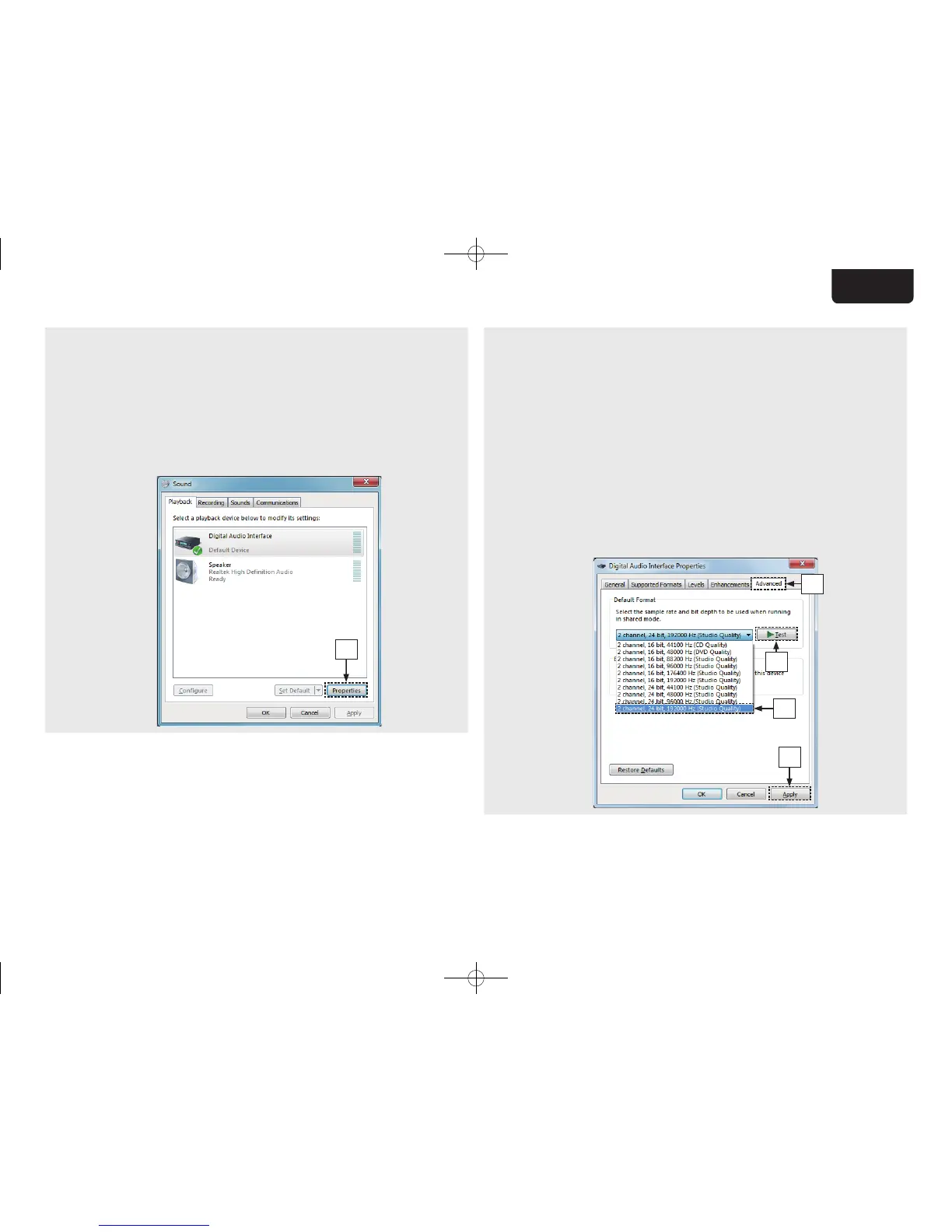
e Check that there is a checkmark next to “Default
Device” under in “SA-KI RUBY” of the “Playback”
tab.
• When there is a checkmark for a diff erent device,
click “SA-KI RUBY” and “Set Default”.
r Select “SA-KI RUBY” and click “Properties”.
• The SA-KI RUBY Properties window is displayed.
SA-KI RUBY
r
t Click the “Advanced” tab.
y Select the sampling rate and bit rate to be applied to
the D/A converter.
• It is recommended that “2 channel, 24 bit, 192000
Hz (Studio Quality)” is selected. (Windows 7)
• It is recommended that “2 channel, 32 bit, 192000
Hz (Studio Quality)” is selected.
(Windows 8/Windows 8.1/Windows 10)
u Click “Apply”.
i Click “Test”.
• Check that audio from this unit is output from the PC.
t
i
y
u
1.SA-KI RUBY N_QSG_ENG_00A_180521.indd 10 2018/05/22 16:09:40



 To Next Page