EasyManua.ls Logo

Marantz SR1041 - REMOTE CONTROL FUNCTIONS; Remote Control Layout; Remote Operation Buttons

Marantz SR1041
15 pages
Print Icon
To Next Page IconTo Next Page
To Previous Page IconTo Previous Page
Loading...
@6
PHONES
jack
For
connecting
a
pair
of
stereo
headphones.
Plugging
in
the
headphones
turns
the
speaker
sound
off.
@?)
MEMOIST.N
button
This
button
is
used
to
store
frequency
preset,
timer
setting
data,
preset
station
name
and
clock
data
in
the
memory.
@8
COPY
button
Press
to
copy
sound
from
TAPE2/MD
to
TAPE1.
The
sound
can
be
copied
regardless
of
the
source
being
played.
NOTE:
This
button
is
invalid
when
a
component
of
the
Marantz
Slim
Line
Series
is
connected
through
the
AL-Bus.
@
TIMER
button
.
This
button
is
used
when
setting
a
timer
program
or
checking
the
timer
program
contents
after
setting
the
timer.
It
is
also
used
to
cancel
a
set
value.
_
60
CLOCK
button
Press
to
enter
the
clock
display
mode.
If
this
button
is
pressed
while
the
POWER
switch
is
ON,
the
display
changes
to
the
clock
display
and
then
returns
to
the
previous
display
in
5
seconds.
6)
Infrared
sensor
The
infrared
signal
from
the
remote
control
enters
the
unit
through
this
window.
When
remote
controlling
the
unit,
point
the
remote
control
transmitter
toward
this
window.
62)
BASS/TREBLE
tone
controls
The
bass
and
treble
frequencies
can
be
controlled
by
turning
the
respective
controls.
Turning
a
control
clockwise
toward
+
enhances
the
corresponding
frequencies
and
turning
it
counterclockwise
toward
attenuates
them.
BASS:
Controls
the
tone
of
low
frequencies.
TREBLE:
Controls
the
tone
of
high
frequencies.
63
VOLume
control
This
knob
adjusts
the
volume.
64
BALance
control
This
rotary
dial
adjusts
the
balance
between
the
left
and
right
speakers
and
headphones.
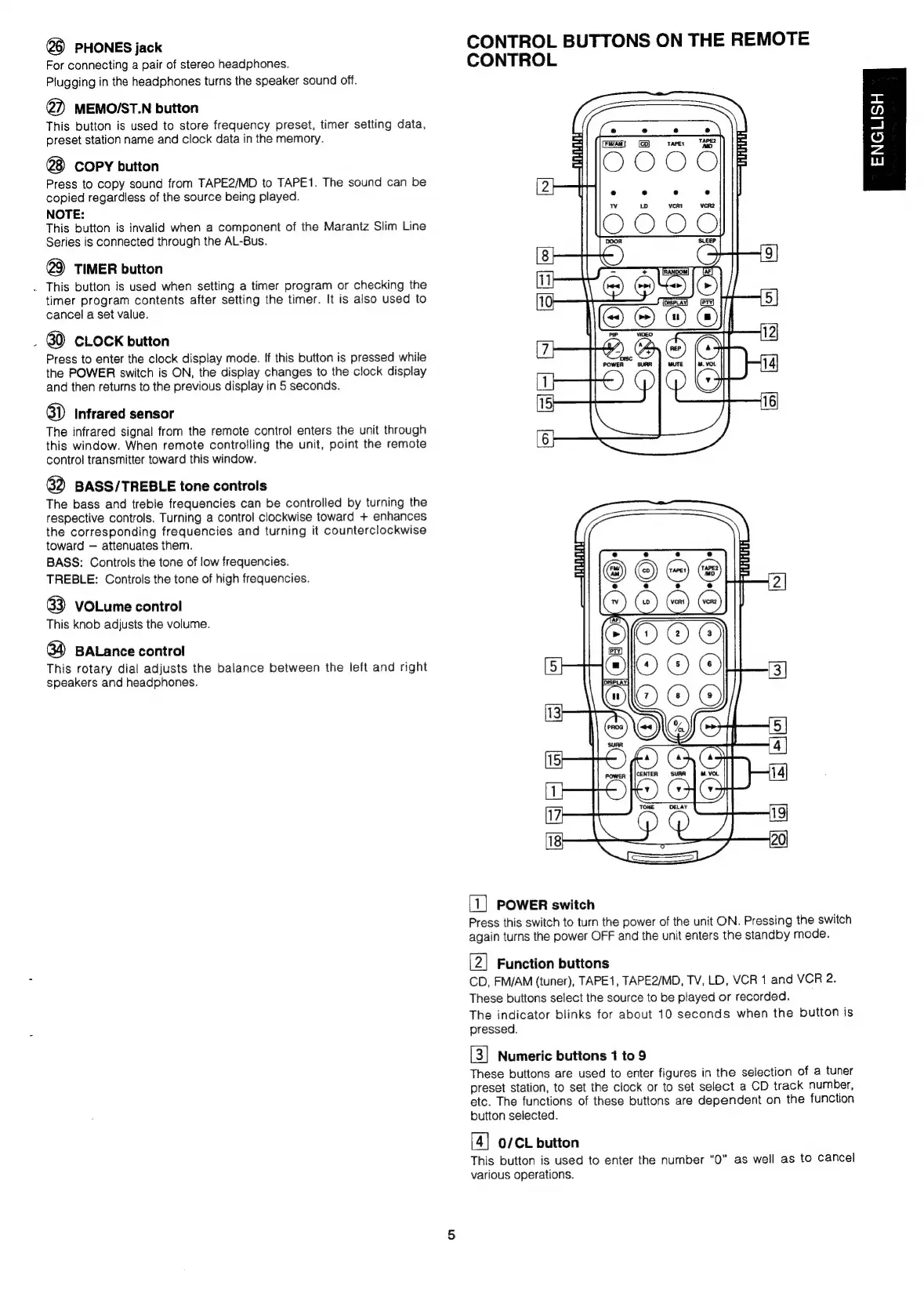
CONTROL
BUTTONS
ON
THE
REMOTE
CONTROL
e
TAPER
TAPEY
MD
Faw!
(CO)
OOOO
Z
e e e e
Oro
(8
9
il
NC
[10
Sa
mm
[5]
©):
@
7
T-—-T1Y.A©
powen
sun
J
mute
=
|
M.
vot
14
1
15
16
6
[1]
POWER
switch
Press
this
switch
to
turn
the
power
of
the
unit
ON.
Pressing
the
switch
again
turns
the
power
OFF
and
the
unit
enters
the
standby
mode.
[2]
Function
buttons
CD,
FM/AM
(tuner),
TAPE1,
TAPE2/MD,
TV,
LD,
VCR
1
and
VCR
2.
These
buttons
select
the
source
to
be
played
or
recorded.
The
indicator
blinks
for
about
10
seconds
when
the
button
is
pressed.
Numeric
buttons
1
to
9
These
buttons
are
used
to
enter
figures
in
the
selection
of
a
tuner
preset
station,
to
set
the
clock
or
to
set
select
a
CD
track
number,
etc.
The
functions
of
these
buttons
are
dependent
on
the
function
button
selected.
[4]
0/CL
button
This
button
is
used
to
enter
the
number
“0”
as
well
as
to
cancel
various
operations.
ENGLISH

Related product manuals