EasyManua.ls Logo

Marantz SR1041 - REMOTE CONTROL OPERATIONS; Playback and Source Control; Audio and System Adjustments; Operational Notes

Marantz SR1041
15 pages
Print Icon
To Next Page IconTo Next Page
To Previous Page IconTo Previous Page
Loading...
m
z
9)
C
iW
es
Control
buttons
Play
(),Stop
(mi),
Pause
(1),
FF
(mr),
REW
(<4).
These
buttons
are
used
when
operating
the
CD
player,
TAPE
deck,
MD
player,
etc.
The
functions
of
these
buttons
are
dependent
on
the
function
button
selected.
When
TUNER
is
selected:
Play
(>)
AF
button
Stop
(m)
PTY
button
Pause
(IB)
Display
button
FF
(>)
Tuning
UP
REW
(<4)
=
Tuning
DOWN
[6]
A/+
button
The
function
of
this
button
is
dependent
on
the
function
button
selected,
as
described
below.
When
CD
is
selected:
Disc
+
(used
to
select
a
disc
in
the
CD
changer).
When
TAPE‘
is
selected:
Deck
A
(used
to
select
deck
A
of
a
double
cassette
deck).
When
TV
is
selected:
Video
(used
to
switch
the
TV
input
between
VIDEO
and
TV).
When
LD
is
selected:
Side
A
(used
to
select
side
A
of
LD).
B/—
button
The
function
of
this
button
is
dependent
on
the
function
button
selected,
as
described
below.
When
CD
is
selected:
Disc
~
(used
to
select
a
disc
in
the
CD
changer).
When
TAPE?
is
selected:
Deck
B
(used
to
select
deck
B
of
a
double
cassette
deck).
When
TV
is
selected:
PIP
(used
to
select
the
Picture-in-Picture
Function).
When
LD
is
selected:
Side
B
(used
to
select
side
B
of
LD).
The
following
table
shows
the
functions
of
the
MODE
buttons
[6]
and
[7].
TAPE1
TV
|
DECKA
|
VIDEO
|
DECKB
|
PIP
|
SIDEA
|
SIDEB
DISC
+
DISC
|
@e-
DOOR
button
e
If
components
of
the
Marantz
Slim
Line
Series
are
connected
through
the
AL-Bus,
the
DOOR
button
allows
the
doors
on
the
system
components
to
be
opened
or
closed.
NOTE:
The
DOOR
button
is
invalid
if
the
components
are
not
connected
through
the
AL-Bus.
[9]
SLEEP
button
Press
to
set
the
sleep
timer.
i4</—,
ppi/-+
These
buttons
are
used
to
increase/decrease
the
tuner
preset
number,
increase/decrease
the
CD
track
number
or
to
go
to
the
next/previous
track
on
a
TAPE.
The
function
of
this
button
is
dependent
on
the
function
button
selected.
RANDOM
/<>
button
The
function
of
this
button
is
dependent
on
the
function
button
selected,
as
described
below.
When
CD
is
selected:
Random
(used
for
random
playback).
When
TAPE‘
is
selected:
Direction
(used
to
select
side
A
or
B).
When
TUNER
is
selected:
Stereo/Mono
(used
to
switch
the
tuner
reception
mode
between
stereo
and
mono).
When
TV
is
selected:
Bilingual
(used
to
select
the
TV
audio
multiplex
mode).
When
LD
is
selected:
Sound
(used
to
select
the
LD
audio
mode).
When
a
VCR
is
selected:
Bilingual
(used
to
select
the
VCR
audio
mode).
co
|
TaPE1
|
TuneR
|
Tv
|
wp
|
vcr]
MODE/<>
RANDOM!
<>
|
ST/MONO
|
BILIN
|
SOUND
|
BILIN
REP.
button
When
CD
is
selected:
Repeat
(used
to
repeat
the
same
tracks).
PROG
button
This
button
is
used
to
store
a
preset
station
in
the
memory
or
to
program
a
CD
track.
M.VOL
4/¥
buttons
These
buttons
vary
the
listening
volume.
Press
the
&
button
to
increase
it
and
the
W
button
to
decrease
it.
SURR.
button
Each
press
changes
the
surround
mode.
MUTE
button
Press
to
mute
the
sound
from
the
speakers.
When
this
button
is
pressed,
the
speakers
are
muted
and
“MUTE”
appears
on
the
display
of
the
main
unit.
Pressing
the
button
again
cancels
the
muting
function,
which
can
also
be
cancelled
by
pressing
one
of
the
function
buttons.
[17]
CENTER
A/V
buttons
Press
to
change
the
level
of
the
centre
channel
sound.
TONE
button
Press
to
output
the
test
tone
from
one
of
the
sound
channels
in
order.
(19)
SURR
A/V
buttons
Press
to
change
the
level
of
the
surround
(rear)
channel
sound.
20]
DELAY
button
Press
to
change
the
delay
time
of
surround
effect.
CAUTION
Danger
of
explosion
if
battery
is
incorrectly
replaced.
_
Replace
only
with
the
same
or
equivalent
type
recommended
by
the
manufacturer.
Discard
used
batteries
according
to
the
manufacturer's
instructions.
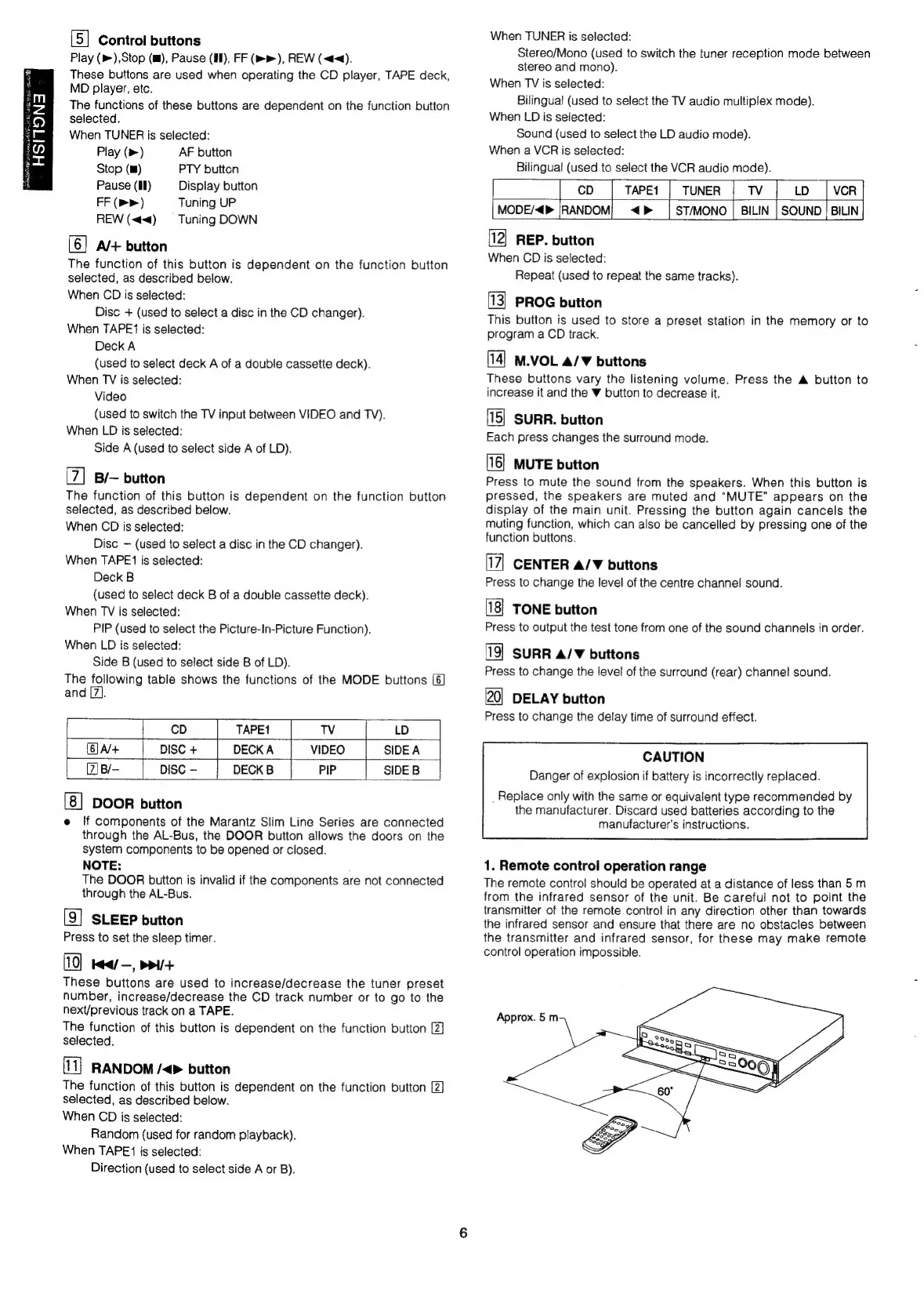
1.
Remote
control
operation
range
The
remote
control
should
be
operated
at
a
distance
of
less
than
5m
from
the
infrared
sensor
of
the
unit.
Be
careful
not
to
point
the
transmitter
of
the
remote
control
in
any
direction
other
than
towards
the
infrared
sensor
and
ensure
that
there
are
no
obstacles
between
the
transmitter
and
infrared
sensor,
for
these
may
make
remote
control
operation
impossible.

Related product manuals