147
GAudioH
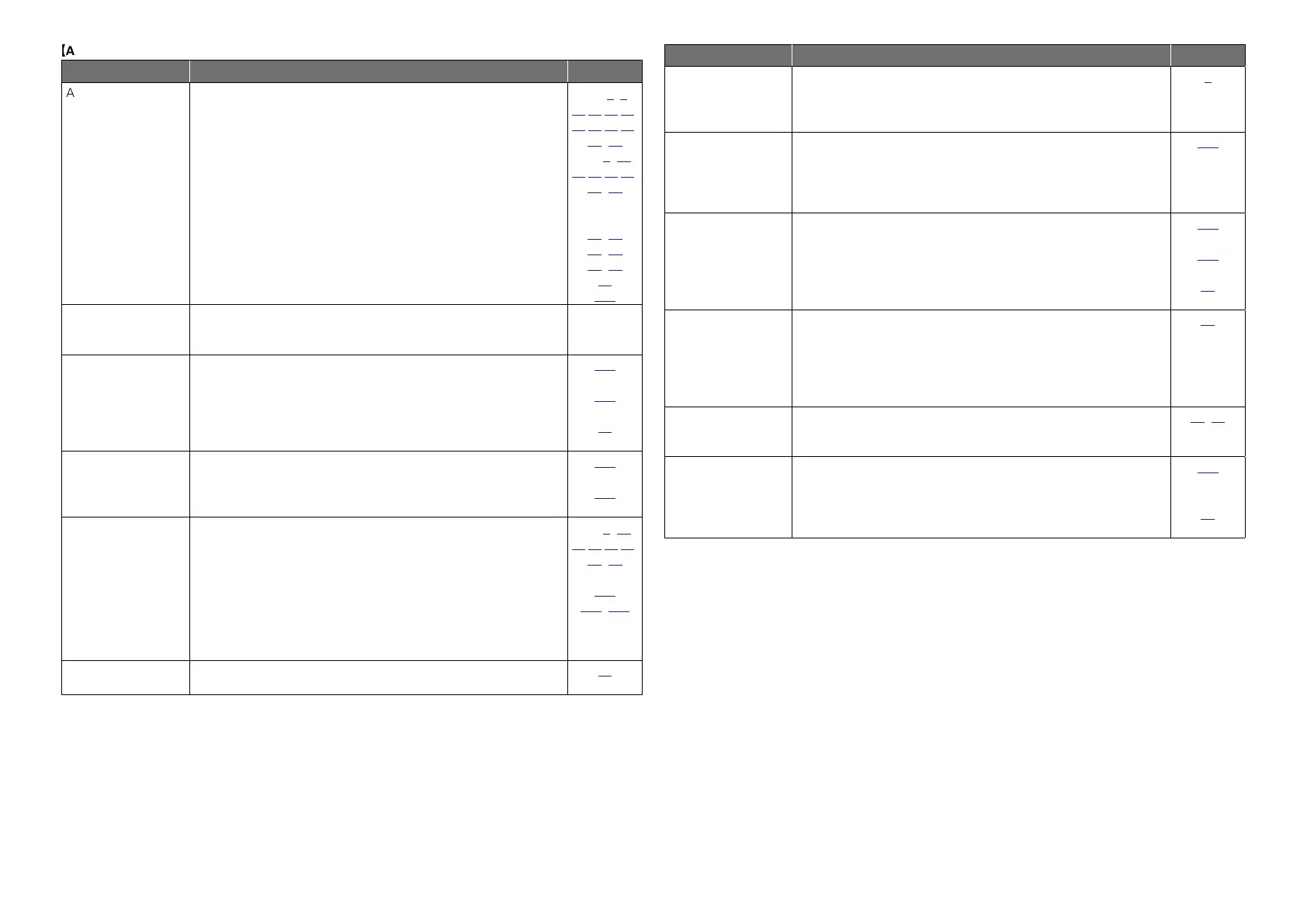
Symptom Cause/Solution Page
Audio is not output. •Check the connections for all devices.
•Check the speaker connections and configurations.
•Check whether the audio device power is turned on.
•Adjust the master volume.
•Cancel the mute mode.
•Select a suitable input source.
•Select a suitable input mode.
•Disconnect the headphones. No sound is output from the speakers
or the PRE OUT connectors when headphones are connected.
C3,8,
10,11,12,13,
14,15,16,17,
18,19
C6,62,
63,64,65,66,
67,68
–
28, 85
28, 85
27, 85
96
131
No sound is
produced from
surround speaker.
•Check if the surround speakers are connected to the SURROUND
terminals.
–
No sound is
produced from
surround back
speaker.
•Check if “Amp Assign” is set appropriately in order to output
audio from the surround back speakers.
•Set “Speaker Config.” – “Surr.Back” on the menu to something
other than “None”.
•Set the surround mode to something other than “STEREO” and
“VIRTUAL“.
106
107
55
No sound is
produced from front
height speaker.
•Check if “Amp Assign” is set appropriately in order to output
audio from the front height speakers.
•Set “Speaker Config.” – “Front Height” on the menu to something
other than “None”.
106
107
No sound is
produced from
subwoofer.
•Check the subwoofer connections.
•Turn on the subwoofer’s power.
•Set “Speaker Config.” – “Subwoofer” on the menu to “Yes”.
•If “Front” and “Center” for “Speaker Config.” are set to “Large”,
and “Subwoofer Mode” is set to “LFE”, no sound may be output
from the subwoofers, depending on the input signal or selected
surround mode.
C6,62,
63,64,65,66,
67,68
–
106
106, 107
DTS sound is not
output.
•Set “Decode Mode” on the menu to “Auto” or “DTS”.
96
Symptom Cause/Solution Page
Dolby TrueHD, DTS-
HD, Dolby Digital
Plus audio is not
output.
•Make HDMI connections.
8
Dolby PLg mode or
DTS NEO:6 mode
cannot be selected.
•Check that “Speaker Config.” – “Center” or “Surround” is set
to other than “None”. If the speaker system is 2.0/2.1ch, this
surround mode cannot be selected.
•When headphones are used, Dolby PLg or DTS NEO:6 cannot be
selected.
106
–
Audyssey DSX™
cannot be selected.
•Check that “Speaker Config.” – “Front Height” or “Front Wide” is
set to other than “None”.
•Check that “Speaker Config.” – “Center” is set to other than
“None”.
•Switch the surround mode to AUTO.
•When headphones are used, Audyssey DSX™ cannot be selected.
107
106
55
–
Audyssey MultEQ
®
XT, Audyssey
Dynamic EQ
®
and
Audyssey Dynamic
Volume
®
cannot be
selected.
•Switch the surround mode to other than “DIRECT” or “PURE
DIRECT”.
•When headphones are used, MultEQ
®
XT, Dynamic EQ
®
and
Dynamic Volume
®
cannot be selected.
55
–
Dynamic EQ
®
and
Dynamic Volume
®
cannot be selected.
•Run Audyssey
®
Auto Setup.
20, 69
M-DAX cannot be
selected.
•Check that an analog signal or PCM signal (fs=44.1/48 kHz) is
input. For playback of multichannel signals such as Dolby Digital
or DTS surround, M-DAX cannot be used.
•Switch the surround mode to other than “DIRECT” or “PURE
DIRECT”.
104
55



 To Next Page