35
Tuning in radio stations
nPresetting radio stations (Manual preset)
Your favorite broadcast stations can be preset so that you can tune
them in easily. Multicasts can also be preset. Up to 56 stations can
be preset.
•Stations can be preset automatically at “Auto Preset”
(vpage97). If “Auto Preset” is performed after performing
“Manual preset”, the “Manual preset” settings will be overwritten.
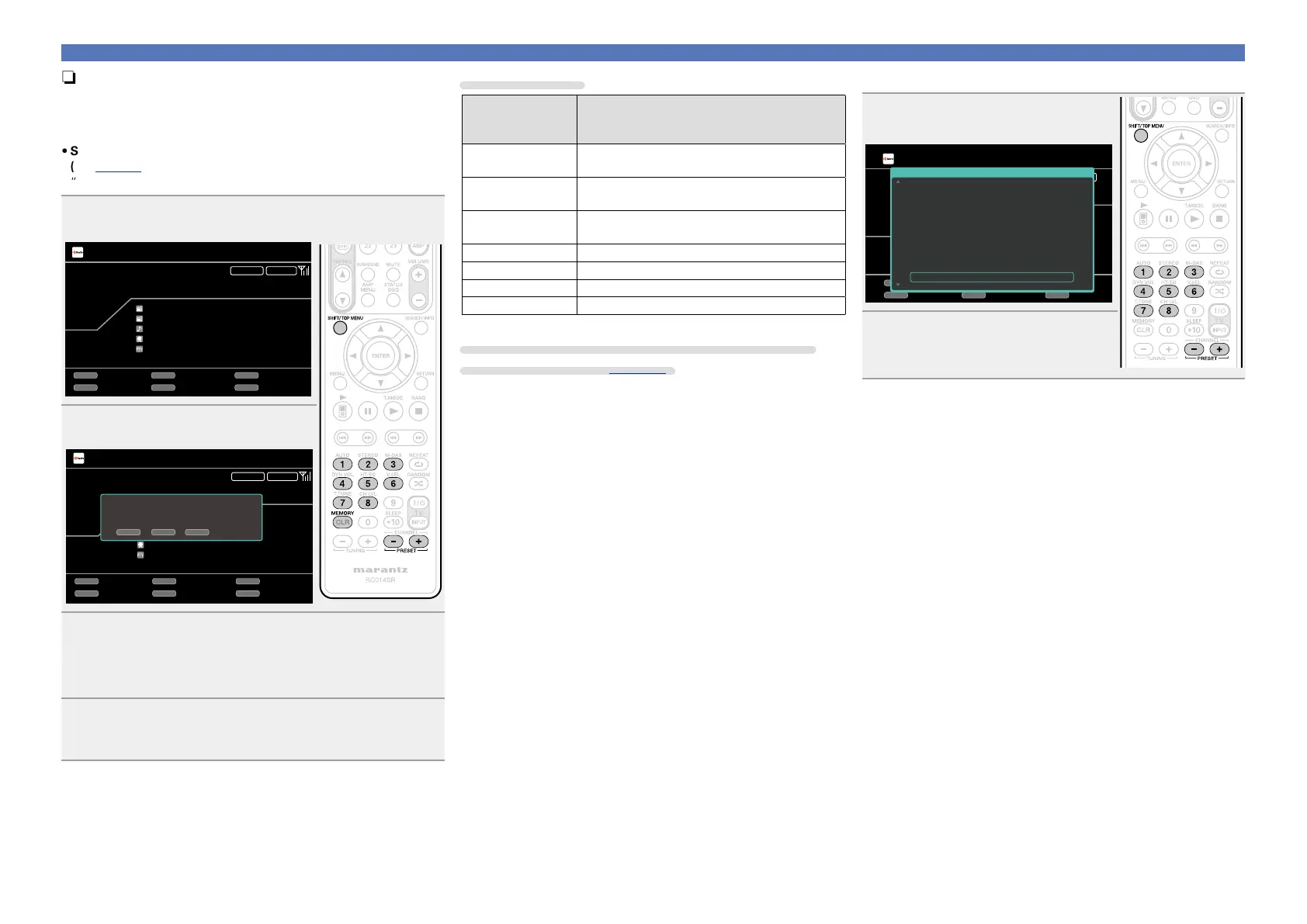
1
Tune in the broadcast station you want to preset.
HD Radio
CH A
Now Playing
FM 97.90MHz
ST.Name HD1
Song Title
Artist Name
Program Type
AUTOSTEREO
MEMORY
Memory
SEARCH
Search
BandTuning Mode
Preset
PRESET
TUNING
BAND T.MODE
2
Press MEMORY.
HD Radio
CH A
Now Playing
FM 97.90MHz
ST.Name HD1
Song Title
Artist Name
Program Type
AUTOSTEREO
MEMORY
Memory
SEARCH
Search
BandTuning Mode
Preset
PRESET
TUNING
BAND T.MODE
To store preset:
Select A1-G8
SHIFT CH+/- MEMORY
A1
3
Press SHIFT/TOP MENU to select the block (A to G) in
which the channel (1 to 8 per a block) is to be preset,
then press PRESET +, PRESET – or 1 – 8 to select the
preset number.
4
Press MEMORY again to complete the setting.
•To preset other stations, repeat steps 1 to 4.
Default settings
Block (A – G)
and
Channel (1 – 8)
Default Settings
A1 – A8
87.50 / 87.90 / 89.10 / 93.30 / 97.90 / 98.10 /
98.90 / 100.10 MHz
B1 – B8
101.90 / 102.70 / 107.90 / 90.10 / 90.10 /
90.10 / 90.10 / 90.10 MHz
C1 – C8
530 / 600 / 930 / 1000 / 1120 / 1210 / 1400 /
1710 kHz
D1 – D8 90.10 MHz
E1 – E8 90.10 MHz
F1 – F8 90.10 MHz
G1 – G8 90.10 MHz
Specify a name for the preset broadcast station
(Preset Name) (vpage98)
nListening to preset stations
1
Press SHIFT/TOP MENU to select
the memory block (A to G).
HD Radio
CH A
FM 97.90MHz
ST.Name HD1
Song Title
Artist Name
Program Type
STEREO
MEMORY
Memory
SEARCH
Search
BandTuning Mode
Preset
PRESET
TUNING
BAND T.MODE
A8 FM 100.10MHz
A7 FM 98.90MHz
A6 FM 98.10MHz
A5
HD1 FM 97.90MHz
A4 FM 93.30MHz
A3
HD2 FM 89.10MHz
A2 FM 87.90MHz
A1 FM 87.50MHz
Preset Channel
2
Press PRESET +, PRESET – or
1 – 8 to select the desired preset
channel.



 To Next Page