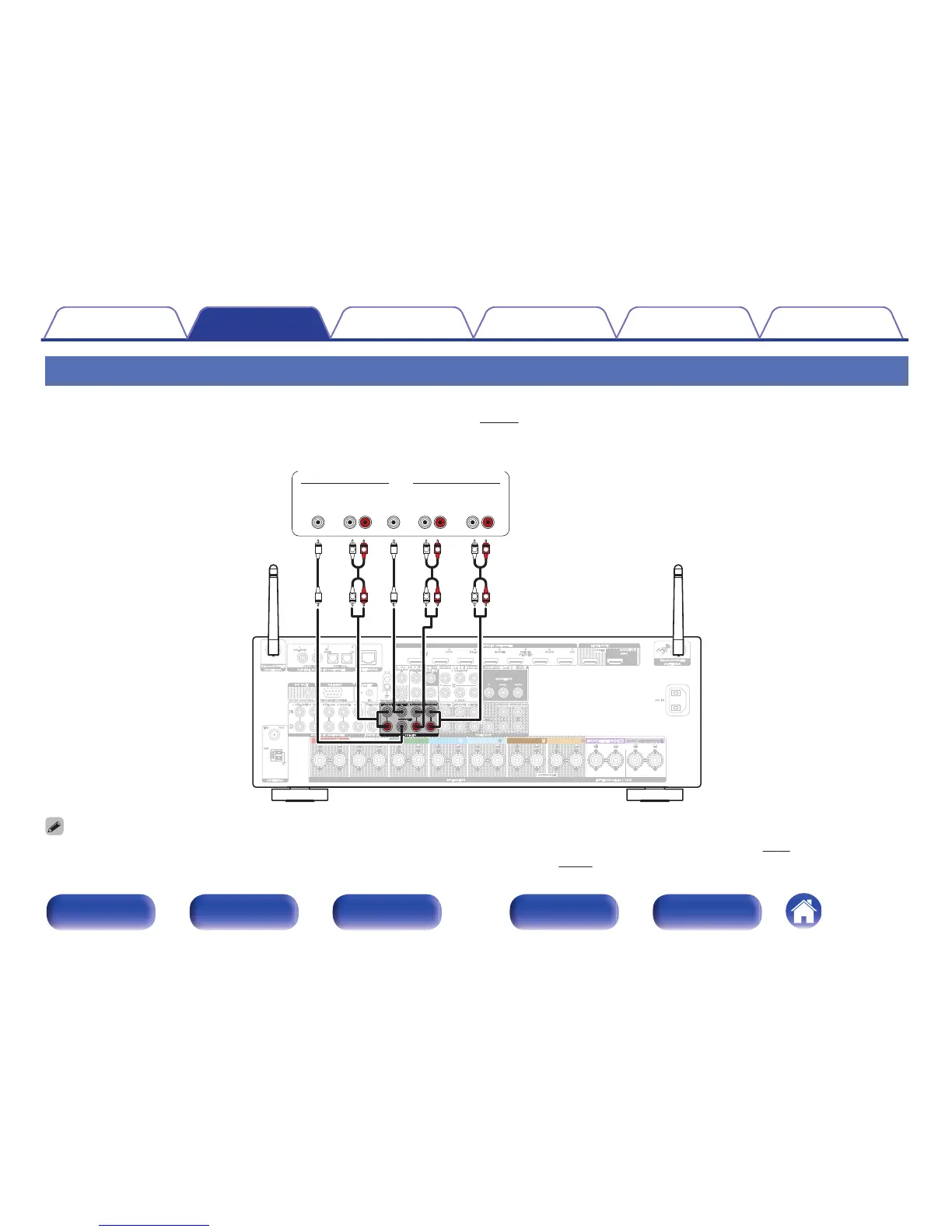
Connecting a device with a multi-channel output connector
You can connect this unit to an external device fitted with multi-channel sound audio output connectors to enjoy music and video.
To play analog signals input from 7.1CH IN connectors, set “Input Mode” (v
p. 178) to “7.1CH IN”.
.
CENTER SURROUND
SURROUND BACK
SURROUNDFRONT
SURROUND BACK
FRONT
L
L
R
R
L
L
R
R
L
L
R
R
SUB-
WOOFER
CENTER SURROUND
BACK
RL
SURROUND
RL
FRONT
RL
AUDIO
Devices with a multi-channel output connector
(Blu-ray Disc player, DVD player,
External decoder etc.)
0
The video signal can be connected in the same way as a Blu-ray Disc player/DVD player. “Connecting a DVD player or Blu-ray Disc player” (v p. 48)
0
When a device is connected to the SBL/SBR terminal of 7.1CH IN connectors, set “Assign Mode” (v p. 189) to “Main Only”.
Contents Connections Playback Settings Tips Appendix
52
Front panel Display Rear panel Remote Index



 To Next Page