1.5. Version Display in the Setup Menu
Follow the steps below to display the rmware information.
(1) Press the "
SETUP
" button on the remote control.
(2) Select "General - Information - Firmware".
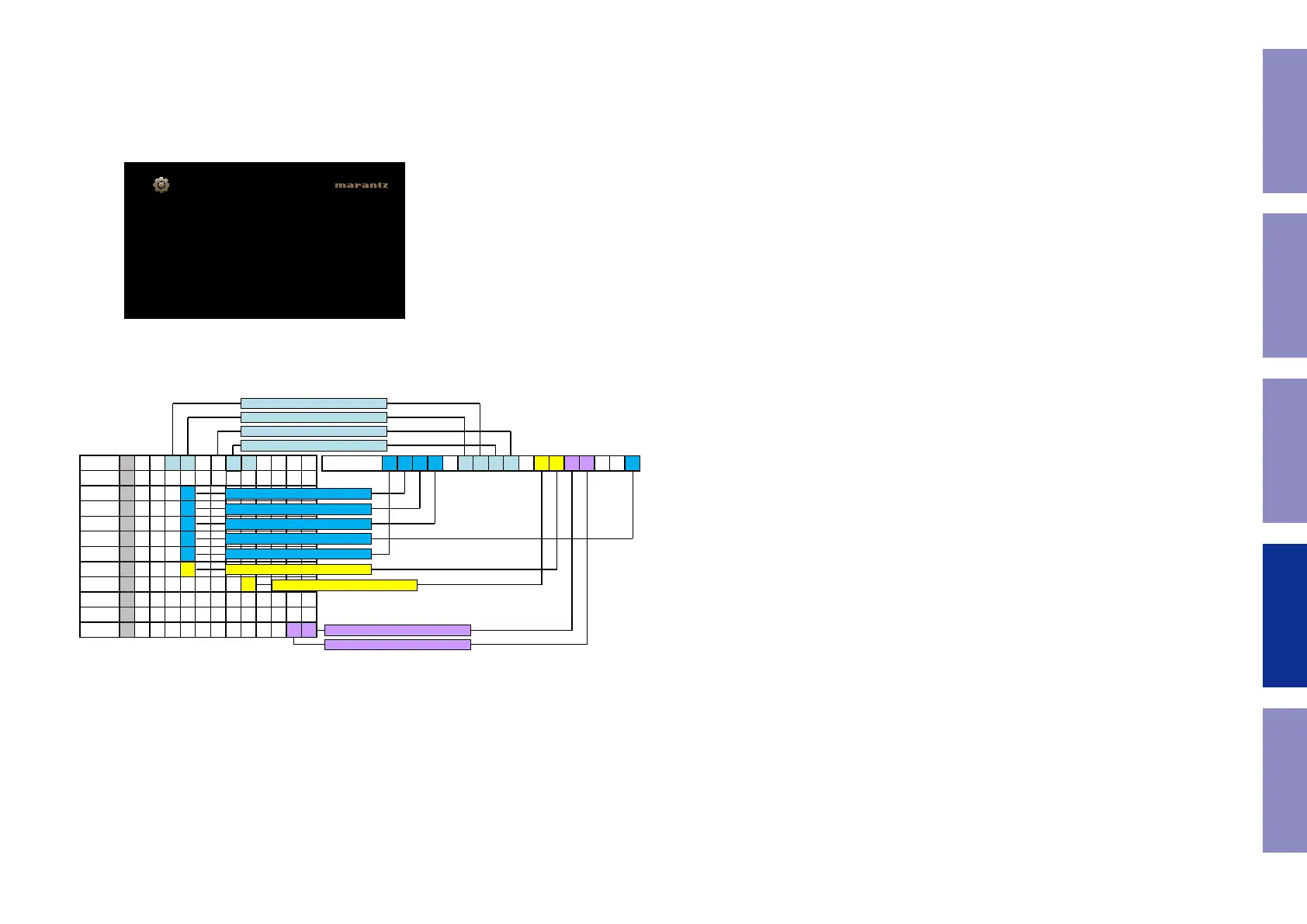
The version information is displayed as a 14-digit number as shown in the screenshot below.
This 14-digit number comprises a part of the version number of each device and module.
These version numbers correspond to the 14-digit number as shown below.
b
The rmware version numbers and this 14-digit version information are written in the Service Information.
XXXX-XXXX-XXXX-XX
General/Firmware
Version
Displays system information
GUI Image
Main
Sub
DSP1
DSP2
DSP3
DSP4
A.PLD
V.PLD
GUI
E.FBL
E.SBL
E.IMG
XI X X X X X X X 0 0 3 7
XB X X X X X X X X X X X
X X X X X X
X X X X 0 0 1 6
X X X
X X X
X X X
X X X
X X X
X X X
X X X X X
X X
X X
2 8X
7
1
5
4
3
2
8X 3 8- 3 8 21
Info display 2 3 4 - 6 7 7 3 - 0 5
The 1st digit from the right for DSP4
The 1st digit from the right for DSP3
The 1st digit from the right for DSP2
The 1st digit from the right for DSP1
The 1st digit from the right for A.PLD
The 1st digit from the right for IMG
The 2nd digit from the right for IMG
The 1st digit from the right for GUI
The 1st digit from the right for V.PLD
The 6th digit from the right for Main
The 5th digit from the right for Main
The 2nd digit from the right for Main
The 1st digit from the right for Main
136
Caution in
servicing
Electrical Mechanical Repair Information Updating


 To Next Page