Web control function
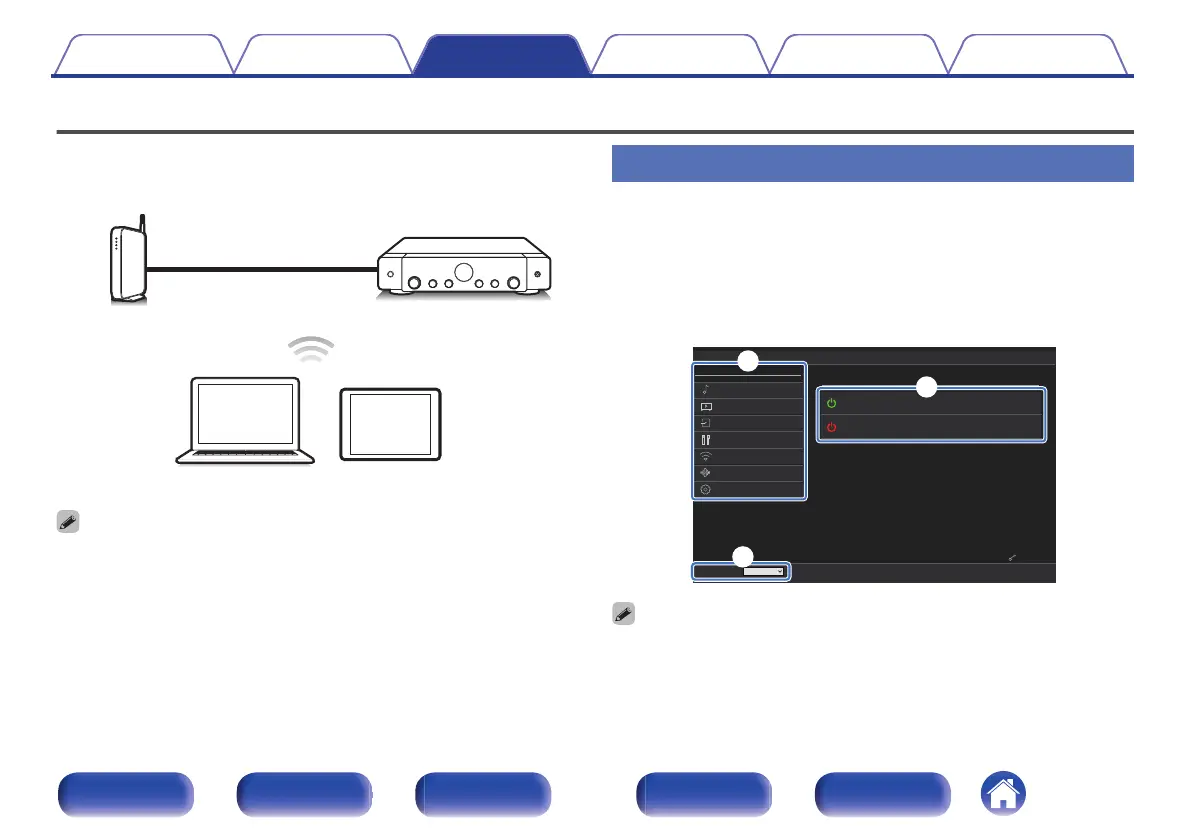
You can control and configure this unit from a web control screen on a
web browser.
0
This unit and the PC or tablet need to be connected correctly to the network in
order to use the web control function. (v p. 45)
0
Depending on the settings of your security-related software, you may not be able
to access this unit from your PC. If this is the case, then change the settings of the
security-related software.
Controlling the unit from a web control
The web control screen supports the following functions.
A
Setup Menu
B
Power ON/OFF for each zone
C
MAIN ZONE input source switching
Web control screen
Top menu
Marantz XXXXXXXX
CBL/SAT
Marantz XXXXXXXX
Source
CBL/SAT
Setup Menu
Audio
Advanced
Video
Inputs
Speakers
Network
HEOS Account
General
MAIN ZONE
MAIN ZONE
ZONE2
q
w
e
0
“Advanced” contains settings for use by custom installers and should not be used
at any other time.
Contents Connections Playback Settings Tips Appendix
121
Front panel Display Rear panel Remote Index


 To Next Page