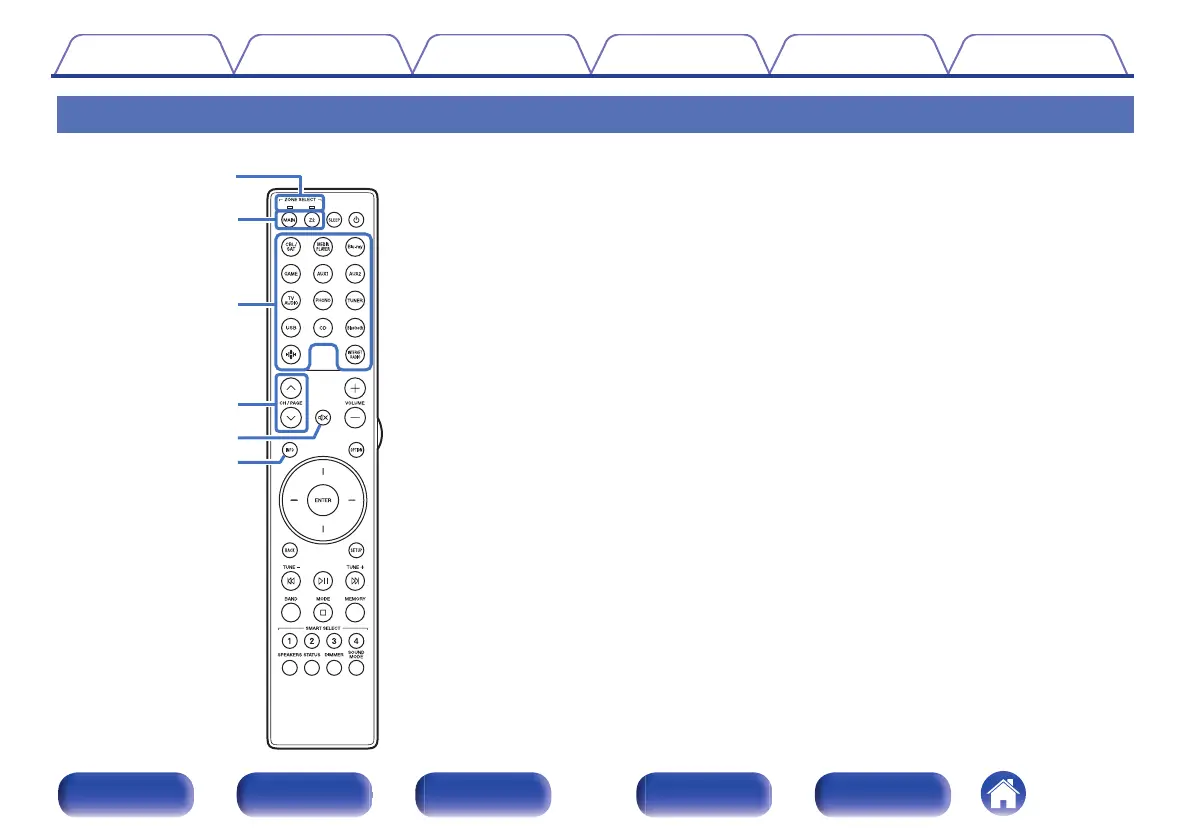
Remote control unit
A
Zone mode indicators
The indicator of the zone that you are operating lights up.
B
ZONE SELECT buttons (MAIN, Z2)
These switch the zone (MAIN ZONE, ZONE2) that is operated through
the remote control unit.
0
“Playing different sources in MAIN ZONE and ZONE2” (v p. 127)
0
“Menu operations” (v p. 134)
0
“Limiting the operating zone with the remote control” (v p. 177)
C
Input source select buttons
These selects the input source.
0
“Selecting the input source” (v p. 52)
0
“Playing different sources in MAIN ZONE and ZONE2” (v p. 127)
D
Channel/page search buttons (CH/PAGE ml)
These select radio stations registered to presets or switch pages.
(v p. 78)
E
MUTE button (:)
This mutes the output audio.
0
“Turning off the sound temporarily (Muting)” (v p. 53)
0
“Turning off the sound temporarily (Muting)” (v p. 128)
F
Information button (INFO)
This displays the status information on the TV screen. (v p. 173)
Contents
Connections Playback Settings Tips Appendix
23
Front panel Display Rear panel Remote Index


 To Next Page