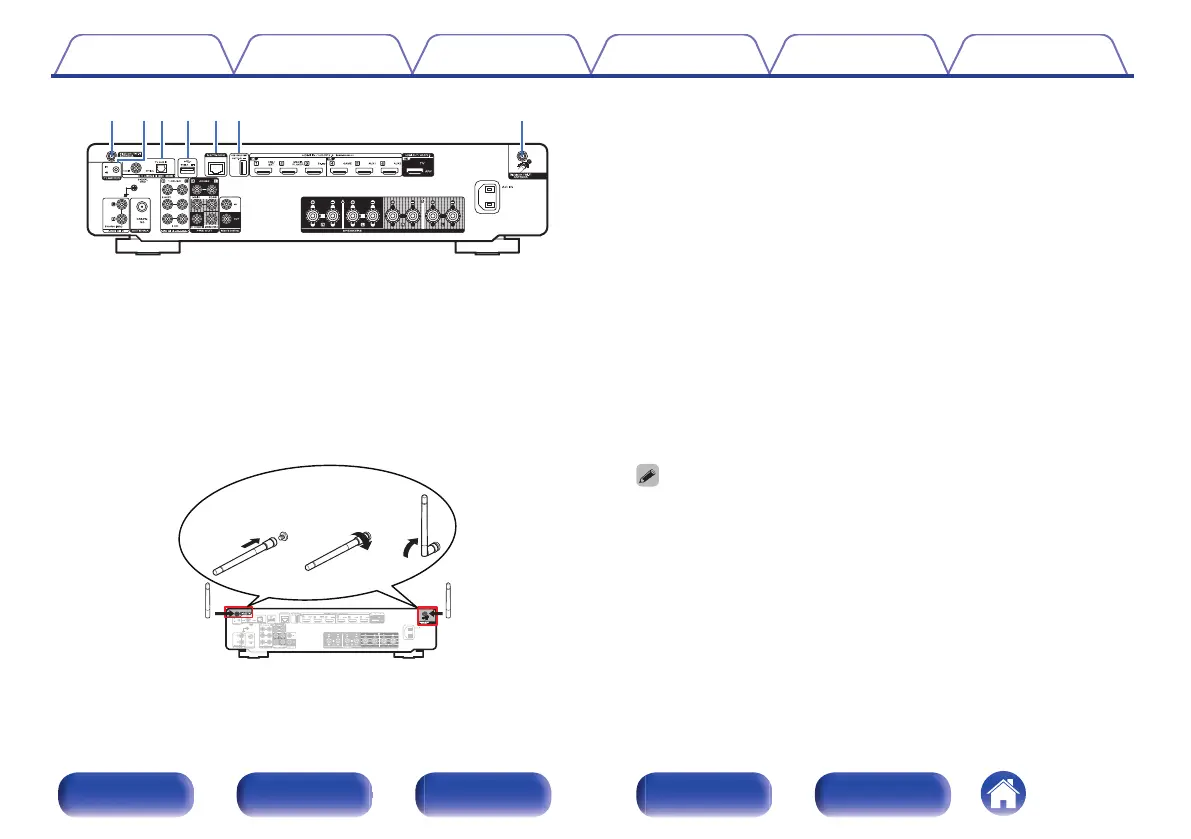
A
Bluetooth/wireless LAN antenna connectors
Used to connect the included external antennas for Bluetooth/wireless
connectivity when connecting to a network via wireless LAN, or when
connecting to a handheld device via Bluetooth. (v p. 46)
A
Place the external antennas for Bluetooth/wireless connectivity
evenly over the screw terminal of rear.
B
Turn clockwise until the antennas is fully connected.
C
Rotate the antenna upwards for best reception.
B
FLASHER IN jack
Used when using a control BOX or other such control devices to control
this unit.
C
Digital audio connectors (DIGITAL AUDIO)
Used to connect devices equipped with digital audio connectors.
0
“Connection 2 : TV equipped with an HDMI connector and
incompatible with the ARC (Audio Return Channel)” (v p. 36)
0
“Connecting a set-top box (Satellite tuner/cable TV)” (v p. 38)
D
USB port (T)
This is used to connect USB storages (such as USB memory devices).
(v p. 43)
E
NETWORK connector
Used to connect to a LAN cable when connecting to a wired LAN
network. (v p. 45)
F
USB port (POWER SUPPLY)
Can be used to power streaming media players, etc.
0
Use a device’s supplied AC adapter when a power supply of 5 V/1.5 A or more
is required.
0
To play content from a USB memory device, connect to the USB port D.
Contents
Connections Playback Settings Tips Appendix
21
Front panel Display Rear panel Remote Index


 To Next Page