N
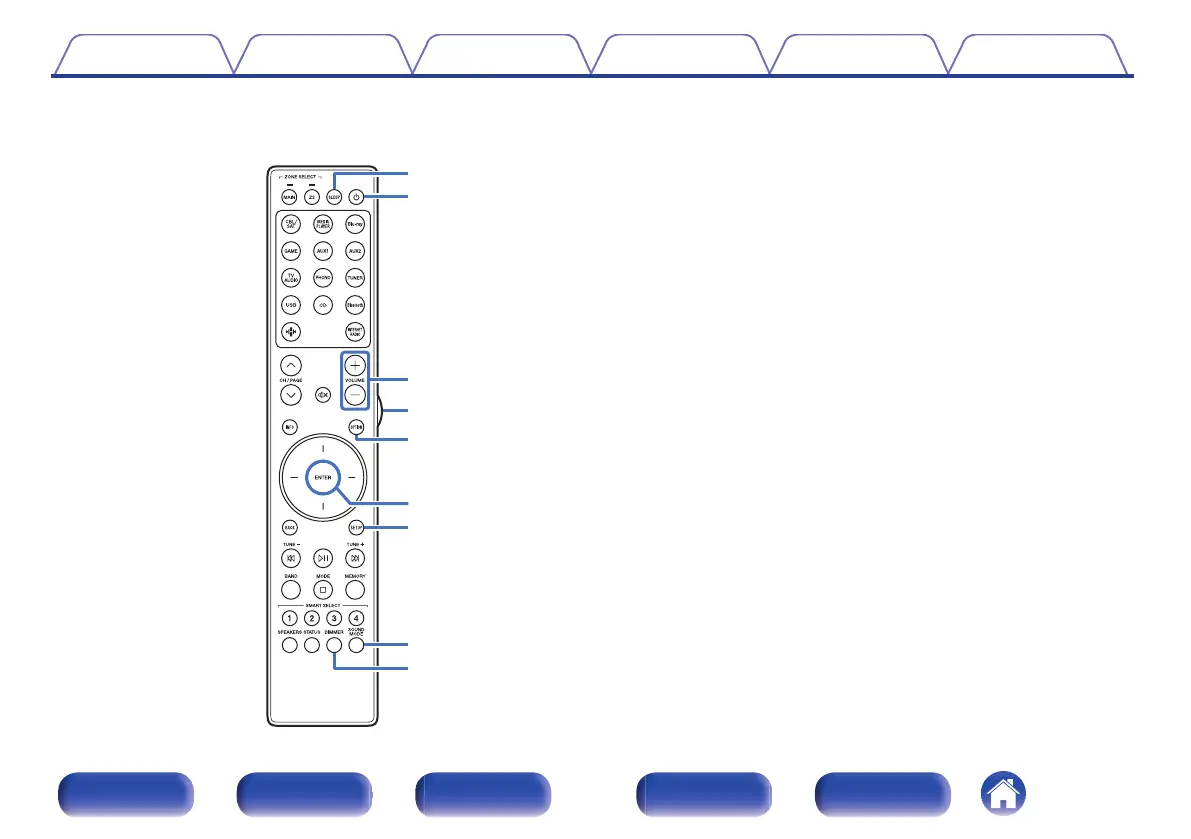
SLEEP button
This sets the sleep timer. (v p. 111)
O
POWER button (X)
This turns the power on/off.
0
“Turning the power on” (v p. 52)
0
“Playing different sources in MAIN ZONE and ZONE2” (v p. 127)
P
VOLUME buttons (no)
These adjusts the volume level.
0
“Adjusting the volume” (v p. 53)
0
“Adjusting the Volume in ZONE2” (v p. 128)
Q
Light button
This turns on the backlight for approx. 5 seconds. (v p. 178)
R
OPTION button
This displays the option menu on the TV screen.
S
ENTER button
This determines the selection.
T
SETUP button
This displays the menu on the TV screen. (v p. 134)
U
SOUND MODE button
These select the sound mode. (v p. 108)
V
DIMMER button
Each press of this switches the brightness of the display. (v p. 169)
Contents
Connections Playback Settings Tips Appendix
25
Front panel Display Rear panel Remote Index


 To Next Page