45
TroubleshootingInformationHDMI Control FunctionPlaybackSetupConnectionsGetting Started Specications
ENGLISH
Playback
Operations Enabled During Playback
You cannot fast forward/fast reverse across les or tracks during •
program or random playback.
Fast forward/fast reverse may be disabled with some DivX•
®
les.
Audio is not output during fast forward/fast reverse of a BD or •
DVD.
Step-by-step reverse playback is not available with •
the UD9004.
If the video is shaky during step-by-step playback, •
stop playback, press SET UP button, then on the
GUI menu, change “Display Setup” – “Still Mode”
– “Field” (vpage 32).
Fast Forward/Fast Reverse
BD
DVD-A
DVD-V
DVD
SA-CD
CD
SD
MP3
WMA
AAC
LPCM
DivX
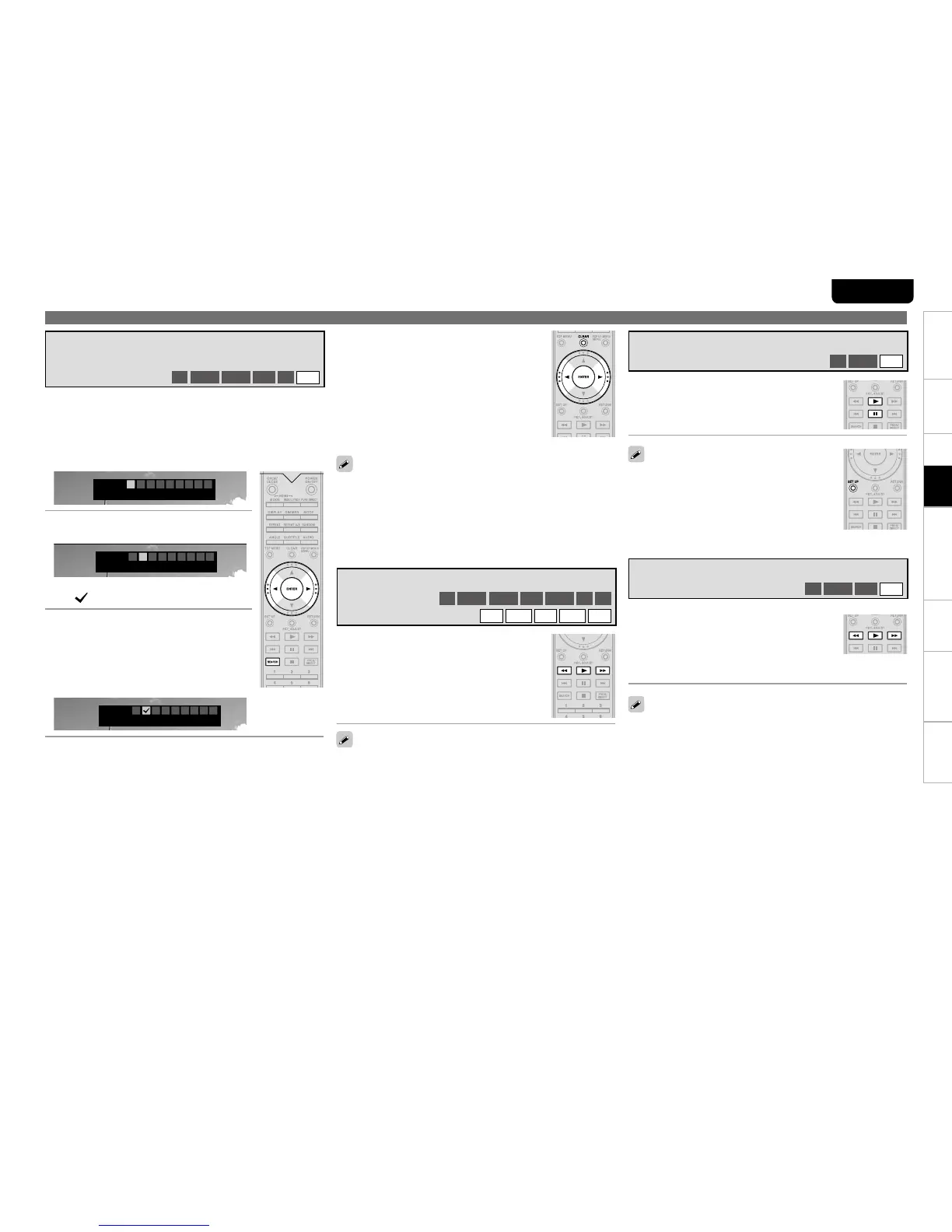
During playback, press 6 or 7
button.
The fast forward/fast reverse speed changes •
each time the button is pressed.
Speed varies with the disc and le.•
Resume normal playback by pressing b1 button.
Press 3 button during pause.
The disc advances frame by frame each time the
button is pressed.
Resume normal playback by pressing b1 button.
Step-by-Step Playback
BD
DVD-V
DivX
Subtitles may not appear depending on the locations you have •
memorized.
The markers you have set will be erased if you turn the power to •
standby or eject the disc.
The marker function does not operate across titles and groups.•
Marker search can only be performed during playback. •
You can attach a marker to a location you want to view or hear
again, so that playback begins at that location.
To Play Back Memorized Locations n
Use 0, 1 buttons to select the marker number,
then press ENTER button.
To erase markers n
Select the number you want to erase, and then
press CLEAR button.
To erase all markers n
Select “AC” and press ENTER button.
1
During playback, press SEARCH button, and then
select “Marker”.
The search mode setting bar is displayed at the top of the
screen.
Marker
Time – – : – – : – –
1 2 3 4 5 6 7 8
AC
2
Use 0, 1 buttons to select the
number.
Marker
Time – – : – – : – –
1 2 3 4 5 6 7 8
AC
Numbers you have already set will be displayed b
as “
”.
3
Press ENTER button at the location
you want to memorize.
The location is registered for the selected
marker number.
The elapsed playing time at the set location is b
displayed.
Marker
Time 1 : 23 : 45
1 3 4 5 6 7 8
AC
Memorizing Locations You Want to
Replay (Marker Function)
BD
DVD-V
DVD-A
DVD
SD
DivX
Audio is not output during slow forward/slow reverse playback. •
If the video is blurred during slow forward/slow reverse playback, •
stop playback and press SET UP button, then on the GUI menu,
change “Display Setup” – “Still Mode” – “Field” (vpage 32).
Slow Forward/Slow Reverse Playback
BD
DVD-V
DVD
DivX
Press 6, 7 buttons during pause.
The speed changes each time the button is
pressed.
The speed of the slow reverse playback is not b
switched.
Resume normal playback by pressing b1 button.



 To Next Page