23 Rev 20201007
Sonar Chart Live™ Settings
Getting your Sonar Chart Live turned on is an easy process.
1. Have your Navionics® Chip inserted into the Micro SD slot of
the MX-7GPS system.
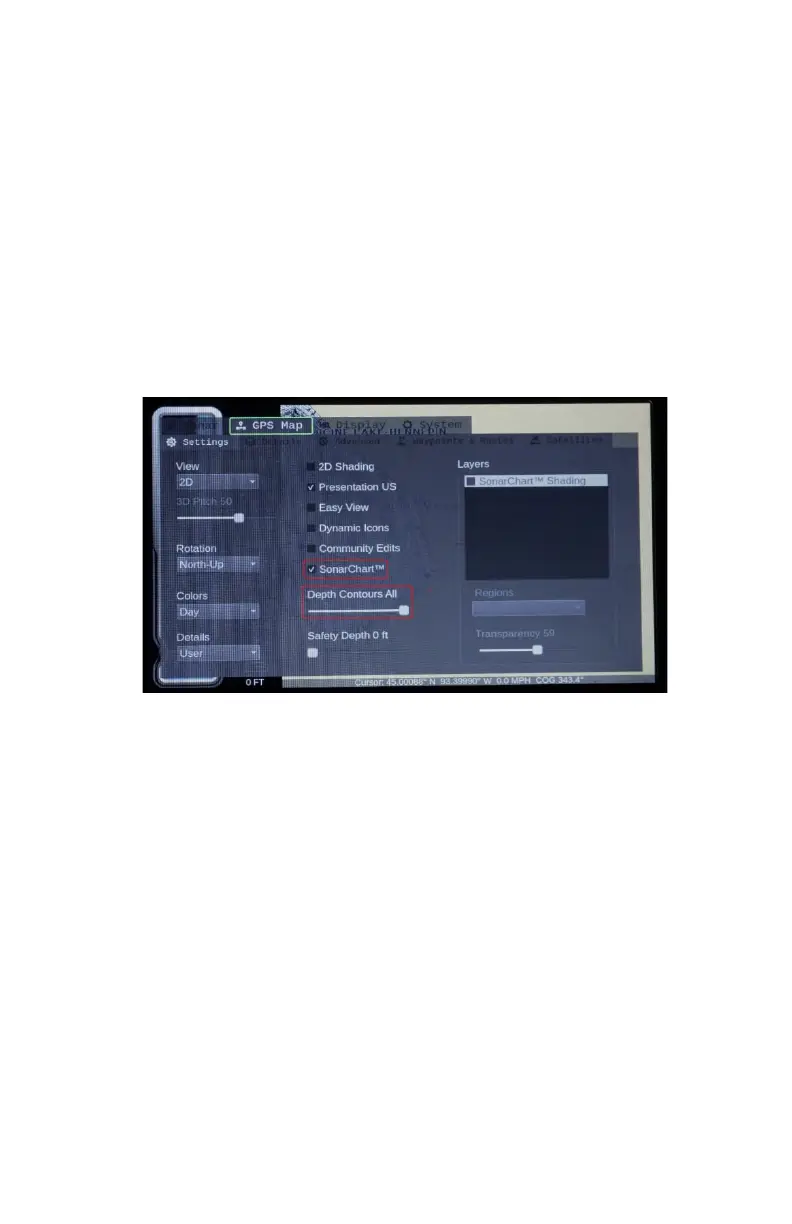
2. Press the Menu button and select your GPS Map Settings
menu.
a. Make sure you have the SonarChart™ checked and
Depth Contours turned to all.
i. Having it set to all will provide you with the most
contoured detailed map available on your chip.
3. Select your Advanced menu option under the GPS Map
menu.
4. Select Sonar Log under the Sonar Chart Live
™.
5. Select Mode and change to Record, Off to turn the record off
and History to view what was recorded.
6. Color will show where you have recorded over your map on
the chip.
7. Advanced Map Options select Very High to show 1ft Contour
lines of what you have recorded.
8. Select Min Depth to desired scanning depth.
Note: If set to zero it will not record/ scan a contour map. We
recommend setting it to a depth deeper than what the lake is.
Here we set it to 164ft. That way it will create contour lines up
to that depth.


 To Next Page