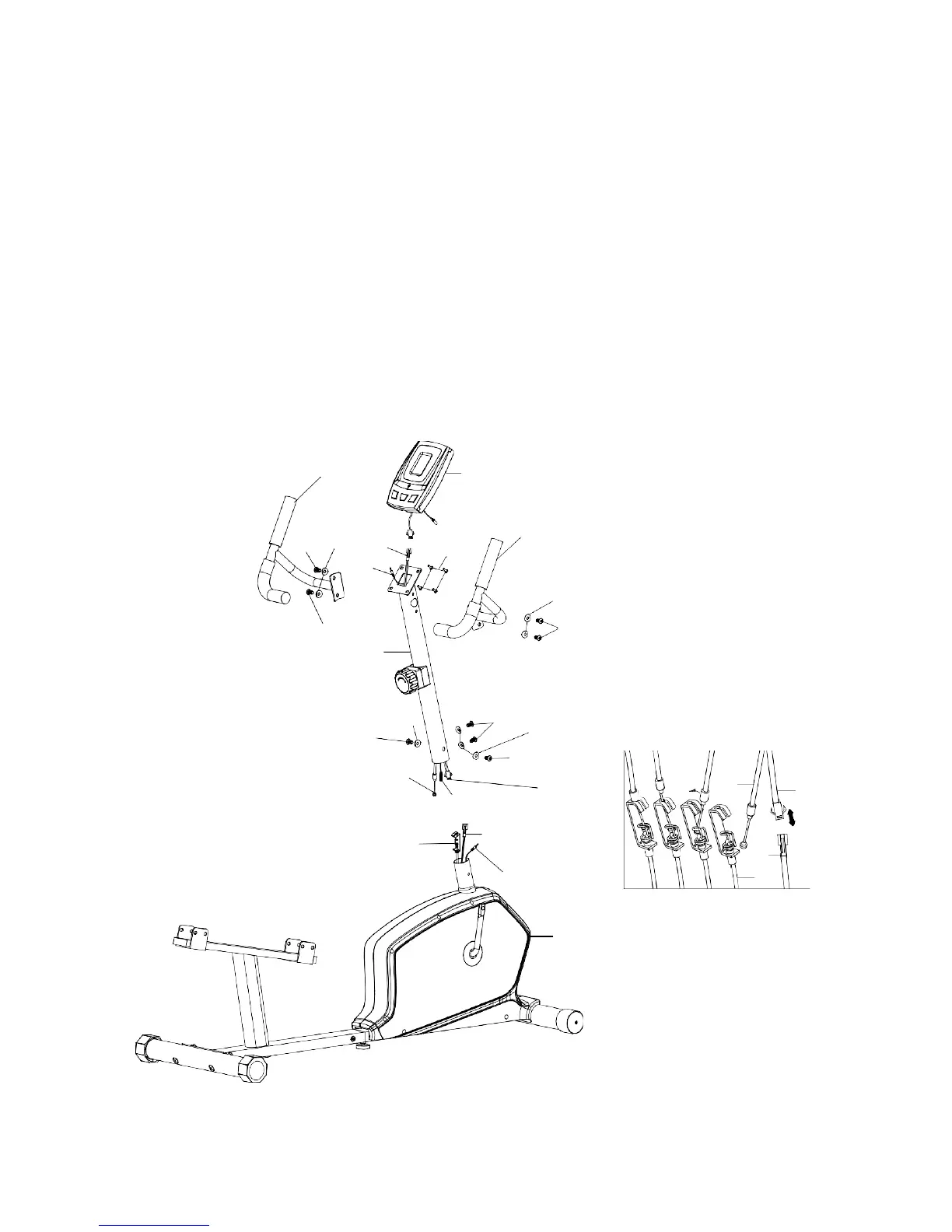
STEP 3
Connect the upper extension sensor wire (34) to the lower sensor wire (35).
Connect the front extension hand pulse wire (48) to the middle extension hand pulse wire (47).
Attach front post (9) to the main frame (1). Secure using four curved washers (5) and four allen
screws (21).
Tip: Avoid pinching the Extension Wires and hand pulse wires
Attach the left stationary handlebar (12) to the front post (9). Secure using two curved washers (5)
and two allen screws (21). Repeat for the right stationary handlebar (11).
Connect the front extension hand pulse wire (48) to the pulse wire form the computer (10)
Connect the upper extension sensor wire (34) to the wire from the computer (10).
Tip: Avoid pinching the Extension Wires and pulse wires
Attach the computer (10) to the top bracket of front post (9). Secure using four screws (20) which
are pre-assembled on the back of computer.
12
10
21
5
34
20
11
48
5
21
21
9
21
5
21
5
32
21
48
34
33
35
32
34
35
47
33
1


 To Next Page