2
PUSH PUSH PUSH PUSH
BALANCED MAIN
RIGHT LEFT
AUX 2
RIGHT LEFT
CD
RIGHT LEFT
GND
POWER
SUPPLY
INPUT
LEFT
RIGHT
MAIN
TAPE 1
TAPE 2
TAPE 1
TAPE 2
AUX 3
TUNER
PHONO/
AUX 1
INPUTSOUTPUTS
1
2
3
4
568
7
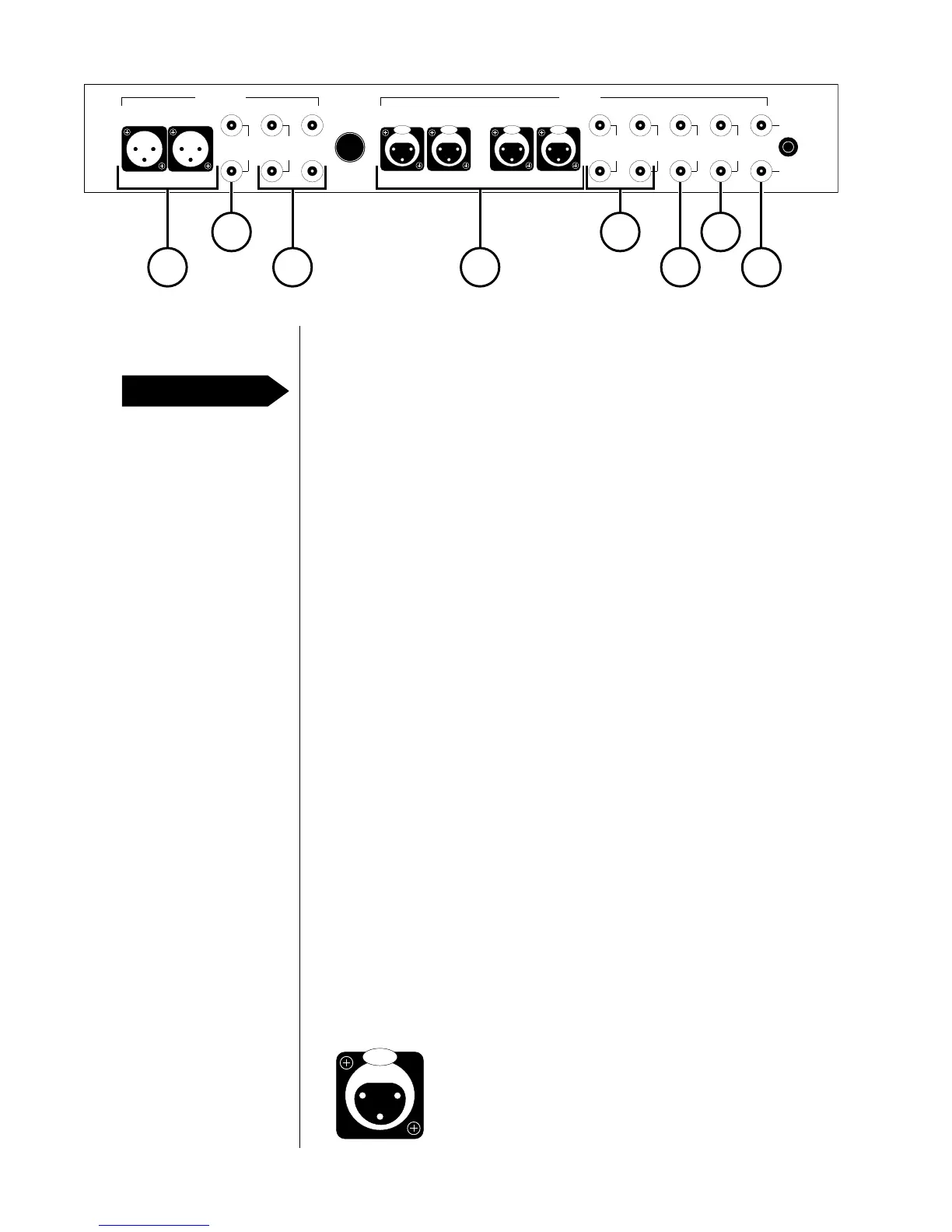
Rear panel
Disconnect all associated equipment from the AC mains BEFORE
making any signal connections and applying power to the Nº28.
Note: All left-channel RCA-type inputs and outputs are at the top of
the rear panel, and all right-channel RCA-type inputs and outputs are
at the bottom of the rear panel.
1 PHONO/AUX 1
If your Nº28 is equipped with the phono option, connect your
turntable's right-channel and left-channel signal leads to these
inputs. Connect the tonearm ground lead to the GND binding post
next to the inputs.
If your Nº28 isn't equipped with a phono option, these inputs will
accept signal leads from any line-level source equipment.
2 TUNER
Accepts right-channel and left-channel signal leads from a tuner
or other line-level source equipment.
3 AUX 3
Accepts right-channel and left-channel signal leads from line-level
source equipment.
4 TAPE 1, TAPE 2 (INPUTS)
Accept right-channel and left-channel signal leads from the tape-
output connectors of a tape machine. These inputs can also be
used with other line-level source equipment.
5 AUX 2, CD
Accept right-channel and left-channel balanced signal leads from
a CD player or other source equipment with balanced output.
The pin assignments of these XLR-type female input connectors
are:
Pin 1: Signal ground
Pin 2: Signal + (non-inverting)
Pin 3: Signal – (inverting)
Connector ground lug: chassis ground
PUSH
21
3
PRECAUTION










 To Next Page