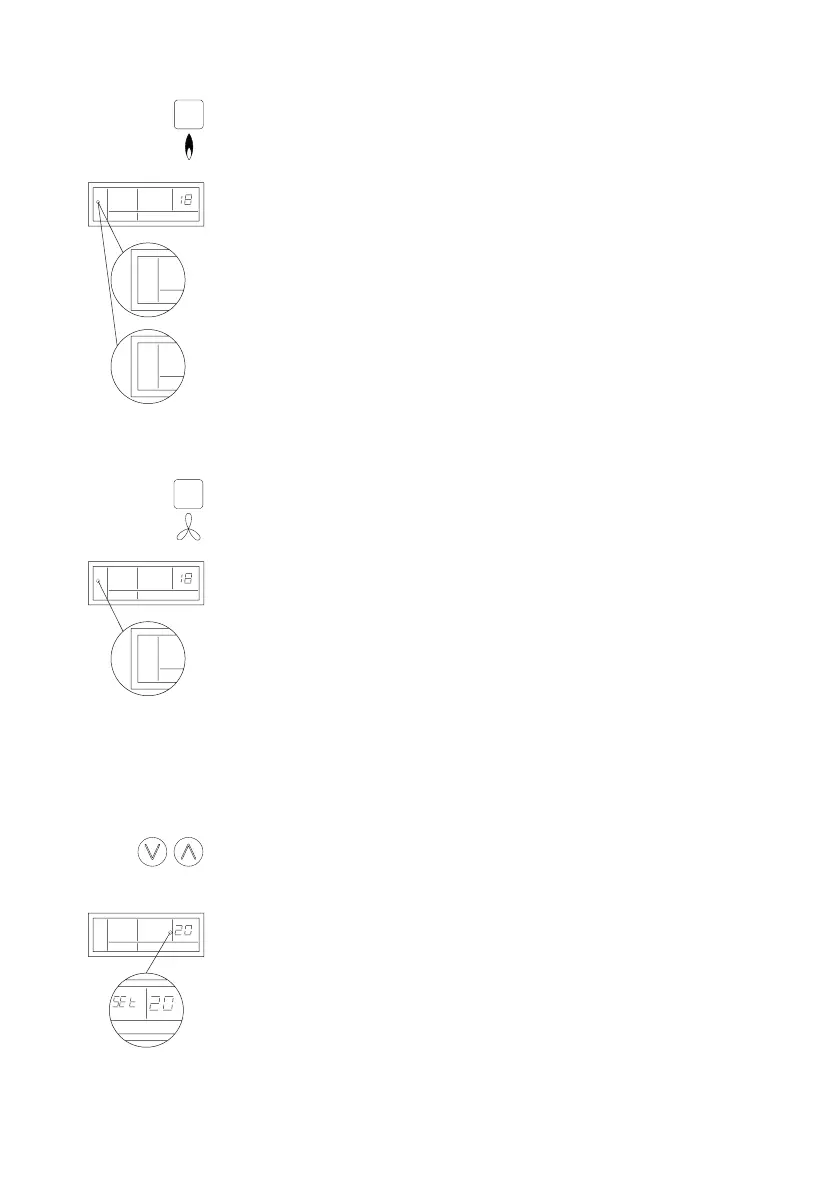
4.2 Switching the heating mode on and off
To activate the heating mode, press the “HEAT” push-button.
The following now appears in the display: “MODE” and “AUTO”
or “HEAT”.
“AUTO” indicates that the heating mode is switched on but that there is
no heating demand as yet. When heat is demanded,
“AUTO” disappears and is replaced by “HEAT”.
To switch off the heating mode again, press the “heat” push-button a
second time.
4.3 Switching the ventilation mode on and off
To activate the ventilation mode, press the ventilation push-button.
The following now appears in the display: “MODE” and “FAN”.
“FAN” indicates that the ventilation mode is active and the fan will switch
on and run continuously.
To switch off the ventilation mode again, press the ventilation push-button
a second time.
Note!
The ventilation mode can be used at the same time as the heating mode.
Consequently, you can switch the fan to operate continuously when the
heating mode is active if required.
4.4 Increasing or lowering the set-point
To increase or decrease the set-point value, press the up or down push-
button.
“SET” appears in the display and the digits start to ash.
Now you can use the up or down push-button to increase or decrease
the set-point to the desired value. After changing the set-point, the main
screen automatically appears again after a few seconds.
8
°C
MODE
AUTO
TEMP
°C
°C
MODE
AUTO
MODE
HEAT
°C
MODE
FAN


 To Next Page