GAP control programming 11
2.1
Stable and repetitive background noise
Press the key , if present, and select the channel to program.
On the programming area of the selected channel proceed as follows:
1.
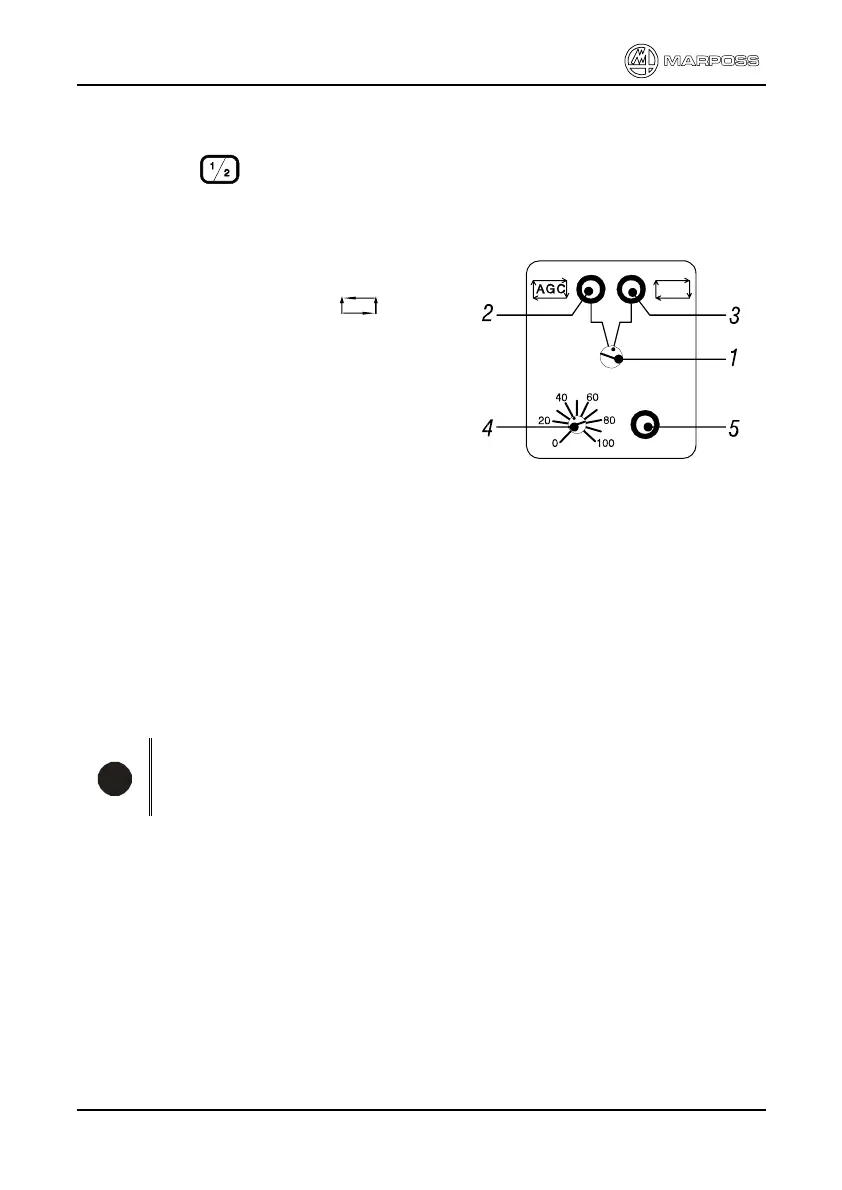
Bring the selector 1 to the right position
(the LED 3 lights up) to select the fixed
gain control procedure ( ).
2.
Rotate the potentiometer 4 counterclockwise to "zero"
3.
Bring the wheel almost in contact with the workpiece, reference pin, etc as in
normal working conditions (wheel spinning at work speed, workpiece rotating,
coolant on, etc)
4.
Adjust the sensitivity on potentiometer 4 to amplify the displayed noise slightly
below the value of 6,5 on the graduated bargraph scale and just before the
LED 5 switches off.
5.
To verify the programming perform a few cycles and verify that the gap
command is triggered at the right time.
i
Note
If the type of wheel, workpiece, etc. is changed it may be necessary to
reprogram the system.
In case of dressing cycle control, intended as continuity check on the grinding wheel
during the traverse of the dresser, it is necessary to make sure that the command is
triggered when there is a contact between dresser and wheel and it is released when
there is a discontinuity (hole or similar) on the wheel.
The dressing can be considered over when, during a complete traverse, the
command is always triggered.



 To Next Page