IP Server Instruction Manual
Encoder System
Connecting with Megapixel Camera
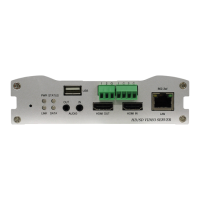
Connect a camera which supports HDMI or HD-SDI output to the HDMI or HD-SDI Input port of
the VS-102-HDSDI accordingly.
Connecting with D1 resolution Camera
Connect a camera to the Video Input port of the VS-102-HDSDI accordingly.
Decoder System
Connect a monitor to the HDMI or COMPOSITE (HD-SDI) Output of VS-102-HDSDI accordingly.
Audio is bi-directional in any configuration regardless of the system mode (Encoder or Decoder).
If necessary, it can be configured to be in transmit-only, receive -only or bi-directional mode.
Connect audio input and output ports to audio devices accordingly.
Audio signal is in line level, therefore, microphones or speakers with amplification functions should
be used.
3. Connecting Serial Ports
For camera control, the PTZ controller (keyboard) and receiver can be connected to serial ports. Two
corresponding serial ports in encoder and decoder which are connected in connected in 1-to-1 fashion
works in pass-through mode. This means that commands at a local system‟s COM1 port will be
transparently passed to the remote system‟s COM1 port. Also, a command at a local system's COM2 port
will pass to the remote system‟s COM2 port.
4. Connecting Sensor and Alarm
Connect sensor and alarm devices to the corresponding terminals accordingly.


 To Next Page