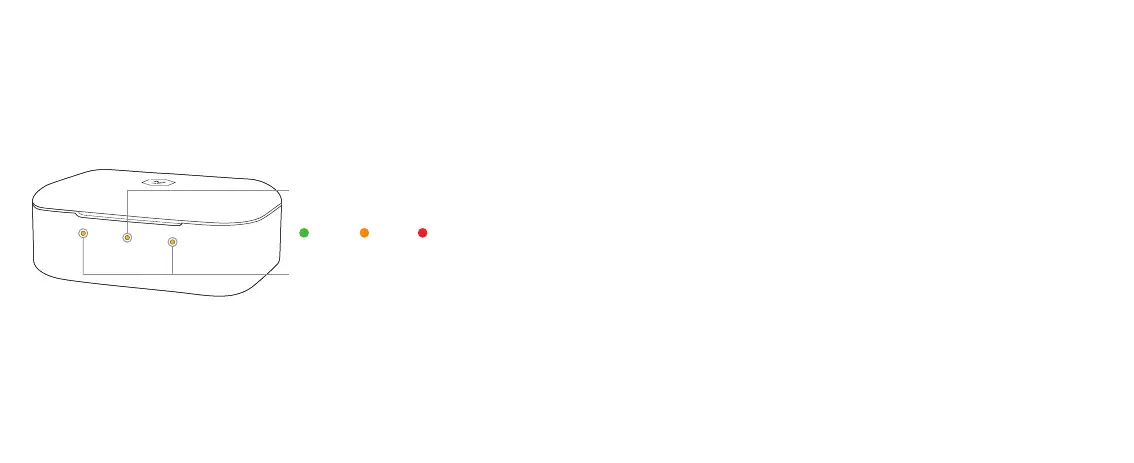
High Med
Low
EARPHONE BATTERY
CASE BATTERY
The charging case holds an additional three charges for your earphones. We
suggest you place your earphones inside the case when they are not in use. This
will allow them to have the maximum charge each time you begin to use them.
When you place the earphones inside the case and close the lid, the earphones
and case battery status will display. A green light indicates the battery is
between 70-100%, amber indicates 30-69%, and red indicates 1-29%. If the
center battery flashes red or does not display, the case battery is depleted.
To charge your case, plug the USB-C cable into the back of your case and plug
the other end into a power source. If you do not have a USB-C power source you
can use our supplied USB-C to USB-A adapter to use a USB-A power source.
The battery status of the case and earphones will remain visible while the
case charges.
4
BATTERY INDICATORS
Case and earphones recharge to 50% in 15 min, 100% in 40 minutes






 To Next Page