Troubleshooting
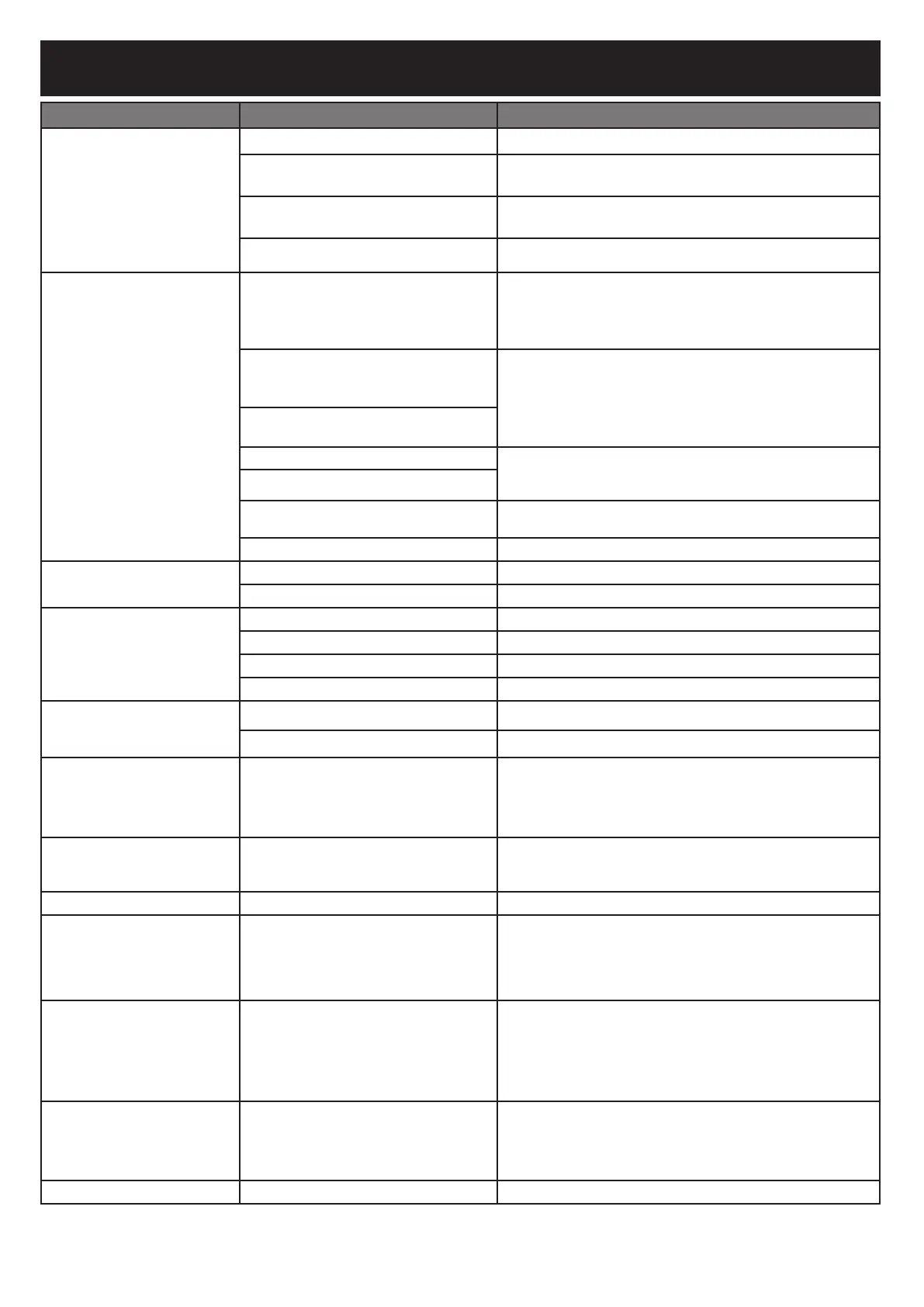
SYMPTOM CAUSE POSSIBLE SOLUTION
Controller not ON. Power not ON.
Press the power button on the controller.
Not plugged in.
Plug controller into power supply and power supply into wall
outlet.
Circuit breaker tripped.
Check wall outlet circuit breaker and reset if tripped.
Controller malfunction.
Contact customer service
Fan not ON. Temperature in cabinet has reached
the set temperature.
Once the set temperature is reached the fan will turn off. Once
the temperature falls below the set temperature the fan will
restart. The fan will continue adjusting itself automatically to
maintain the set temperature.
Hopper lid open.
For safety, the hopper is equipped with shut-off switches to
prevent the fan from stoking the fire when these doors are
open. Closing the doors will engage the switches, allowing the
fan to continue normal operation.
Ash door open.
Fan disconnected from controller.
Check that connection is fully seated.
Fan disconnected from wiring harness.
HOPR displayed on controller
There is a problem with your top or bottom switch, contact
customer service and request a new switch kit
Err 3
See below.
Controller temperature
inaccurate.
Temperature probe not fully plugged in.
Check that connection is fully seated.
Temperature probe is dirty.
Carefully clean temperature probe.
Slow heating. Shutdown slides not opened.
Open shutdown slides.
Low charcoal.
Refill hopper with charcoal.
Grill lid open.
Close grill lid.
Fan not on.
See “Fan not ON.”
Excessive smoke leaking
from hopper.
Loose seal at hopper lid.
Tighten hopper lid latch.
Loose seal at ash door.
Tighten ash door latch.
Controller restarts, enters
standby mode.
Electrostatic charge. When the
product is disturbed by electrostatic
discharge, the controller may restart,
then enter standby mode.
Controller needs to be restarted by the user to restore normal
operation, this phenomenon is normal.
Err 1 Temperature probe not fully plugged in.
1. Check that connection is fully seated.
2. Unplug controller from power supply, wait 10 seconds and
reconnect.
Err 2 Meat probe malfunction.
Contact customer service
Err 3 Grill overheated.
1. Turn off grill.
2. Check for cause of overheat.
• Grease fire.
• Fan malfunction.
3. Restart grill.
Err 4 Charcoal failed to ignite.
1. Ensure shutdown slides are open.
2. Ensure hopper lid and ash door are fully closed.
3. Ensure charcoal is not empty.
4. Ensure old ash from previous use has not blocked up the ash
grate. Shake grate to allow all the old charcoal to fall thru it.
5. Restart grill.
Err 5 Meat Probe Temp above 300°F.
1. Using protective gloves, remove meat probe from grill.
2. Unplug from controller.
3. Allow meat probe to cool.
Poor Wifi connection Weak signal.
1. Angle the antenna on back of controller to point at the ground
29



 To Next Page