EasyManua.ls Logo

Masterbuilt GRAVITY Series - User Manual

Masterbuilt GRAVITY Series
52 pages
Print Icon
To Next Page IconTo Next Page
Loading...
Manual Code / Código del manual: 9804210021 220509-GH
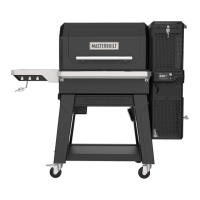
GRAVITY SERIES™ 800
Digital Charcoal Grill + Smoker
Gril au charbon + Fumoir numériques
Parrilla de carbón vegetal digital + Ahumador
Manual applies to the following model number(s)
Le manuel s’applique aux numéros de modèle suivants
El manual se aplica a los siguientes números de modelo
These numbers are located on the rating label of the grill.
Ces numéros se trouvent sur la plaque signalétique du gril.
Estos números se ubican en la etiqueta posterior de la parrilla.
Mfg. Date - Serial Number | Date de fabrication - Numéro de série | Fecha
de fabricación - Número de serie
Your model number | Votre numéro de modèle | Su número de modelo
MB20040122
Please record this information immediately and keep in a safe
place for future use.
S’il vous plaît noter cette information immédiatement et conserver
dans un endroit sûr pour une utilisation future.
Por favor, registrar esta información inmediatamente y guardar en
un lugar seguro para su uso futuro.
IMPORTANT | IMPORTANTE
Maîtrisez-le. Masterbuilt. Domínelo. Masterbuilt.Master it. Masterbuilt.
Welcome to the family. Let’s get started.
Bienvenue à la famille. Commençons.
Bienvenido a la familia. Empecemos.
Transmitter and WiFi Characteristics = RF 0dBM / 2412-2484 MHz
Caractéristiques de l’émetteur et du WiFi = RF 0dBM / 2412-2484 MHz
Características del transmisor y WiFi = RF 0dBM / 2412-2484 MHz
IFETEL: RCPMAMB22-0567-A1
This equipment has passed the electromagnetic
compatibility test and will not cause harmful interference to nearby
electronic equipment. The equipment has a certain
anti-interference ability during operation.
Cet équipement a passé le test de compatibilité
électromagnétique et ne causera pas d’interférences nuisibles aux
équipements électroniques voisins. L’équipement possède une
certaine capacité anti-interférence pendant son fonctionnement.
Este equipo ha superado la prueba de compatibilidad
electromagnética y no causará interferencias dañinas a los
equipos electrónicos cercanos. El equipo tiene cierta capacidad
antiinterferencias durante el funcionamiento.
Two people recommend for assembly
Deux personnes sont recommandées pour
l’assemblage
Se recomienda ensamblarlo entre dos personas.

Questions and Answers

  • U
    ubrooksAug 16, 2025
    What to do if my Masterbuilt Smokers show Err 4?
    • J
      Jamie IrwinAug 16, 2025
      If your Masterbuilt Smoker displays 'Err 4', it means the charcoal failed to ignite. Here's what to do: 1. Make sure the shutdown slides are removed. 2. Check that the hopper lid and ash door are fully closed. 3. Ensure the charcoal hopper isn't empty. 4. Shake the ash grate to remove any old ash that may be blocking it. 5. Restart the grill.
  • H
    Haley ShawAug 19, 2025
    What to do if my Masterbuilt Smokers show Err 3?
    • P
      paul70Aug 19, 2025
      If your Masterbuilt Smoker displays 'Err 3', it indicates the grill has overheated. To resolve this: 1. Turn off the grill. 2. Identify the cause of the overheat, such as a grease fire or fan malfunction. 3. Restart the grill.
  • M
    Mr. Jason Ortiz MDAug 22, 2025
    What to do if my Masterbuilt Smokers show Err 1?
    • S
      Stacie ChambersAug 22, 2025
      If your Masterbuilt Smoker displays 'Err 1', the temperature probe might not be fully plugged in. Try these steps: 1. Check that the connection is fully seated. 2. Unplug the controller from the power supply, wait 10 seconds, and then reconnect it.
  • P
    psullivanAug 26, 2025
    What to do if Masterbuilt GRAVITY Grill controller is not ON?
    • M
      mauricewrightAug 26, 2025
      If the Masterbuilt Grill's controller isn't turning on, first, ensure the power is on by pressing the power button. Then, check that the controller is properly plugged into the power supply and the power supply into the wall outlet. Also, examine the wall outlet's circuit breaker and reset it if it has tripped. If none of these steps work, it may indicate a controller malfunction.
  • J
    Joshua MeyerAug 28, 2025
    Why is the fan not ON on my Masterbuilt Grill?
    • M
      Mr. Nathan RaymondAug 28, 2025
      There are several reasons why the fan on your Masterbuilt Grill might not be running. If the temperature inside the cabinet has reached the set temperature, the fan will turn off and restart when the temperature falls below the set point. Also, the fan will not operate if the hopper lid is open; closing the lid will allow the fan to function normally. Finally, check the fan connection to the controller to ensure it's fully seated, and press the lid/door switch rapidly 10 times to clean the contact points.
  • D
    David ReyesAug 31, 2025
    What to do if my Masterbuilt Smokers is heating slowly?
    • T
      Troy VasquezAug 31, 2025
      If your Masterbuilt Smoker is heating slowly, consider the following: * Ensure the shutdown slides are removed. * Refill the hopper with charcoal if it's low. * Make sure the grill lid is closed.
  • P
    Patrick LevineSep 3, 2025
    Why is my Masterbuilt Smokers controller temperature inaccurate?
    • E
      Elizabeth SmithSep 3, 2025
      If the temperature displayed on your Masterbuilt Smoker's controller is inaccurate, it might be due to the temperature probe. Check that the temperature probe is fully plugged in and carefully clean the temperature probe.
  • W
    walkerkevinSep 6, 2025
    Why is the fan not on in my Masterbuilt Smokers?
    • K
      Katherine ShafferSep 6, 2025
      If the fan isn't running on your Masterbuilt Smoker, there could be several reasons: * The temperature in the cabinet may have reached the set temperature. The fan will turn off once the set temperature is reached and restart when the temperature falls below the set temperature. * The hopper lid might be open. Closing the doors will engage the switches, allowing the fan to continue normal operation. * The fan may be disconnected from the controller. Check that the connection is fully seated.
  • R
    Rachel SandersSep 9, 2025
    What to do if my Masterbuilt Smokers controller is not ON?
    • S
      Shelby StevensonSep 9, 2025
      If the controller on your Masterbuilt Smoker isn't turning on, here are a few things to check: * Press the power button on the controller. * Ensure the controller is plugged into the power supply and the power supply is plugged into a working wall outlet. * Check the wall outlet's circuit breaker and reset it if it has tripped.
  • F
    fbriggsSep 12, 2025
    Why is there excessive smoke leaking from the hopper of my Masterbuilt Smokers?
    • B
      Benjamin BridgesSep 12, 2025
      Excessive smoke leaking from the hopper of your Masterbuilt Smoker can occur due to loose seals. Try these solutions: * Tighten the hopper lid latch. * Tighten the ash door latch. * After the hopper is cold, remove the heat shield and tighten the screws between the top and middle hopper sections.

Summary

Warnings and Important Safeguards

Read All Instructions

Essential guidance for safe assembly and operation.

Carbon Monoxide Hazard

Risks associated with CO gas from burning fuels.

Assembly Instructions

Initial Assembly Steps

Securing hopper lid, lifting, attaching side panels, front legs, and shelves.

Pre-Seasoning

Start-Up

Reloading Charcoal

Shutdown Procedure

Adding Smoke;Flavor

Control Panel Overview

Cleaning and Storage

Troubleshooting

Warranty Information

Masterbuilt GRAVITY Series Specifications

General IconGeneral
WiFi and Bluetooth ConnectivityYes
Built-in Temperature GaugeYes
Fuel TypeCharcoal
Cooking Area1050 sq in
Control TypeDigital
Temperature ControlDigital
Hopper Capacity10 lbs
ConstructionSteel

Videos

How to Pre-season the Masterbuilt Gravity Series 560 Grill

Related product manuals