13
User Manual
MDMAXPROHD
www.matcotools.com 877-853-3738
Swipe in from the left/right edge of the screen to switch between
function modules.
Alternatively, you can also tap
on the upper left corner of the
screen to toggle between Diagnostics and Toolbox.
4.2.2 How to arrange diagnostic vehicle software icons?
All software icons, by default are organized by the system. Many
display rules are available to meet your preference.
To re-organize it, press and hold certain software icon, an option menu
pops up on the screen. Choose the display rule and the system will
arrange the icon as desired.
If you choose “Pin to the top”, the icon will be displayed on the top of
the screen and marked with an orange solid dot.
4.2.3 How to distinguish if the software is locked or not?
If the software is locked, tap it to display the latest software summary.
In this case, you need to purchase the software to unlock its content.
Once it is unlocked, the software icon will turn into orange.
4.3 Function Modules
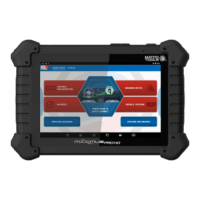
There are 2 function modules available on the MAXIMUSPROHD:
Diagnostics and Toolbox.
4.3.1 Diagnostics
It mainly includes the following items:
Automotive
Congures MAXIMUSPROHD to operate as a
diagnostic tool exclusively for passenger cars.
Max VIN (VIN Scan) and Manual Diagnosis
are supported.
Heavy Duty
Congures MAXIMUSPROHD to operate as a
diagnostic tool exclusively for motorcycles.
Maintenance Reset
To perform all kinds of common repair &
maintenance items, including electronic
throttle position reset, ABS bleeding, oil lamp
reset and DPF regeneration etc.
Previous Session
When a vehicle diagnosis is performed,
MAXIMUSPROHD records the detailed
diagnostic information. This function provides
a quick access to the previously tested
vehicles. Testing can be resumed from the
previous operation without starting from
scratch.
4.3.2 Toolbox
It mainly includes the following items:


 To Next Page