35
User Manual
MDMAXPROHD
www.matcotools.com 877-853-3738
*Note: While viewing recorded live data, carefully look for any irregularies
in any of the PID values/signal informaon (TEMP, RPM, etc). If any PIDs
go beyond the standard range value, or irregularies are detected, follow
the procedures in the vehicle’s service manual to perform additional
troubleshoong and repair.
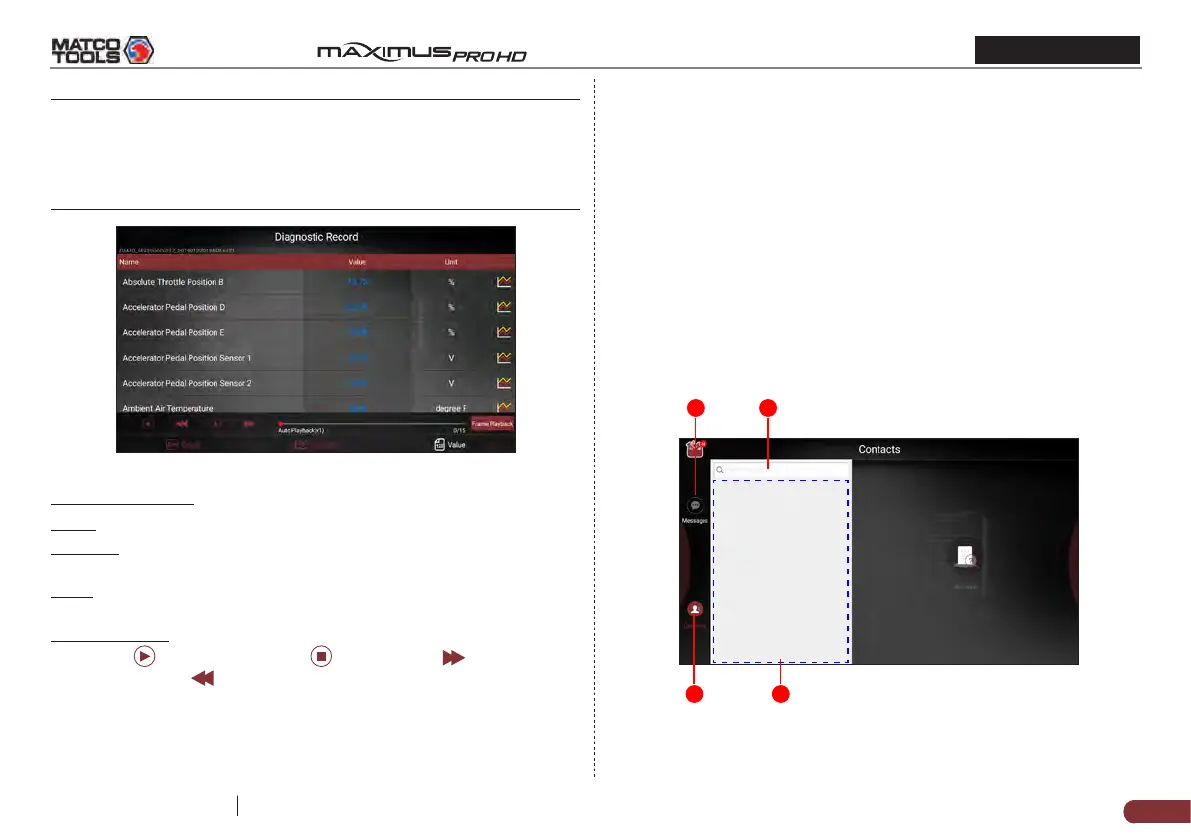
Fig. 6-3
On-screen Buttons:
Graph – Displays the parameters in waveform graphs.
Combine – This option is mostly used in graph merge status for data
comparison. In this case, dierent items are marked in dierent colors.
Value – This is the default mode which displays the parameters in
texts and shows in list format.
Frame Playback – Plays back the recorded data stream items frame by
frame. Tap
to start playing. Tap to stop it. Tap to fast forward
to next frame. Tap
to reverse to previous frame. Once it is in frame
playback mode, this button changes into “Auto Playback”.
6.1.4 Data Samples
This feature allows you to manage the recorded data stream sample
les.
6.1.5 Shared Data Samples
This feature lets you view the data stream sample les shared with
others.
6.2 Tech 2 Tech
This option aims to help repair shops or technicians launch instant
messaging and remote diagnosis, making the vehicle (even thousands
of miles away) repair job getting xed faster.
6.2.1 Interface Layout
21
4 3
Fig. 6-4



 To Next Page