34
User Manual
MDMAXPROHD
www.matcotools.com 877-853-3738
6 Toolbox
6.1 Saved Reports
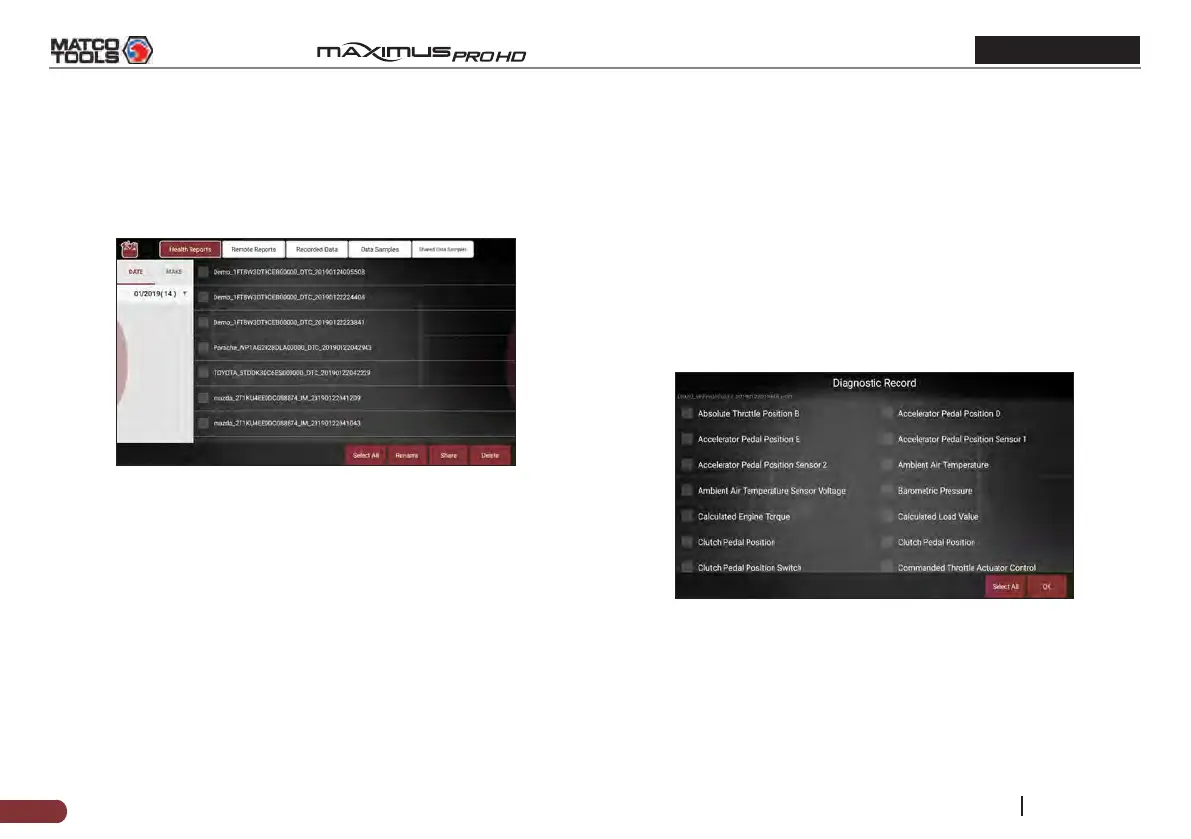
Tap “Saved Reports”, a screen similar to the following appears.
Fig. 6-1
6.1.1 Health Report
This module stores all diagnostic reports generated in process of
vehicle diagnosis.
All the diagnostic reports are sorted by Date and Make. Tap the
desired type to re-arrange and lter it.
• To select certain report, check the box before the report. To select
all reports, tap “Select All”. To deselect all, tap “Unselect”.
• To revise the lename of the report, select the desired one and tap
“Rename”.
• To share the report with others, select the desired one and then tap
“Share”.
• Select the desired report and then tap “Delete” to delete it.
6.1.2 Remote Report
This option lists all diagnostic reports generated in process of remote
diagnostics.
6.1.3 Recorded Data
If user records the running parameters or waveform graphs while
reading data stream, it will be saved as diagnostic records and appear
under this tab. You can use this option to view recorded live data.
Frame playback and auto playback are supported.
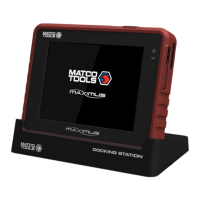
Tap “Recorded Data”, and select certain diagnostic record to enter:
Fig. 6-2
Select the desired data stream items and tap “OK” to jump to the
playback page:


 To Next Page