21
User Manual
MDMAXPROHD
www.matcotools.com 877-853-3738
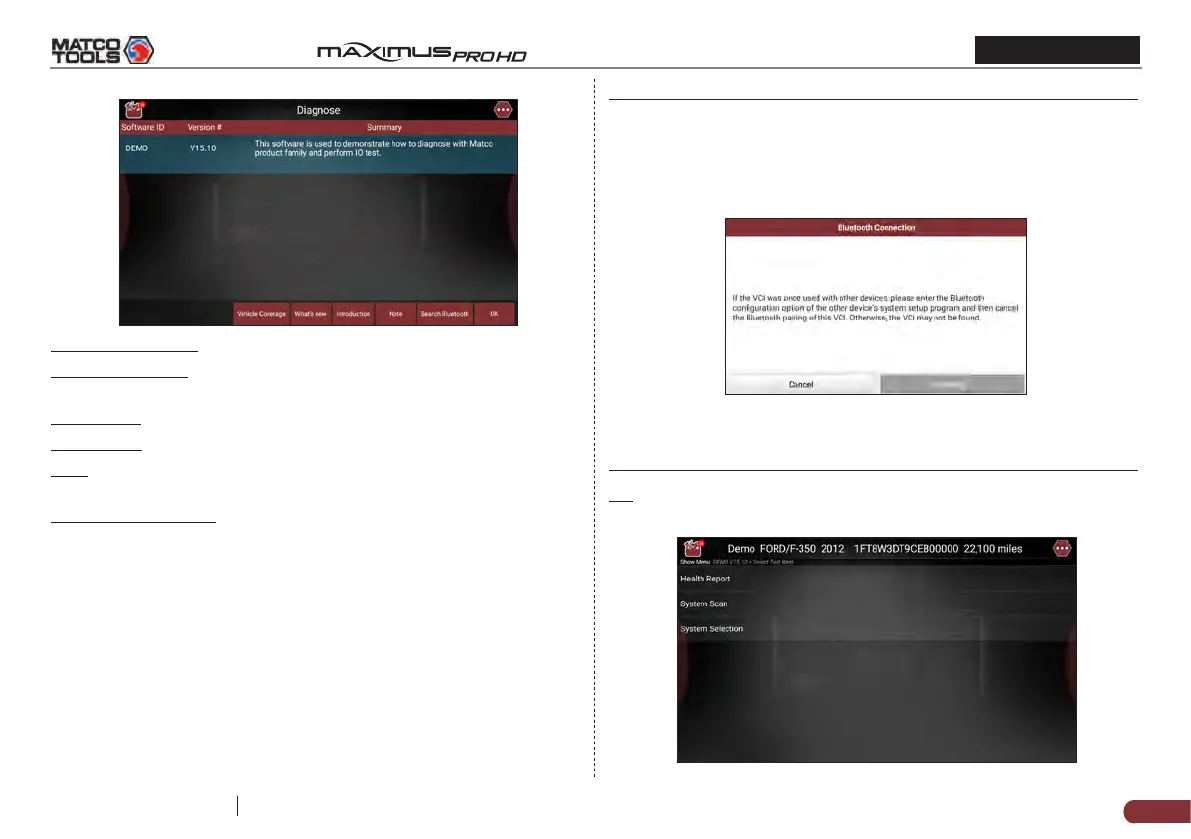
On-screen Buttons:
Vehicle Coverage: Tap to view the vehicle models that the current
diagnostic software covers.
What’s new: Tap to view the optimized items and enhancements.
Introduction: Tap to check the software function list.
Note: Tap to read some precautions on using the current diagnostic
software.
Search Bluetooth (BT): Tap to search for the available VCI dongle.
*Notes:
• Bluetooth connection is not required to run the DEMO program.
• If a vehicle is tested and no Bluetooth connection is made before
diagnosis, tap “Search Bluetooth”, a dialog box similar to the
following appears:
Tap “Scan” to start searching for the VCI. Once it is found, tap it to
start pairing.
If the tablet has paired with the VCI, it will enter Step 2 directly.
OK: Tap it to go to next step.
2). Select test item: Select the desired test item to proceed.


 To Next Page