Nov.2018 Rev 1.0 www.mateksys.com
OSD
AT7456E
MPU
6000
BARO
BlackBox
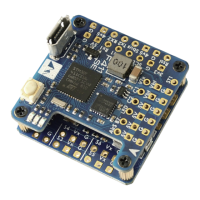
MicroSD Slot
MCU
STM32F722RET6
0m25
USB
DFU
ICM
20602
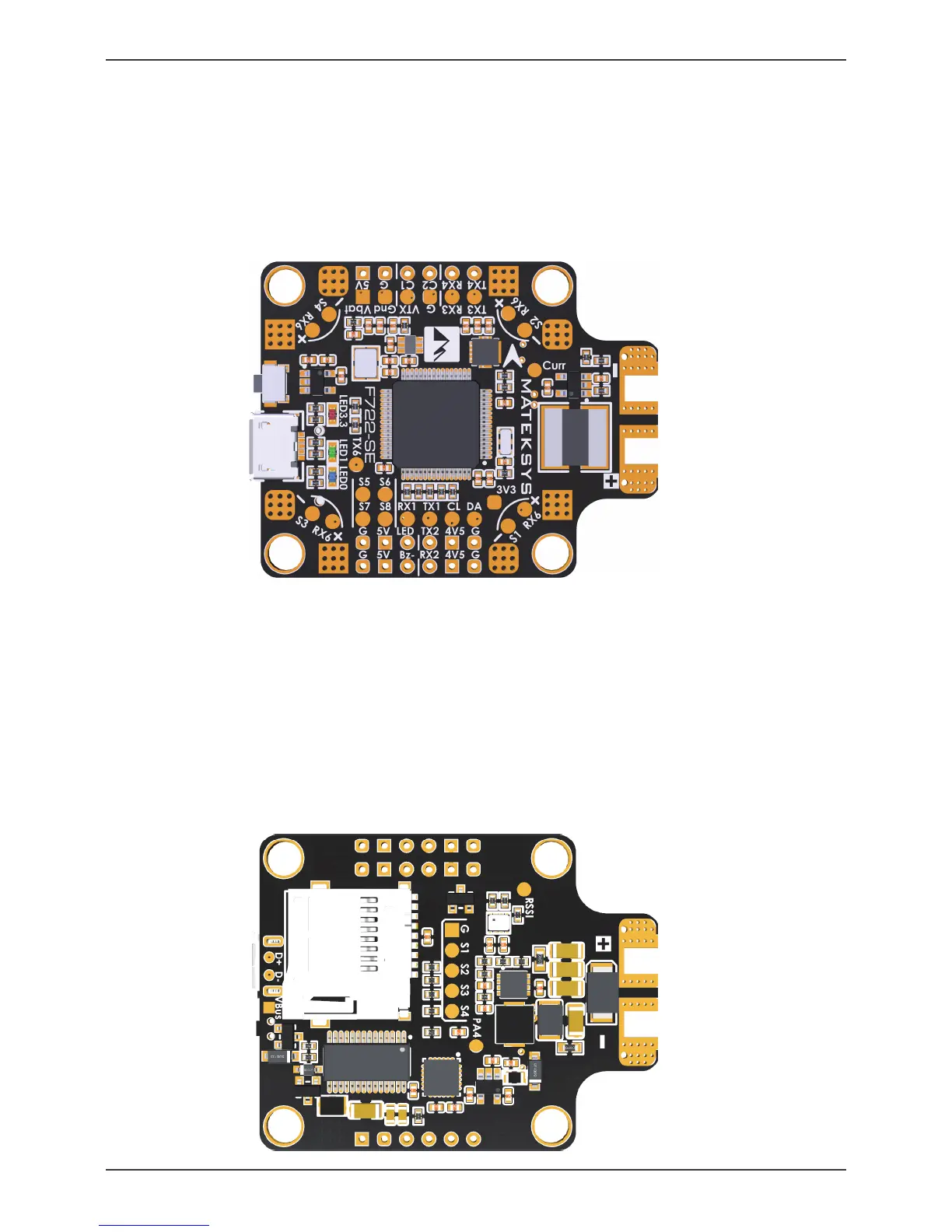
S1/S2/S3/S4: ESC signal
RX6: UART6_RX, One per corner
Duplicates of RX6 pad for ESC Telemetry
TX6: UART6_TX, nearby 3xLEDs
Curr: current sensor signal IN or OUT
Voltage meter scale: 110
On board current sensor: 184A (Scale 179)
*** Current readout is not accurate when load <1A
+ & - : LiPO & ESC power pads
6~36V (2~8S)
***
50V capacitor is necessary
with 8S input
RSSI: Receiver RSSI IN
PA4: for analog Airspeed sensor in INAV
No function in BF
G/S1/S2/S3/S4: for 4in1 ESC
Size & Weight: 36x46mm /10g
Holes: Φ4mm, 30.5mm mounting
M3 Silicon Grommets included
5V: onboard BEC 5V 2A cont. Max.3A
4V5: 4.4~4.8V, Max.500mA, the voltage is also supplied when connecting via USB
3V3: LDO3.3V Max.200mA
G: Ground
RX1 & TX1: UART1
CL & DA: I2C1_SCL & SDA
RX2: UART2_RX for Serial RX by default, PPM share RX2 pad
TX2: UART2_TX
*** TX2 can be remapped to softserial_tx1 to get one more Uart for Frsky SmartPort
(CLI resource SERIAL_TX 11 A02)
*** F722 MCU has build-in inversion, SBUS can be connected to any unused UART_RX.
*** Frsky FPort, SmartPort, Tramp & SmartAudio can be connected to any unused UART_TX
LED: 2812 LED signal
Bz- & 5V: General active 5V buzzer
Bz- /5V/G: for MATEKSYS DBUZ5V
C1: Camera-1 video IN (Default)
C2: Camera-2 video IN
*** C1/C2 can be switched via PINIO2 (Modes Tab/USER2)
VTX: Video OUT for Video Transmitter
Vbat: Battery voltage filtered, Max.1A load on this pad. (Default ON)
*** ON/OFF can be switched via PINIO1 (Modes Tab/USER1)
G/Gnd: Ground
RX3 & TX3: UART3
RX4 & TX4: UART4
*** RX4 has 200ohm built-in, can be remapped to PWM camera control
(CLI resource camera_control 1 A01)
S5/S6
S7/S8: ESC signal
LED 3.3: Red, 3.3V Status
LED 0: Blue, FC Status
LED 1: Green, FC Status
D+ & D-: USB data
VBus: USB voltage
LAYOUT


 To Next Page