Play
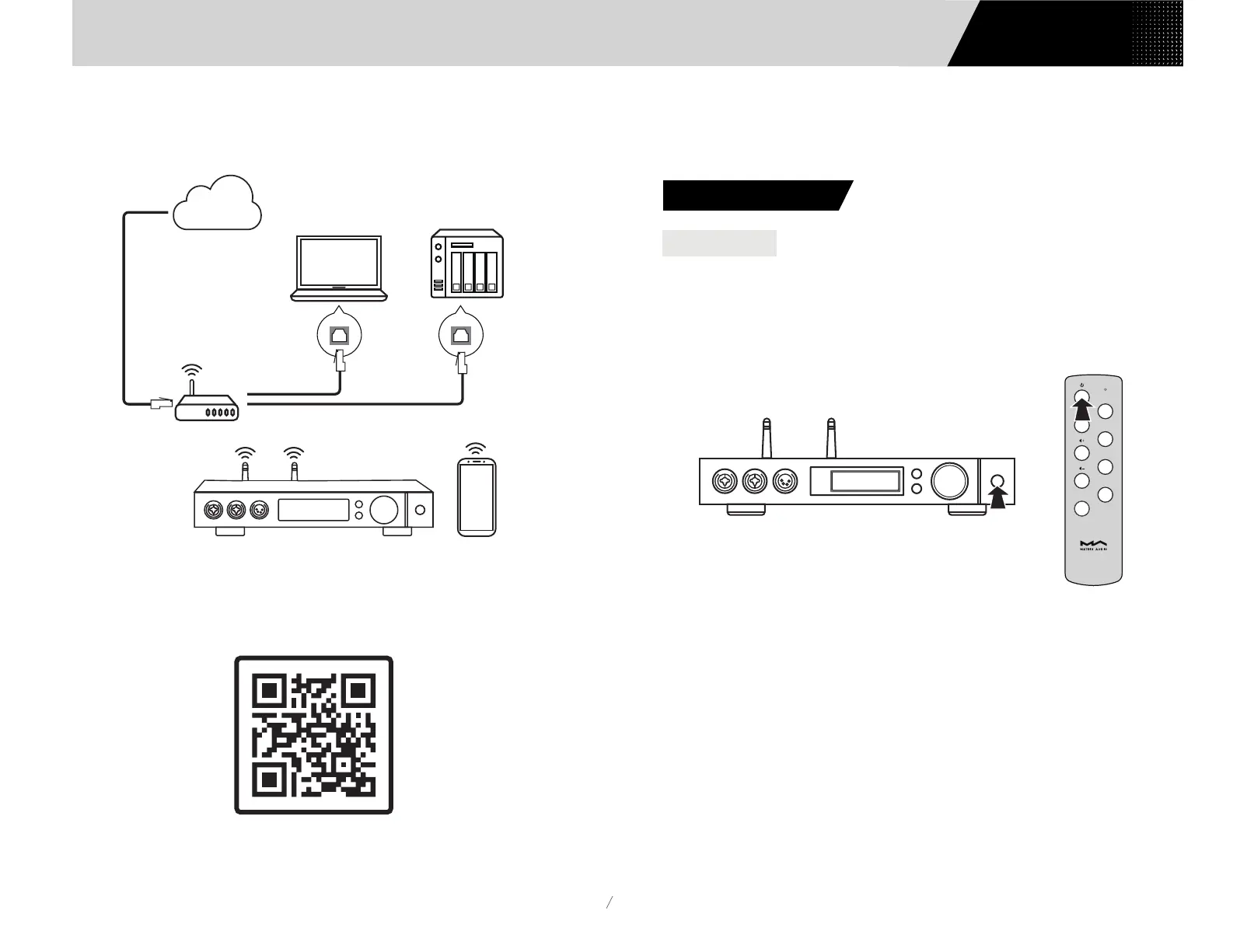
3.7.2 Let element X in the status as shown below:
3.7.3 Scan the QR code below to download MA Remote app for your iPhone, iPad and
Android devices, and follow the configuration wizard in the app to connect element X
to Wi-Fi and explore more exciting functionalities..
08
Connect to LAN port
Connect to WAN port
Connect to LAN port
Router
Computer NAS
Internet
The LED indicator will turn to dimmed after element X is connected to power supply,
indicating that it has entered the standby status, press the 'Standby' button on the
unit body or remote control, element X will power on, and the LED indicator will turn
to highlight white.
When the power is on, press the 'Standby' button on the front panel or IR Remote
control to turn it into standby mode, and the LED indicator will turn to dimmed.
4.1. Basic operation
4.1.1 Power on
4. Play
Filter
COA
OPT
IIS
USB/NET
Users Manual
Download MA Remote


 To Next Page