Settings
14
Configure to turn ON/OFF the dither function, it can
effectively reduce the quantizing distortion.
ON (Default)
OFF
5.5 Dither
Dither
ON
5
Set the internal time-base jitter elimination circuit for
turn ON or OFF.
ON (Default)
OFF
5.6 Jitter Eliminator
Jitter Eliminator
ON
6
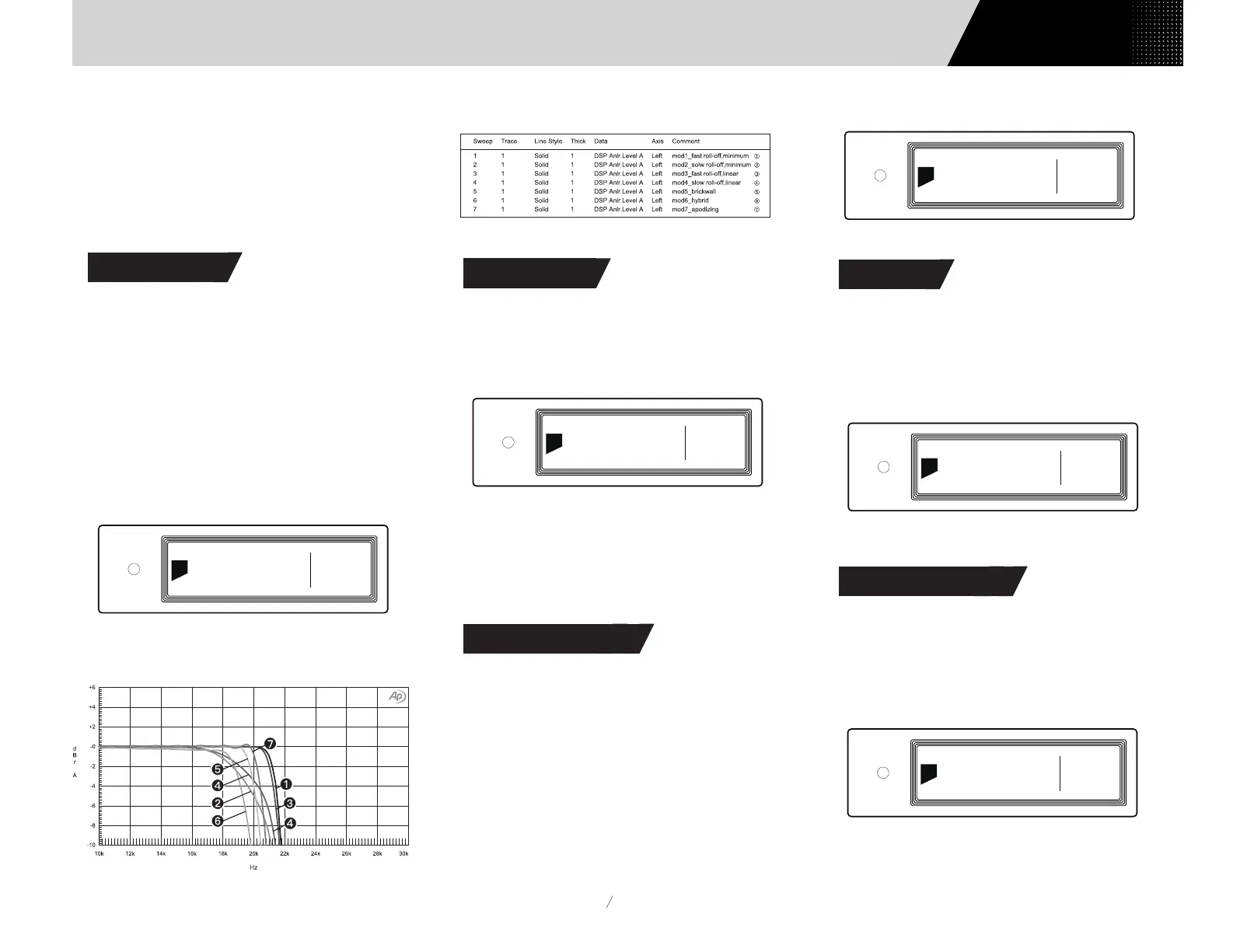
7 Configurable digital filters with different frequency
response curves, to set filters for different timbre
MOD1 fast roll-off, minimum phase filter (Default)
MOD2 slow roll-off, minimum phase filter
MOD3 fast roll-off, linear phase filter
MOD4 slow roll-off, linear phase filter
MOD5 brickwall filter
MOD6 hybrid, fast roll-off, minimum phase filter
MOD7 Apodizing, fast roll-off, linear phase filter
The frequency response curve of 7 different filters are
as follow:
5.2 PCM Filters
Set the cut-off frequency of DSD digital filter
47kHz (Default), 50kHz, 60kHz, 70kHz, AUTO
Suggestion:
DSD64 - 47k, DSD128 - 50k, and so on. When this
option sets to AUTO, the DSD filter will be selected
automatically.
5.3 DSD Filters
Set headphone amplifier gain
Low (Default)
High
Suggestion:
'Low' for low-impedence and low-power headphones.
'High' for high-impedence and high-power headphones.
5.4 Headphone Gain
PCM Filter
MOD 1
2
DSD Filter
47kHz
3
Headphone Gain
High
4
(Tested at 1kHz)
In order to avoid misoperation, switching from
0dB ADJ or 10dB ADJ to 0dB Fixed requires a
2-step confirmation, press "〇" button to
confirm, other operations will cancel this
setting.
Users Manual


 To Next Page