Picking the best exposure for color
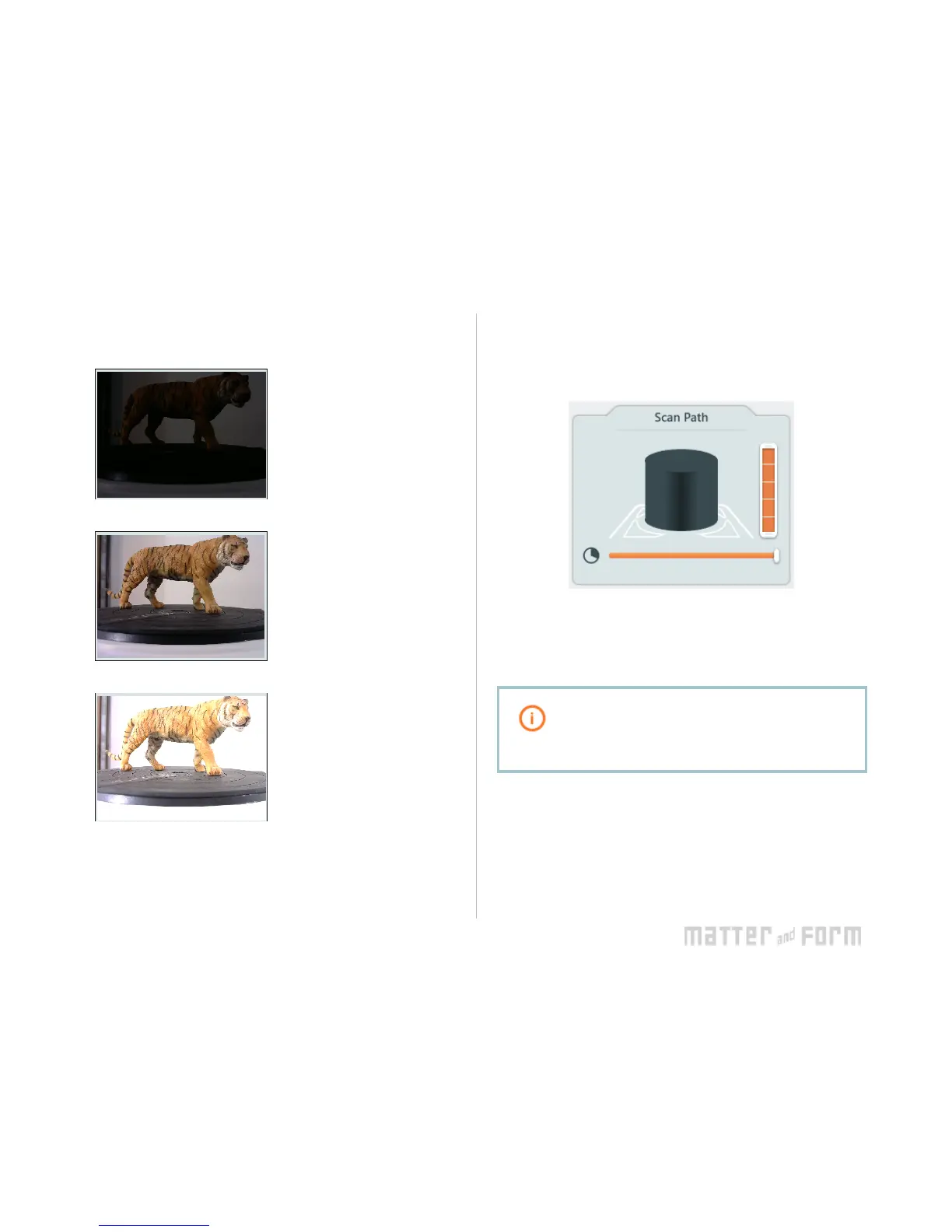
Here are three examples for Texture Settings exposures:
This is underexposed.
Capturing textures with this
exposure will result in a
fairly dark object.
This is a good choice for
capturing color because the
object is evenly lit with
minimal shadows and hot
spots.
This is overexposed.
Capturing textures with this
exposure will result in hot
spots and uneven colors.
Scan Path
Adjusting the sliders in the Scan Path toolbox will restrict
scanning to only a portion of the object.
● Height: The vertical slider sets how high the camera
head will move - each block of the slider represents
another height at which the camera head will stop to
complete a bed rotation (or pass) to capture points.
If unsure of the appropriate scan path height for
your object, leave the slider full and cancel the
scan’s progress when your object is completely
scanned. It will load in the Project Editor as is.
● Degree: The horizontal slider sets the degree of bed
rotation for each pass (45° minimum). Moving this
slider will restrict the scan bed’s rotation in order to
scan only a portion of an object.
Click Scan when you’re happy with your settings.


 To Next Page