6
Calder Brothers Corp
V1.0
Serial Number Range:
848-S-56TCG9Y2*03848 to _____________
Page 6
Model: 1560 Paver
PAVER OPERATION SECTION
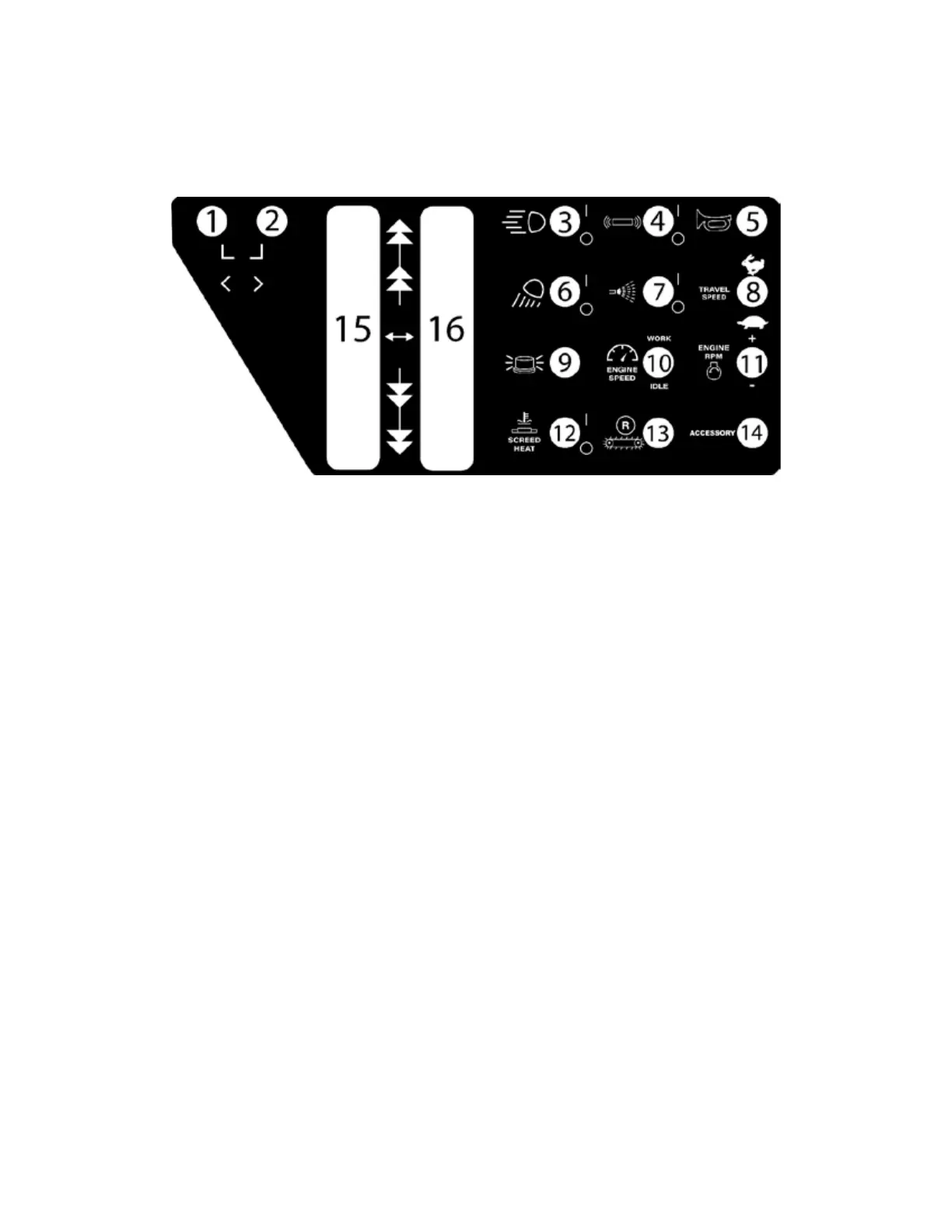
Machine Functions Explained
1. Hopper Open and Close. *If your machine is optioned with dual hopper control this toggle is just
the left hopper*
2. Hopper Open and Close (optional). *If your machine is optioned with dual hopper control this
toggle is the right hopper. If your machine does not have dual control this hole is empty.
3. Forward Hopper Lights On/o
4. Screed Vibrator On/o
5. Horn
6. Screed Lights On/O
7. Wash down pump On/o
8. Travel speed High or Low speed. Paving and Machine loading/unloading should
always be done in low speed range.
9. Beacon Lights. (Optional)
10. Engine Speed: this is to select a set RPM for idle or high RPM for work mode.
11. Engine RPM Adjustment: this increases or decreases the idle or work RPM a
small increment.
12. Screed Heat On/o. This turns the screed heat on or o. The desired tempera-
ture is set in the digital display. See Screed Heating Section.
13. Conveyor Reverse. This reverses the conveyor direction to return material to the
hopper.
14. Accessory. This is for extra options.
15. Left Drive Lever
16. Right Drive Lever
Operator Functions



 To Next Page