Contents
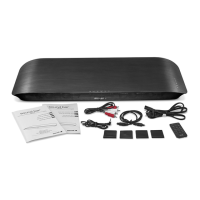
What’s in the Box ........................................................................................................2
Important Safety Instructions .....................................................................................3
Identifying the Parts ....................................................................................................6
Main Unit ................................................................................................................................. 6
Remote Control ...................................................................................................................... 7
Getting Started ............................................................................................................7
Prepare the Remote Control ................................................................................................. 7
To Replace the Remote Control Battery ............................................................................. 8
Placement and Instalment ................................................................................................... 8
Connections ..............................................................................................................10
Use the AUX Socket .............................................................................................................. 10
Use the OPTICAL Socket ...................................................................................................... 11
Connect to Power ................................................................................................................ 11
General Operation ...................................................................................................13
Standby/ON .......................................................................................................................... 13
Mute Sound ........................................................................................................................... 13
Select Modes ........................................................................................................................ 13
Adjust the Volume ................................................................................................................ 13
Select a Preset Sound Effect ............................................................................................... 14
Troubleshooting ........................................................................................................15
Specications ...........................................................................................................16
Connect to a Bluetooth Device ......................................................................................... 12


 To Next Page
 Loading...