EasyManua.ls Logo

maximo PV2024 HM - Fault Reference Code

Default Icon
29 pages
Print Icon
To Next Page IconTo Next Page
To Previous Page IconTo Previous Page
Loading...
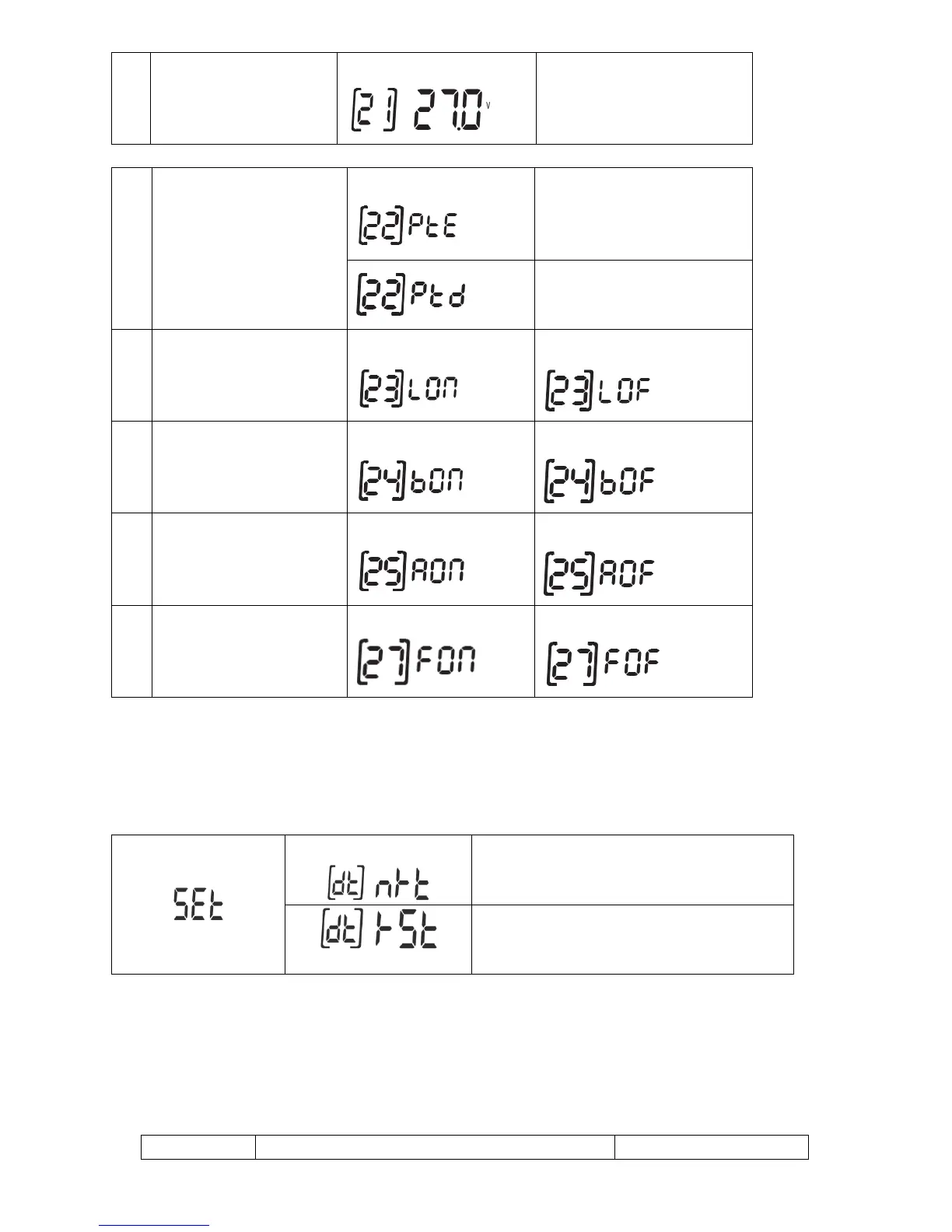
19
voltage when AC is
available
27.0V (default)
Setting range is from 22.0V to
29.0V.
Increment of each click is 0. 1V
22
Auto turn page
(default)
If selected, the display screen
will auto turn the display page.
If selected, the display screen
will stay at latest screen user
finally switches.
23
Backlight control
Backlight on
Backlight off (default)
24
Alarm control
Alarm on (default)
Alarm off
25
Beeps while primary source
is interrupted
Alarm on
Alarm off (default)
27
Record Fault code
Record enable (default)
Record disabled
After pressing and holding MENU button for 6 seconds, the unit will enter reset model. Press UP and
DOWN button to select programs. And then, press ENTER button to exit.
(default)
Reset setting disable
Reset setting enable
Fault Reference Code
Fault Code
Fault Event
Icon on