KK-641.002 Rev.No:1 01.08.12 ML-121X User Manual Page | 13
S e l e c t C o n f i g T y p e
R e - I n i t i a t e S y s t e m
P C P r o g r a m
U s e V a l i d D a t a
_ _ _ _
_ _ _
_ _ _ _ _
_ _ _
_ _ _ _ _
_ _ _ _ _
_ _ _
_ _ _
_ _ _
_ _ _
_ _ _
[ U p / D o w n ] : S c r o l l i n g [ E n t e r ] : A c c e p t
From the screen above, the configuration type is selected.
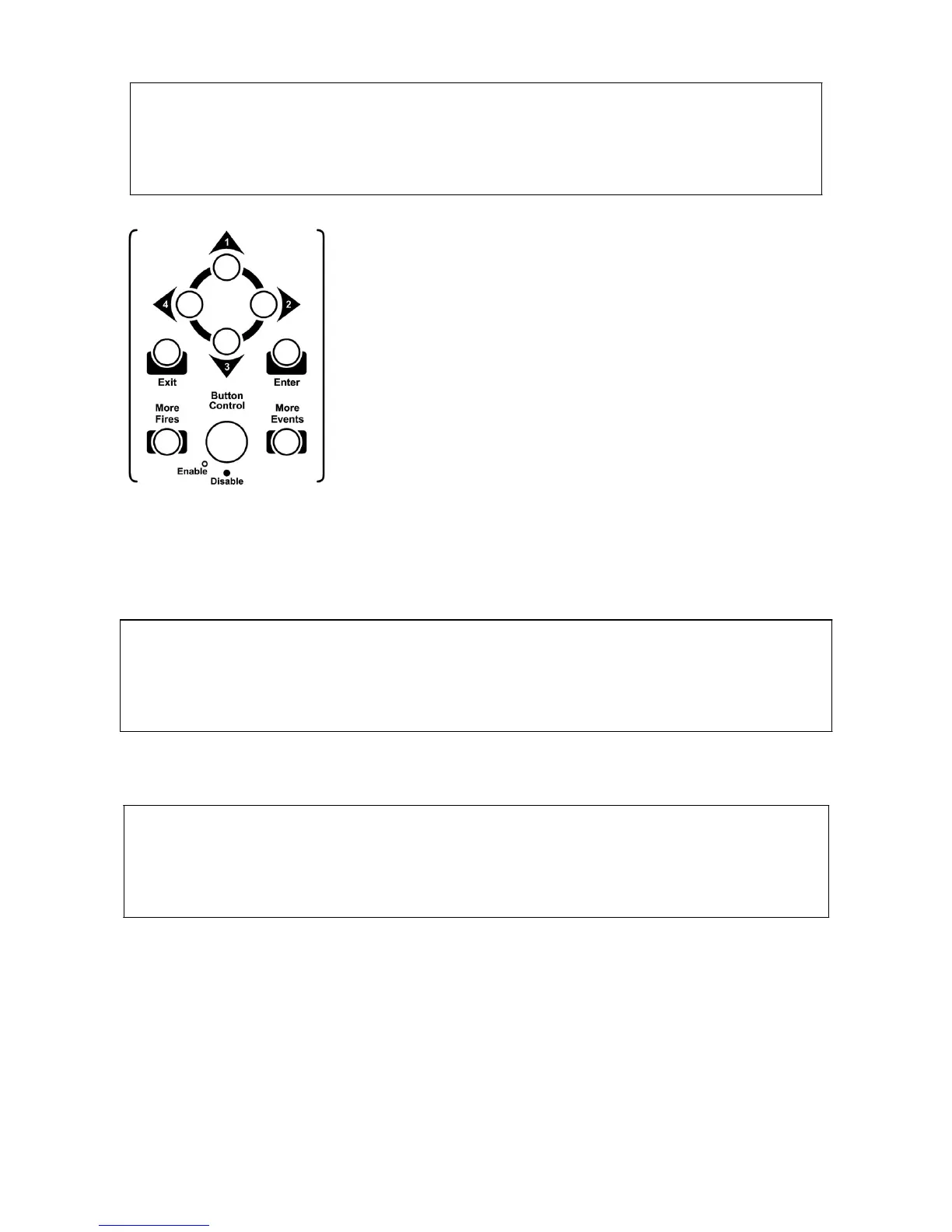
It is possible to scroll up and down in the menu by using ‘1’
and ‘3’ buttons, to confirm the selection press ‘Enter’ button.
8.1.4.1. Re-Initiate System (Automatic Learning)
Automatic learning is the operation that the panel scans and saves all devices connected to
the loop lines one by one.
Auto learning is activated by pressing ‘ENTER’ button. Below screen is displayed:
S e l e c t C o n f i g T y p e
C l e a r V a l i d D a t a ?
_ _ _
_ _ _ _
_ _ _ _ _
_ _ _
_ _ _ _ _
_ _ _ _ _
_ _ _
_ _ _
_ _ _
_ _ _
_ _ _
[ E x i t ] : C a n c e l [ E n t e r ] : A c c e p t
Activating this option will erase the panel memory and re-configure the system by scanning all
devices.
S e l e c t C o n f i g T y p e
D i s a b l e P r o g r a m E n a b l e S w i t c h
_ _ _ _ _ _
_ _ _ _ _ _
_ _ _
_ _ _ _ _
_ _ _
_ _ _ _ _
_ _ _ _
_ _ _
_ _ _ _ _
[ E x i t ] : M a i n M e n u
When program enable switch is OFF, Automatic Learning starts. As a result, new
configuration data is created depending on the currently connected devices and the previous
configuration data is erased. The new data is saved to the memory of panel.
8.1.4.2. PC Program
A special software program called ‘Loop Manager’ is used for programming the panel.
Creating zone location texts, creating cause-effect scenarios, device settings etc. are all done
through ‘Loop Manager’ Software.


 To Next Page