EasyManua.ls Logo

Maxlogic ML-121X - Page 25

Maxlogic ML-121X
36 pages
Print Icon
To Next Page IconTo Next Page
To Previous Page IconTo Previous Page
Loading...
KK-641.002 Rev.No:1 01.08.12 ML-121X User Manual Page | 25
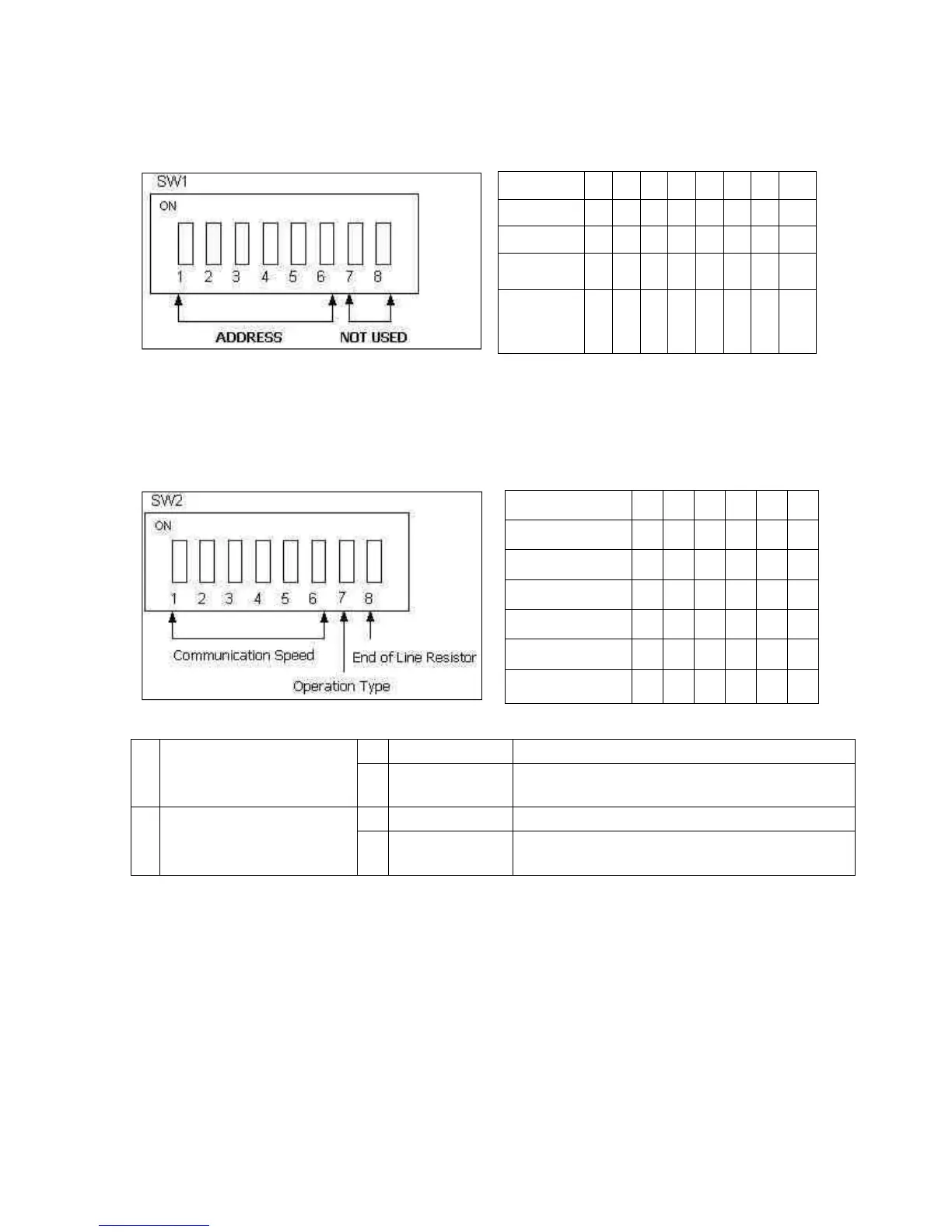
SWITCH 1- Used to set the address of panel in network.
1
0
0
0
0
0
0
0
0
11
0
1
0
1
0
0
0
0
23
0
1
1
0
1
0
0
0
54
1
0
1
0
1
1
0
0
Panel
Address
1
2
3
4
5
6
7
8
SWITCH 2- Used to set the communication speed, operation type and end of line
resistor of Panel which will operate in the network.
250 Kbps
1
0
0
0
0
0
100 Kbps
0
1
0
0
0
0
50 Kbps
0
0
1
0
0
0
20 Kbps
0
0
0
1
0
0
10 Kbps
0
0
0
0
1
0
5 Kbps
0
0
0
0
0
1
Communication
Speed
1
2
3
4
5
6
7
Operation Type
0
Normal Mode
Used for panels and repeater panels
1
Transparent
Mode
Used for signal amplifying distance extender
modules
8
End-of-Line
Resistor
Setting
0
120R disabled
-
1
120R enabled
Used to activate 120R which is the end-of-line
resistor. Always, it must be at this position

Related product manuals