Car audio equipment installations can be troublesome at times, even to the most
experienced of installation technicians. If you are not confident working with
electrical wiring, removing and reinstalling interior panels, carpeting, dashboards or
other components of your vehicle, please call your dealer in order to have the unit
professionally installed.
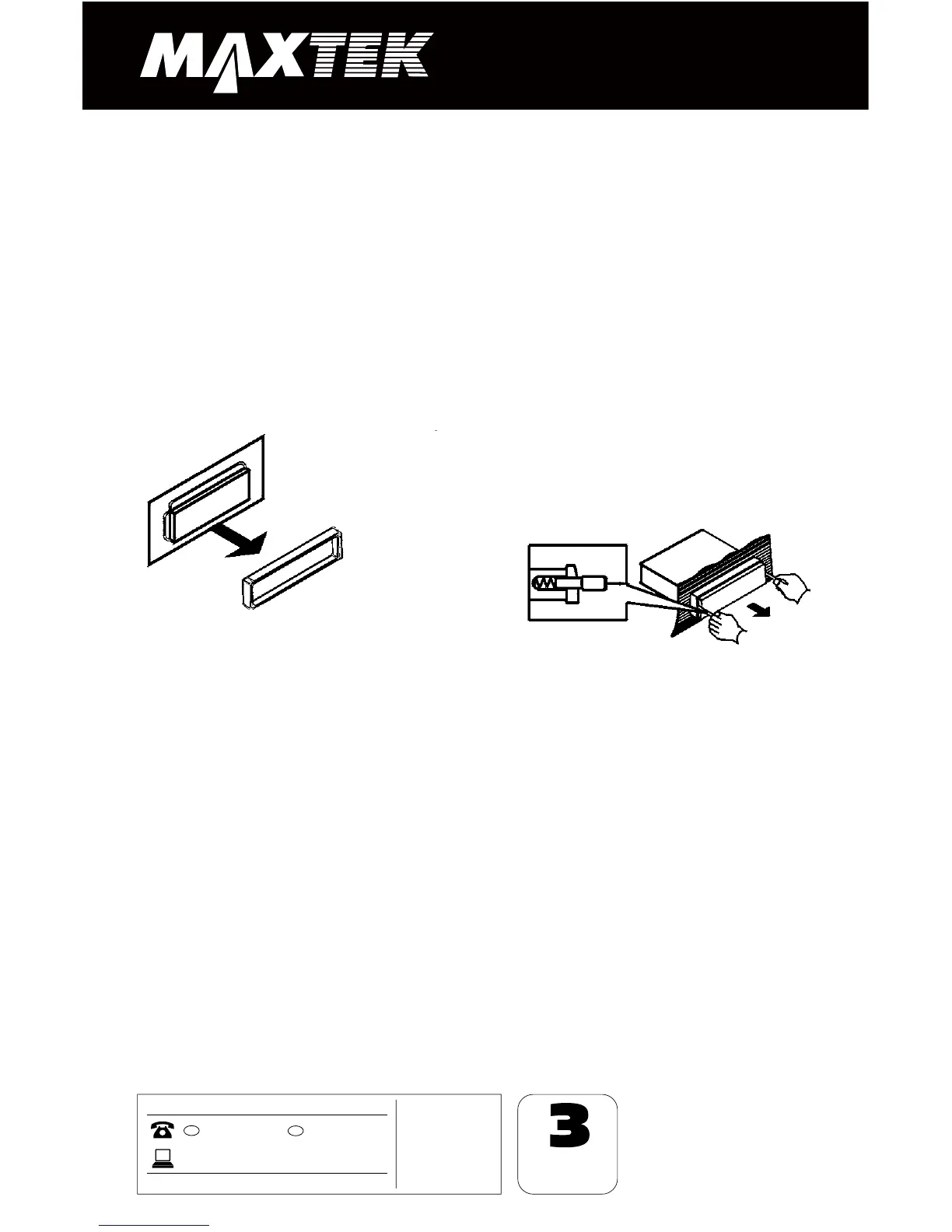
Remove the Old Unit from the Dashboard
DIN Front Mount
DO NOT DISCONNECT WIRES
AT THIS TIME!
2. Insert the keys supplied with the
old unit into both sides of the unit
as shown in figure below until they
click. Pull to remove the old unit
from the dashboard.
1. Remove the outer trim frame.
a.
While the old unit is playing,
disconnect the wires from one
speaker.
b. Take a length of masking tape and
fold it around the wire so it forms a
flag.
c. On the masking tape mark the
polarity of the speaker wires (+ & - ),
as well as left or right, and front or
rear.
d. Double check that you marked the
first speaker correctly by checking
that the speaker wires are the same
at the head unit.
e. Repeat this procedure for all of the
speakers.
f. Mark the power, ground, and any
other wires also
.
2. Mark Polarity of the Speaker Wires
Marking the polarity of the speaker wires will make it easier to connect the existing
speakers to your car radio. Consult wiring diagram of existing head unit before
disconnecting any wires.
If you are not positive of the polarity of the existing wires
from the speakers to the head unit, install new wires.
Before You Install


 To Next Page