NOTE 1:
Mark the polarity of the existing speaker wires before disconnecting battery.
NOTE 2:
Remove the two transport screws from the top of the unit before installing.
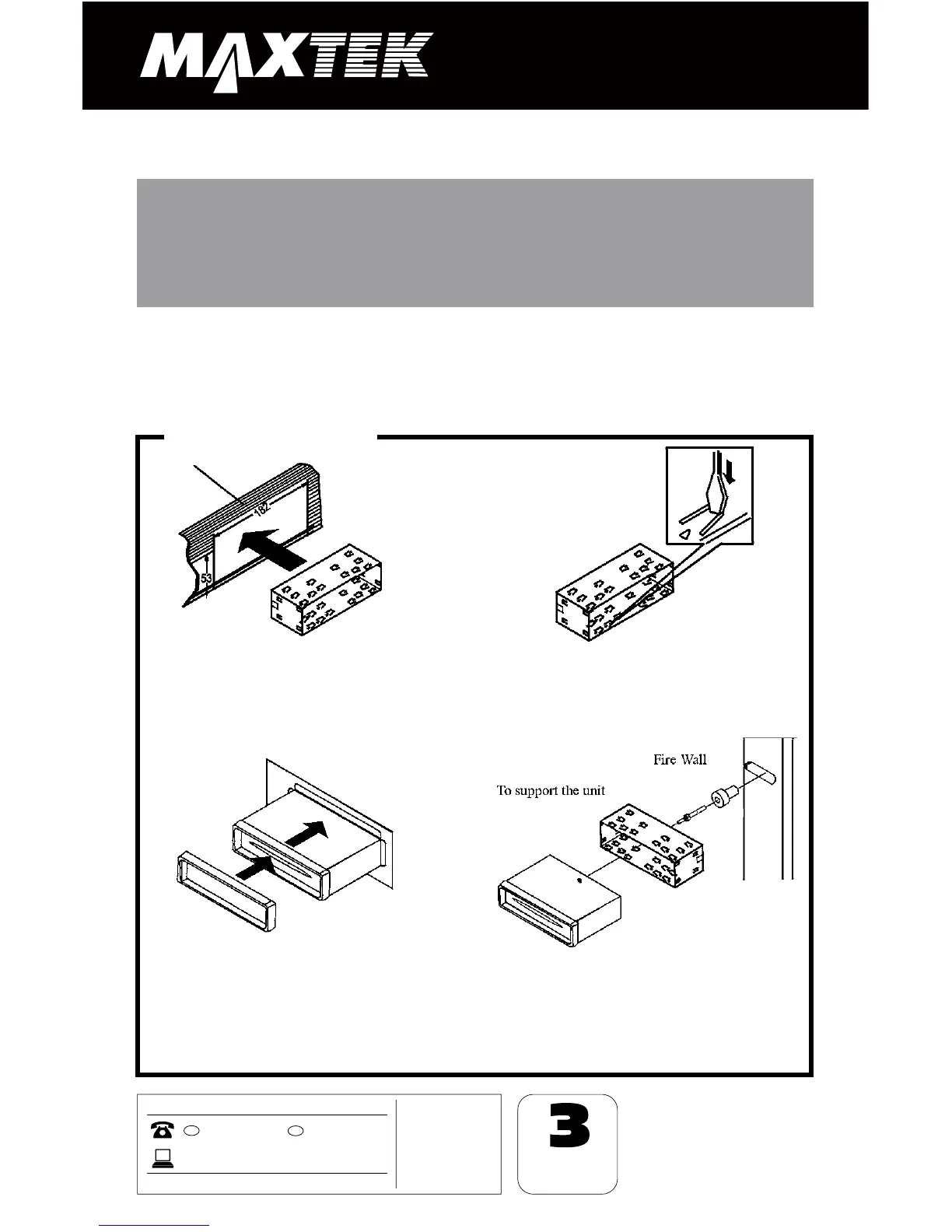
1. After removing the old radio and
mounting sleeve, insert supplied
mounting sleeve into opening.
2. Bend the tabs on the mounting
sleeve to keep the mounting sleeve
firmly in place.
3. Attach wires from the unit to
existing wires. See wiring connections
diagram. Insert radio into dashboard.
Then apply the trim frame to outside
of radio.
4. Support radio using supplied rear
mounting bolt and steel bar. See parts
list.
DIN Front Mount
Installation
WARNING!
Disconnect negative battery terminal from battery before
starting installation. Consult the vehicle owner’s manual for
proper instructions.


 To Next Page