7RSYLHZ5HDUYLHZ5HDUZLGHYLHZ
7KHWRSYLHZUHDUYLHZUHDUZLGHYLHZGLVSOD\VZKHQDOORIWKHIROORZLQJFRQGLWLRQVDUH
PHW
•
7KHLJQLWLRQLVVZLWFKHG21
•
6KLIWOHYHUVHOHFWRUOHYHULVLQ5SRVLWLRQ
'LVSOD\VZLWFKLQJ
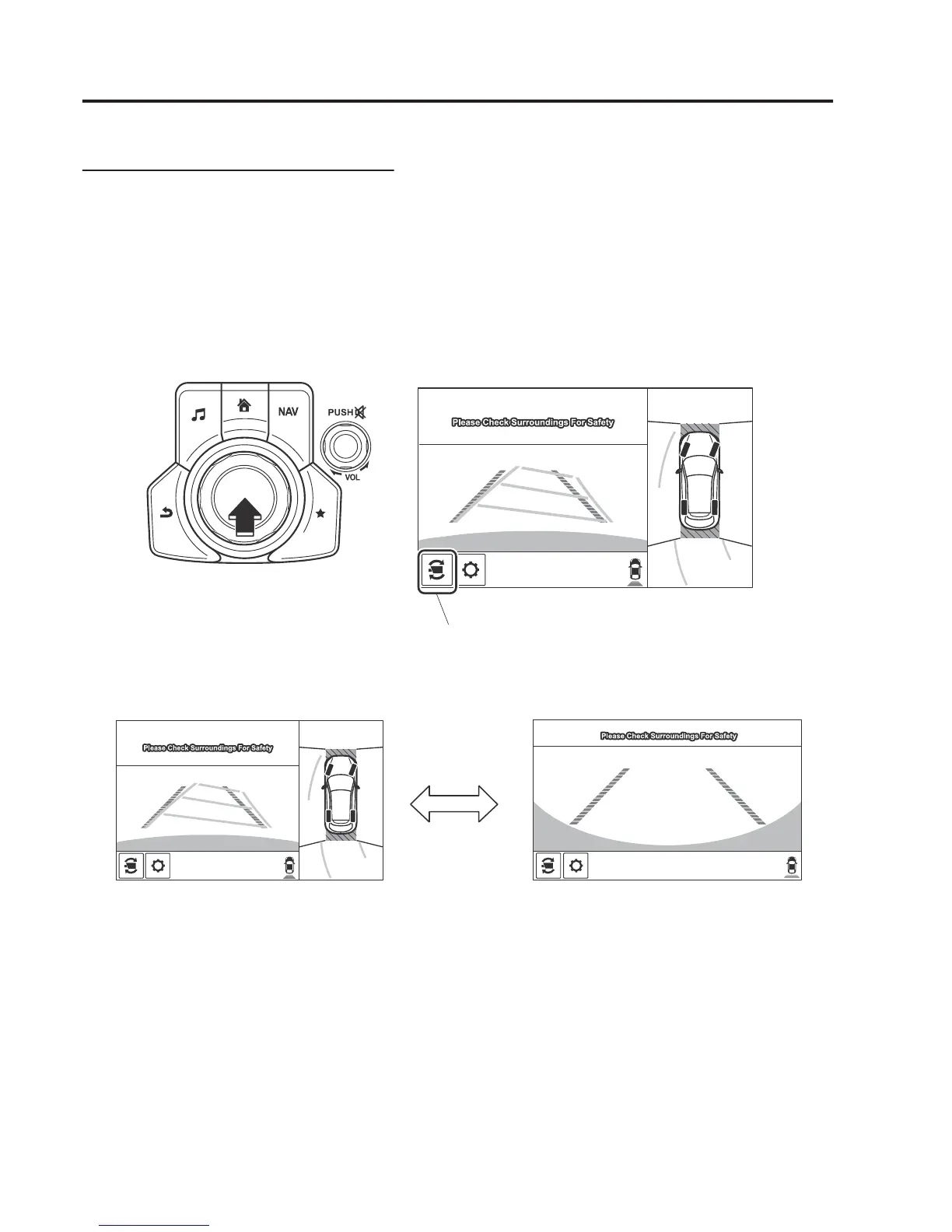
7KHGLVSOD\HGVFUHHQFDQEHVZLWFKHGE\SUHVVLQJWKHFRPPDQGHUNQRERUE\WRXFKLQJWKH
VZLWFKFDPHUDLFRQRQWKHVFUHHQZKLOHWKHWRSYLHZUHDUYLHZUHDUZLGHYLHZLVGLVSOD\HG
Top view/Rear view Rear wide view
Switch camera icon
NOTE
•
The top view/rear view and rear wide view automatically display whether or not the 360°
View Monitor switch is turned on or off when shifting the shift lever/selector lever to R
position.
•
The setting can be changed to display the top view/front view when shifting from reverse
to a forward gear without operating the 360°View Monitor switch to check the front of the
vehicle while parallel parking.
Refer to Personalisation Features on page Reference 9-12.
:KHQ'ULYLQJ
L$&7,96(16(



 To Next Page