J94S.book Page 32 Saturday, June 23, 2001 1:04 PM
Interior Comfort
Audio System
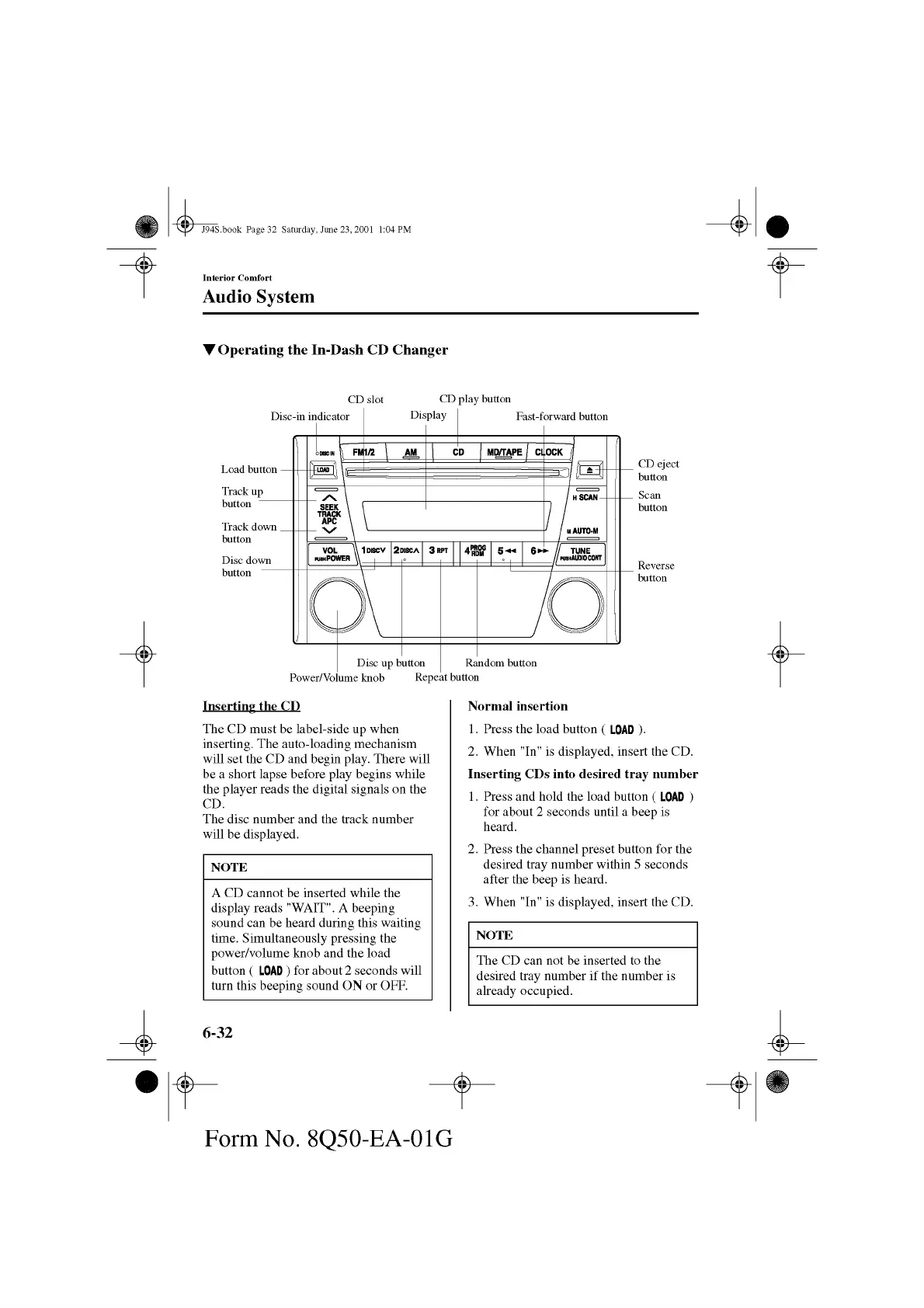
▼ Operating the In-Dash CD Changer
CD slot
CD play button
Inserting the CD
The CD must be label-side up when
inserting. The auto-loading mechanism
will set the CD and begin play. There will
be a short lapse before play begins while
the player reads the digital signals on the
CD.
The disc number and the track number
will be displayed.
NOTE
A CD cannot be inserted while the
display reads "WAIT". A beeping
sound can be heard during this waiting
time. Simultaneously pressing the
power/volume knob and the load
button ( LOAD ) for about 2 seconds will
turn this beeping sound ON or OFF.
6-32
Norm al insertion
1. Press the load button ( LOAD ).
2. When "In" is displayed, insert the CD.
Inserting CDs into desired tray nu m ber
1. Press and hold the load button ( LOAD )
for about 2 seconds until a beep is
heard.
2. Press the channel preset button for the
desired tray number within 5 seconds
after the beep is heard.
3. When "In" is displayed, insert the CD.
The CD can not be inserted to the
desired tray number if the number is
already occupied.
Form No. 8Q50-EA-01G



 To Next Page