
EasyManua.ls Logo

MC Fastpack - User Manual

MC Fastpack
116 pages
Print Icon
To Next Page IconTo Next Page
Loading...
EXPERTISE
INJECTION SYSTEMS
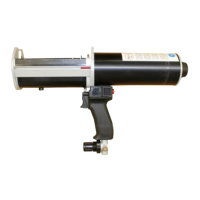
MC-Fastpack Power-Tool
Instruction handbook
Betriebsanleitung
Manuel d’instructions
Manuale di istruzioni
Manual de instrucciones
Manual de instruções
使用说明书

Table of Contents

Questions and Answers

  • R
    ronald62Jul 29, 2025
    Why is my MC Fastpack Power Tool making a leaking air noise?
    • M
      Morgan RuizJul 29, 2025
      If your MC Power Tool is making a leaking air noise, it could be due to several reasons. First, the inlet pressure might be too high, causing the safety valve to activate; check and reduce the inlet pressure to an adequate level. Second, there might be a leakage at the compressed air connection; in this case, check and tighten the adapter. Finally, if the leakage is coming from inside the handle, it's best to send the device to the manufacturer or an authorized service station for inspection.
  • P
    Penny JonesAug 4, 2025
    What to do if my MC Fastpack Power Tool is unable to discharge material?
    • K
      kgarciaAug 4, 2025
      If your MC Power Tool is unable to discharge material, it could be due to the material curing in the mixer. Replace the mixer and refer to the mixer-open-time in the technical data sheet of the materials you are dispensing. Another cause could be insufficient pressure. Gradually increase the pressure by turning the pressure regulation valve.
  • V
    valdezjessicaAug 9, 2025
    Why is dispensing interrupted when using my MC Fastpack Power Tool?
    • M
      mcleanchristineAug 9, 2025
      If dispensing with your MC Power Tool is interrupted, the compressed air supply may have been interrupted. Check the compressed air supply pressure and the connection to the dispenser.
  • M
    Maria MasseyAug 15, 2025
    What to do if the cartridge cannot be removed from the dispenser of my MC Power Tool?
    • T
      tinagreenAug 16, 2025
      If the cartridge cannot be removed from the dispenser of your MC Power Tool, it might be because the plunger discs are still in position inside the cartridge. Fully retract the plungers by using the retract button, and check the dispense volume indicator.
  • M
    Matthew SmithAug 22, 2025
    How to fix the issue when plunger discs cannot enter the cartridge of my MC Fastpack Power Tool?
    • B
      brandonallenAug 22, 2025
      If the plunger discs of your MC Power Tool cannot enter the cartridge, it might be due to several reasons. First, the cartridge may not be fully inserted in the cartridge holder. Check that the correct cartridge holder is installed and is not damaged, then push the cartridge fully down into the cartridge sleeve. Second, there could be foreign matter in the cartridge guide; remove any foreign matter, but avoid using sharp tools. Third, the wrong diameter of plunger discs might be installed; check the correct diameter and change the plunger discs if necessary.

Summary

1) General

2) Safety Regulations

Mandatory Safety Instructions

Outlines mandatory safety procedures and precautions.

6) Preparing the Dispenser for Use

7) Operation

Inserting the Cartridge

Instructions for correctly fitting a cartridge into the dispenser.

Connecting Air Supply

How to connect the device to a compressed air source.

Dispensing the Material

Process of dispensing the product using the tool.

Removing the Cartridge

Steps for safely ejecting a used or empty cartridge.

8) Troubleshooting

Troubleshooting Common Issues

Lists common faults, their causes, and recommended remedies.

9) Maintenance and Repair

10) Technical Data

MC Fastpack Specifications

General IconGeneral
BrandMC
ModelFastpack
CategoryPower Tool
LanguageEnglish