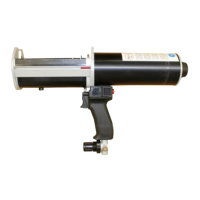
MC-Fastpack Power-Tool
14 MC-Bauchemie Müller GmbH & Co. KG 01-2021
8) TROUBLESHOOTING
No Fault Cause Remedy
1 Plunger discs
cannot enter the
cartridge
• Cartridge not fully
inserted in cartridge
holder
• Foreign matter in
cartridge guide
• Wrong diameter of
plunger discs installed
• Check that the correct
cartridge holder is installed
and is not damaged. Push
cartridge fully down into the
cartridge sleeve.
• Remove foreign matter from
cartridge guide (do not use
sharp tools).
• Check the correct diameter of
plunger discs. Change plunger
discs if necessary.
2 Cartridge cannot
be removed from
the dispenser
• Plunger discs are still
in position inside the
cartridge
• Fully retract the plungers by
using the retract button (check
dispense volume indicator).
3 Dispensing is
interrupted
• Compressed air supply
has been interrupted
• Check compressed air supply
pressure. Check connection to
dispenser.
4 Unable to
discharge
material
• Material has cured in
the mixer
• Pressure not high
enough
• Replace the mixer. Refer to
mixer-open-time in technical
data sheet of materials to be
dispensed.
• Gradually increase the
pressure by turning the
pressure regulation valve.
5 Leaking air noise • Inlet pressure too high –
safety valve blowing o
• Leakage at compressed
air connection
• Leakage from handle
• Check and reduce inlet
pressure to adequate level.
• Check and tighten the adapter.
• If the source of air leakage is
inside the handle please send
the device to the manufacturer
or authorized service station
for inspection.
6 Uneven
dispensing speed
• Foreign matter in driving
unit /damaged sealing
• Send device to manufacturer
or authorized service station
for inspection (never use
solvents to clean the air path).


 To Next Page
 Loading...