FleX Controller – User Manual 57
Version 1.0
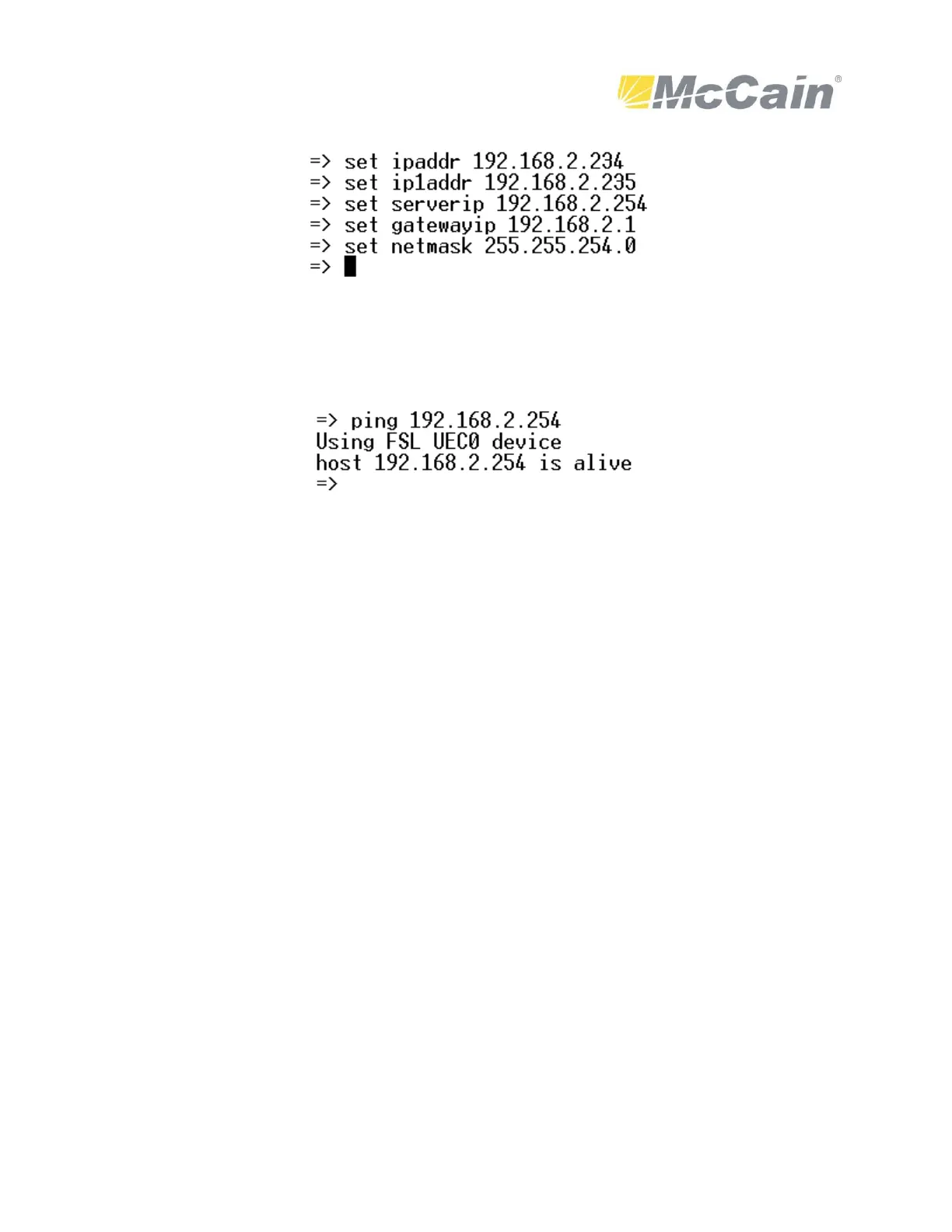
Please note: ipaddr, ip1addr are the IP addresses for Ethernet Port 1 and Port 2. serverip is the
computer IP address (where the TFTP server program is), gatewayip and netmask are part of the
network parameters and must be configured.
Proceed to test the computer and controller connectivity by typing the following:
Pinging the computer and having a response from it is the best way to test the link.
Proceed to update the U-Boot (u-bootEBIII.bin). Be careful to not turn OFF the controller or
interrupting the network link between the controller and computer. Type the following to update
the U-Boot:
protect off bank 1
erase 0xFE000000 0xFE0DFFFF
tftp 0x400000 u-bootEBIII.bin
cp.b 0x400000 0xFE000000 $filesize
Proceed to update the kernel (uImage_EBIII) by typing the following:
erase 0xFE100000 0xFE7FFFFF
tftp 0x400000 uImage_EBIII
cp.b 0x400000 0xFE100000 $filesize
Proceed to update the DTB (atc_EBIII.dtb) by typing the following:
erase 0xFE0F0000 0xFE0FFFFF
tftp 0x400000 atc_EBIII.dtb
cp.b 0x400000 0xFE0F0000 $filesize


 To Next Page