WARNING! Only perform the steps described within these instructions! All further
inspection, maintenance and repair work must be performed by an qualied specialist.
Gloves and appropriate protective clothing must be worn when performing these
instructions. When inspecting the blade always remove the battery from the mower.
Troubleshooting
General Troubleshooting
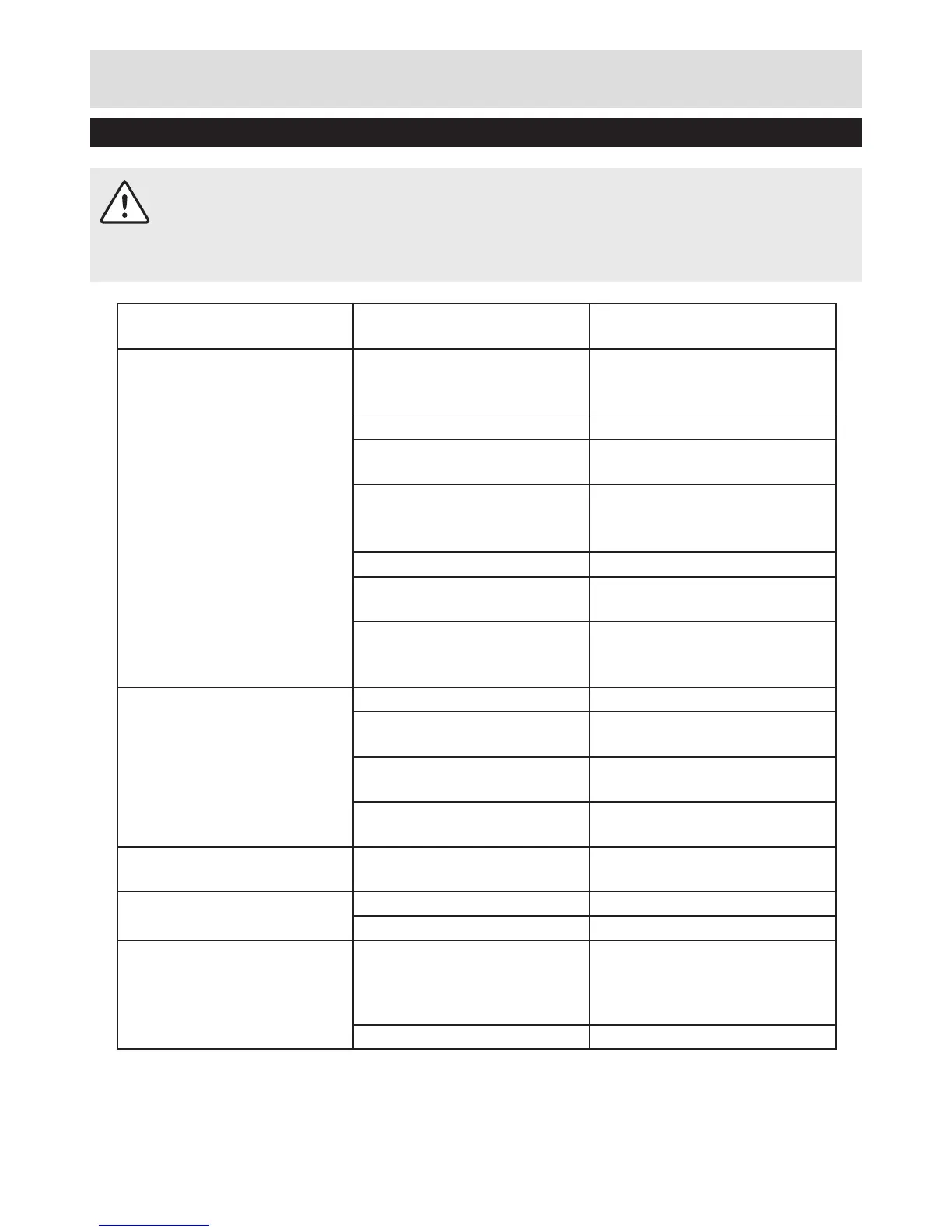
Fault Possible Cause Solution
Mower fails to operate Possible clogging Check underneath the mower
and clear as necessary (always
wear gardening gloves)
Battery not fully charged Charge battery
Battery not inserted (properly) Ensure battery is correctly
inserted
Grass too long Increase height of cut and
tilt garden product to reduce
starting load
Battery too hot/cold Allow to cool/warm
Isolator key not inserted
correctly/fully
Fit key correctly
There is a short delay in the
motor starting after engaging
the On/Off switch
This is normal. Hold On/Off
switch for 1– 3secs to start
motor.
Motor starts and stops
immediately
Battery not fully charged Charge battery
Isolator key not inserted
correctly/fully
Fit correctly
Battery not inserted (properly) Ensure battery is correctly
inserted
Battery too hot/cold Allow to cool/warm Increase
height of cut
Garden product functions
intermittently
Motor protector has activated Allow motor to cool and
increase height of cut
Lawnmower leaves ragged
cut
Height of cut too low Increase height of cut
Cutting blade blunt Replace the blade
Poor cutting or motor labours Possible clogging Check underneath the mower
and clear out as necessary
(always thick gardening
gloves)
Blade tted upside down Ret blade correctly


 To Next Page