22
The Drum Module Settings
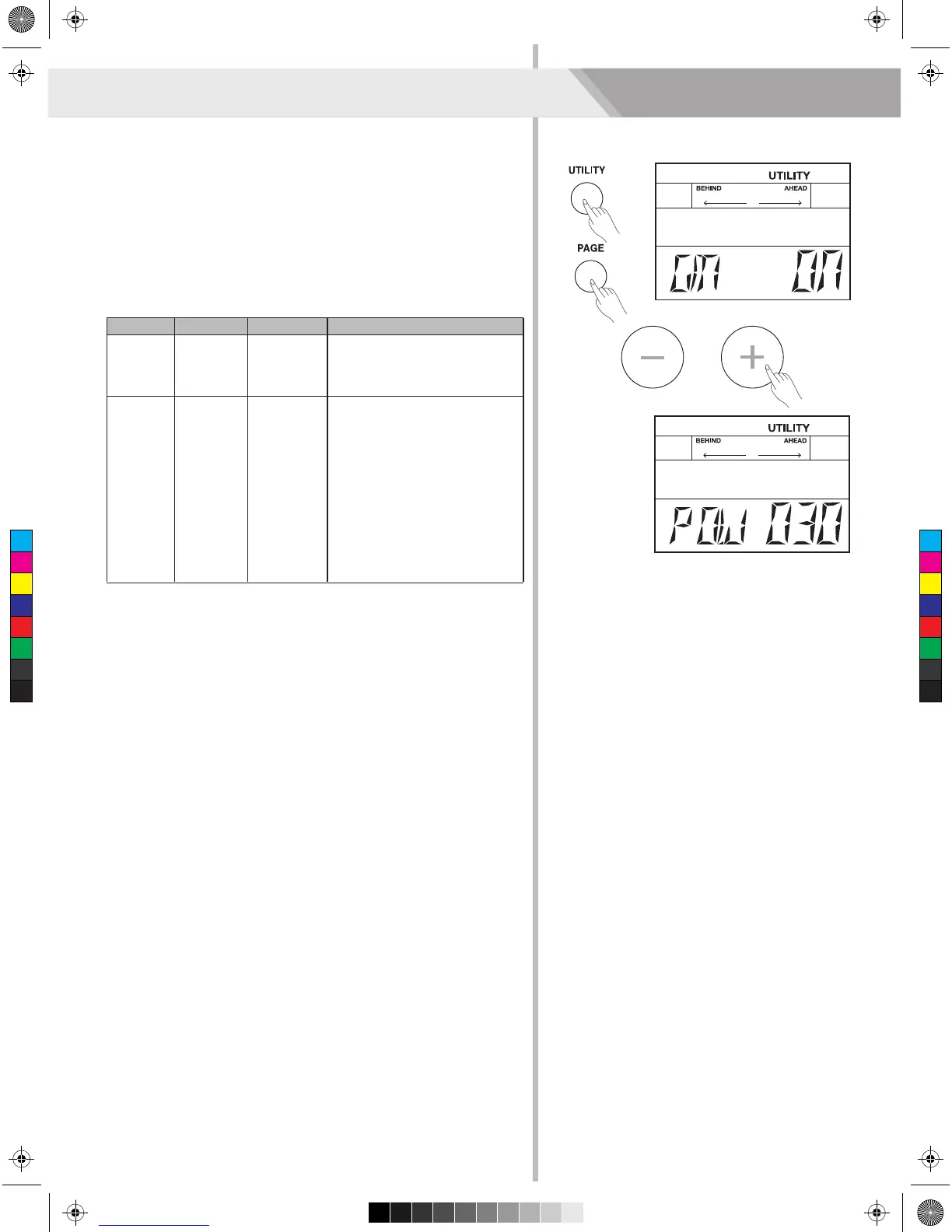
You can go further set the drum module function, do as the procedures
shown below:
1. Press the [UTILITY] button, the LCD will display the UTILITY menu.
2. You can repeatedly press the [PAGE] button to select the function
menu and use the [+] / [-] button to adjust the parameter value.
The setting values of drum module are shown below:
Utility Mode (UTILITY)
Parameter
GM MODE
AUTO
POWER
Range
ON/OFF
30, 60 ,OFF
Description
ON: The channel 10 will respond
GM drum kit.
OFF: The channel 10 will
respond local drum kit.
Factory settings, approximately
30 minutes.
30: Automatically turns the power
off if no buttons or functions are
operated for approximately 30
minutes.
60: Automatically turns the power
off if no buttons or functions are
operated for approximately 60
minutes.
OFF: The power will not power
off automatically.
LCD Display
GM XXX
POW XXX
C
M
Y
CM
MY
CY
CMY
K
AW_DD620_manual_G04_150508.pdf 22 2015/5/13 16:09:48


 To Next Page