6
Panel Description
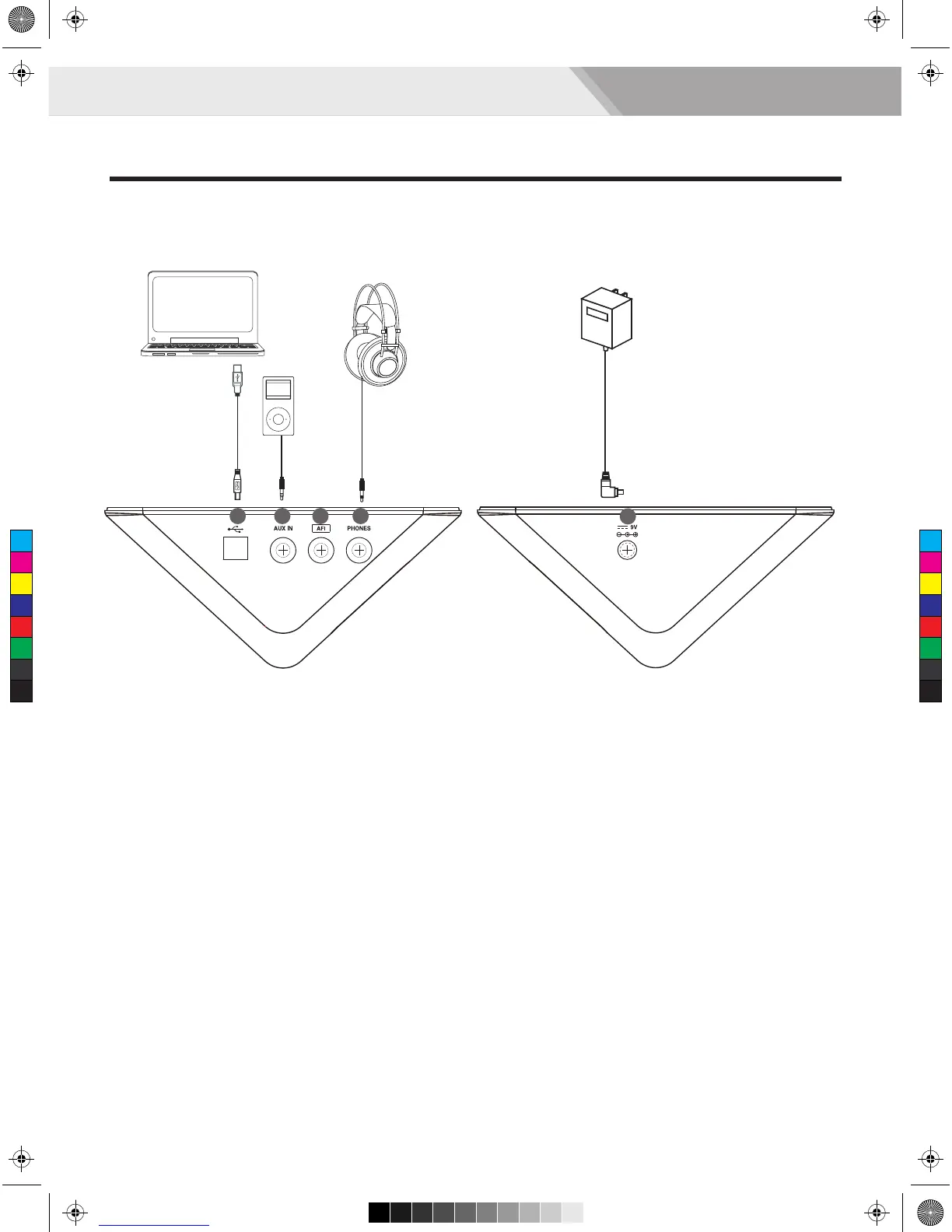
Side Panel (Connecting)
16. USB MIDI Terminal
Connect the PC/USB host with audio devices.
Note:
Only transmit MIDI data.
17. AUX IN jack (1/8”)
For connecting an extra audio player, for example, MP3
and so on via a stereo plug. You can enjoy playing the
drum along with your favorite songs.
18. AFI Terminal
Connect the AFI trigger.
19. PHONES jack (1/8”)
Connect stereo headphones here.
20. DC IN jack
Connect the AC adaptor here. Plug the AC adaptor cable
into the DC IN jack.
Note:
To prevent malfunction and equipment failure, always turn down the volume, and turn off all the units before making any
connections.
16 18 19
20
17
C
M
Y
CM
MY
CY
CMY
K
AW_DD620_manual_G04_150508.pdf 6 2015/5/13 16:09:46


 To Next Page