18
Beat Check
In order to improve playing accuracy of beat, practice with the metro-
nome basic beat type. If the score function is on, system will display
your practicing score after you have finished.
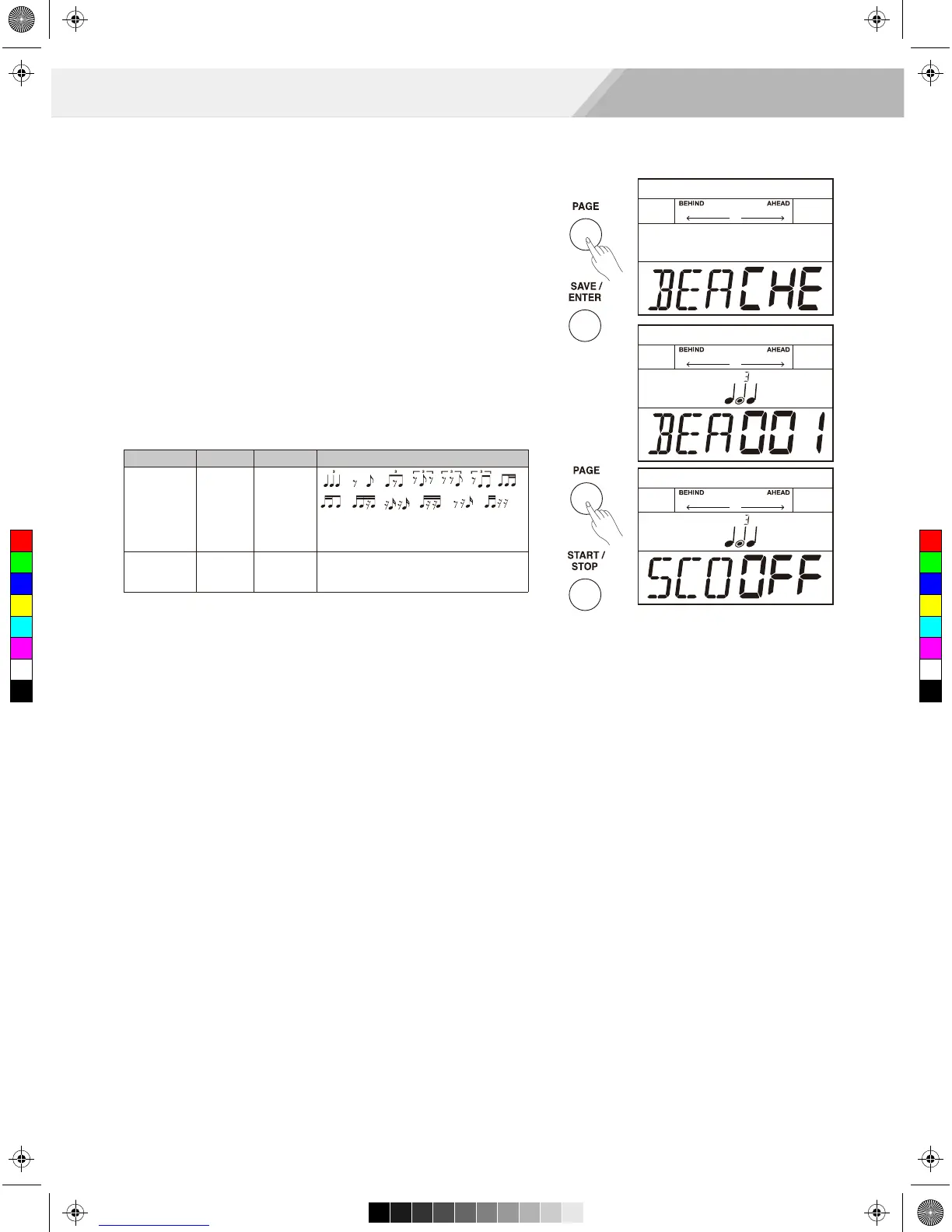
1. Repeatedly press the [PAGE] button to select beat check mode.
2. Press the [SAVE/ ENTER] button to enter beat check mode.
3. Use the [<]/[>] button or turn the [DIAL] to select a beat type to
practice. There are 13 beat types to choose from.
4. Use the [PAGE] button to switch to score editing, press the [<]/[>]
button or turn the [DIAL] to turn score function on/ off.
The default score setting is “OFF”.
5. Press the [START/ STOP] button to start practicing.
There will play a length of one measure count-in before starting.
6. If the score setting is “ON”: Auto stops practicing and displays your
score after circularly playing several times. Or, Press the
[START/ STOP] button to stop practicing and back to the main page
of beat check without display your score.
If the score setting is “OFF”: Press the [START/ STOP] button to
stop the practicing mode.
Coach
Beat check
BEA
SCO
Range
1-13
ON, OFF
Description
Use the [<]/[>] button or turn the
[DIAL] to select a suitable beat type.
ON: The score setting is on.
OFF: The score setting is off.
Display
BEA XXX
SCOXXX
C
M
Y
CM
MY
CY
CMY
K
AW_DD630_manual_G03_180105.pdf 18 18/1/5 15:30



 To Next Page