13
BASIC OPERATION
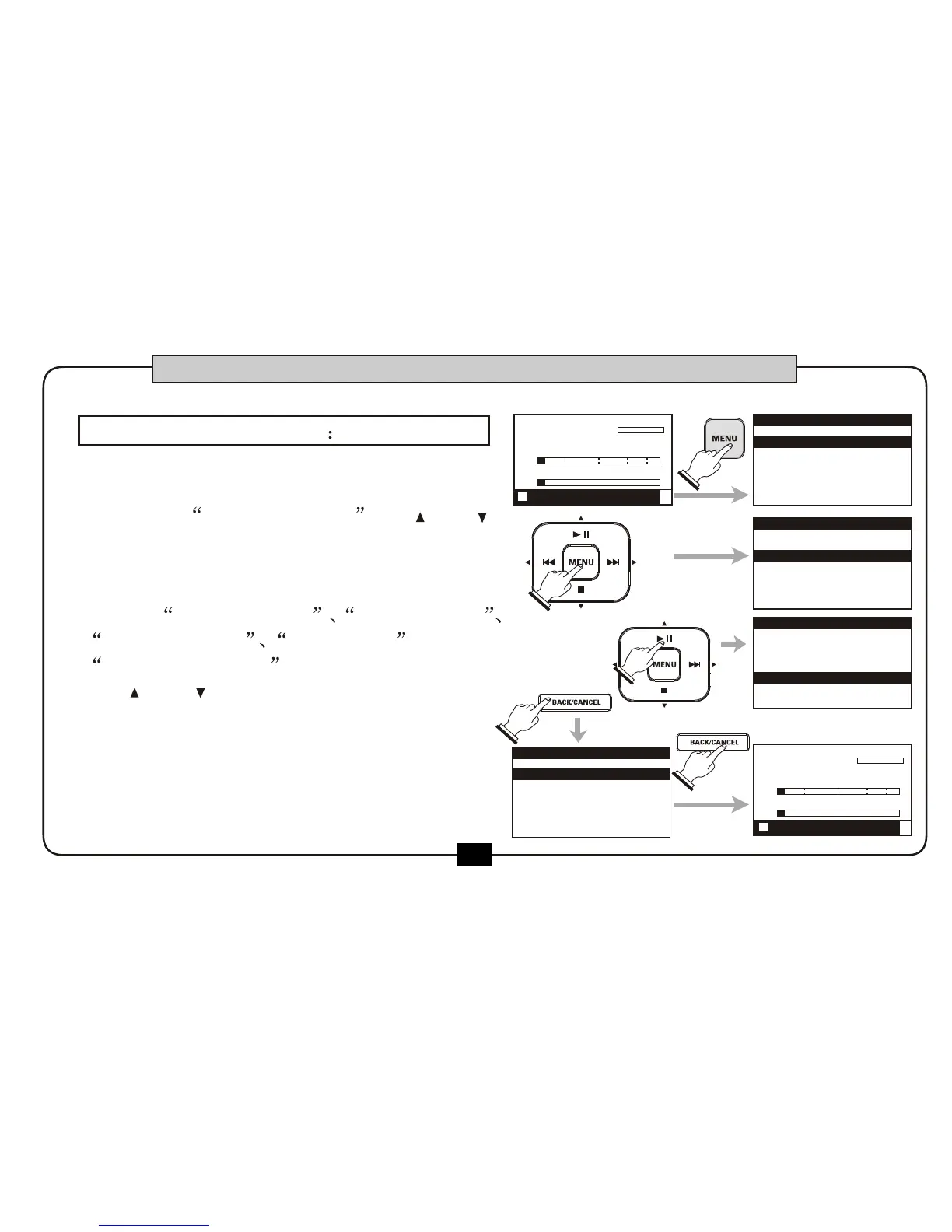
At the main screen, press [MENU] button,
the following menu appears. This screen let
you select RECORD SETUP by [ ] or [ ]
button.
The screen now indicates five parameter
items: SAMPLE RATE REC FO RMAT
INPUT SEL EDT AUTO GAIN and
VOCAL ENHANCE . You c an selec t them
by [ ] or [ ]button .
Press the [BACK/CANCEL]
button will return to the main menu .
RECORDING SETUP
00:00:00
00:02:22
DR2-0001.mp3
R
L
-48 0-6-12-24-36
STOP FX:off
1.RECORD SETUP
2.PLAY SETUP
3.EFFECT
4.FILE
5.UTILITY
MENU
SAMPLE RATE
RECORD FORMAT
Mp3 320kbps
INPUT SELECT
4 MICS
48kHZ
RECORD SETUP
SAMPLE RATE
48kHZ
RECORD FORMAT
INPUT SELECT
4 MICS
Mp3 320kbps
RECORD SETUP
1.RECORD SETUP
2.PLAY SETUP
3.EFFECT
4.FILE
5.UTILITY
MENU
00:00:00
00:02:22
DR2-0001.mp3
R
L
-48 0-6-12-24-36
STOP FX:off
1.
2.
3.


 To Next Page