35
UTILITY
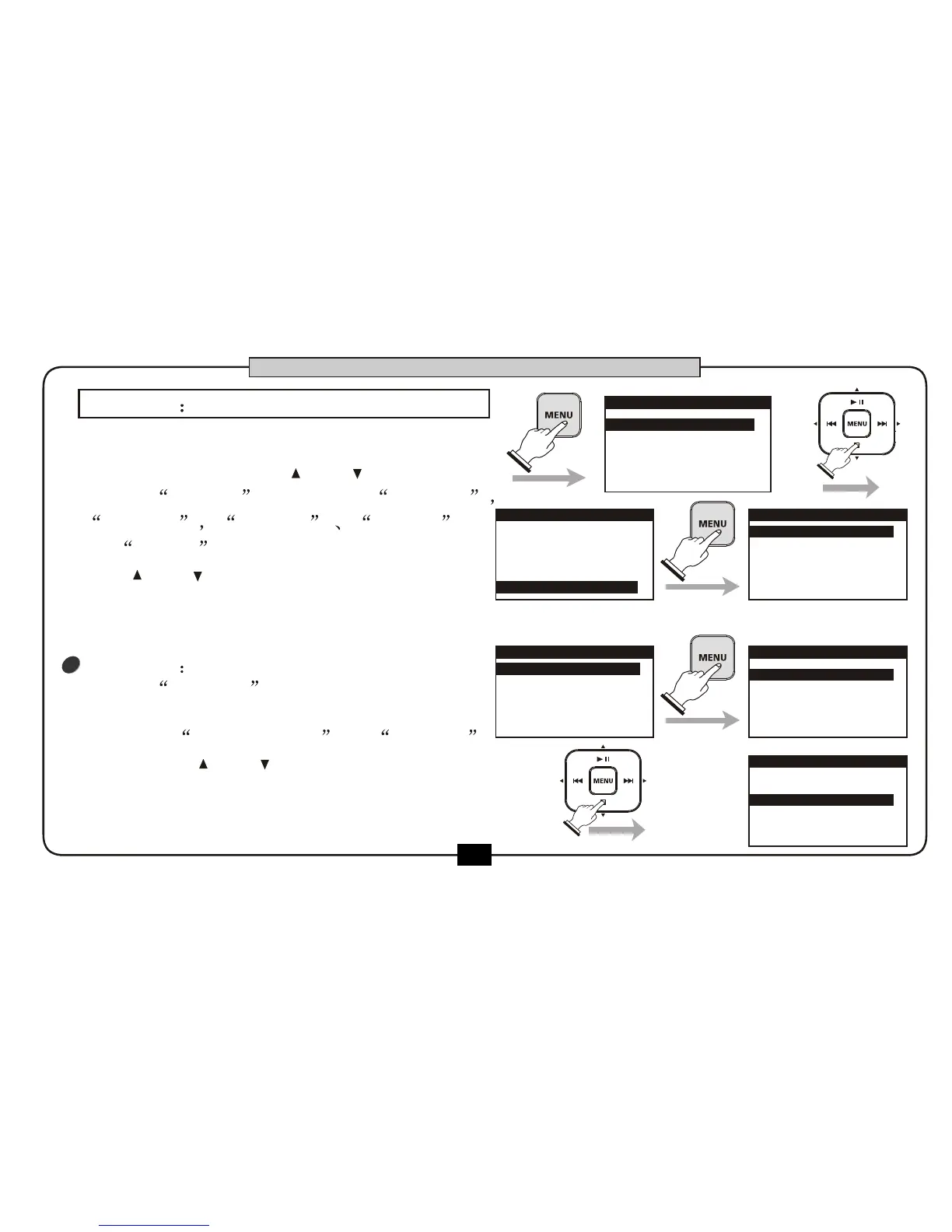
At the home screen, press [MENU] to go to
the main menu .press [ ] or [ ] button
choose UTILITY . Five items SD CARD
DISPLAY PRESET POWER
and TUNER will be listed on the screen .
use [ ] or [ ] button to choose the item.
Press [BACK/CANCEL] button to return
to the home screen.
1
SD CARD
choose SD CARD , press the [MENU]
button to enter the SD menu, there are two
operation INFORMATION a nd FORMAT .
You can use[ ] or [ ] button to choose .
Press [BACK/CANCEL] button back to
return to utility menu.
1.RECORD SETUP
2.PLAY SETUP
3.EFFECT
4.FILE
5.UTILITY
MENU
1.RECORD SETUP
2.PLAY SETUP
3.EFFECT
4.FILE
5.UTILITY
MENU
1.SD CARD
2.DISPLAY
3.PRESET
4.POWER
5.TUNER
UTILITY
1.INFORMATION
2.FORMAT
SD CARD
1.INFORMATION
2.FORMAT
SD CARD
BASIC OPERATION
1.SD CARD
2.DISPLAY
3.PRESET
4.POWER
5.TUNER
UTILITY


 To Next Page