20
SETUP PLAYBACK
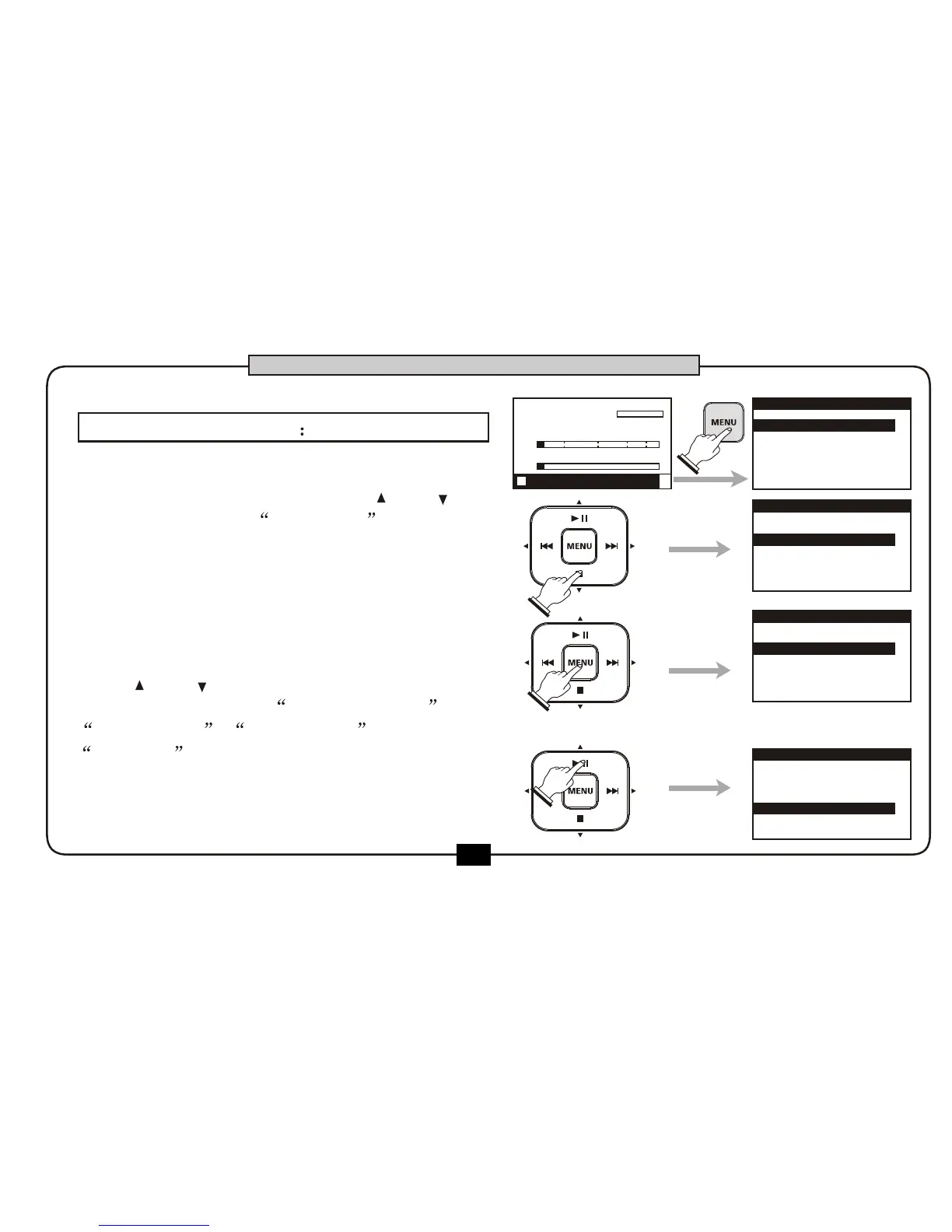
At the home screen , press [MENU] button
to go into the main menu. Use [ ] or [ ]
button to choose play setup then
press [MENU] button to go into the playback
setup screen .
Use [ ] or [ ] button to edit the
parameters such as TRACK SELECT ,
BASS C OMP , PLAY M ODE and
VOLUME .
Press [BACK/CANEL] to go back to the
home screen.
00:00:00
00:02:22
DR2-0001.mp3
R
L
-48 0-6-12-24-36
1.RECORD SETUP
2.PLAY SETUP
3.EFFECT
4.FILE
5.UTILITY
MENU
TRACK SELECT
SPECIAL
OFF
PLAY MODE
ONCE
STEREO
PLAY SETUP
1.RECORD SETUP
3.EFFECT
4.FILE
5.UTILITY
2.PLAY SETUP
MENU
TRACK SELECT
STEREO
SPECIAL
PLAY MODE
ONCE
OFF
PLAY SETUP
BASIC OPERATION
1.
2.
3.
STOP FX:off


 To Next Page