27
EFFECT
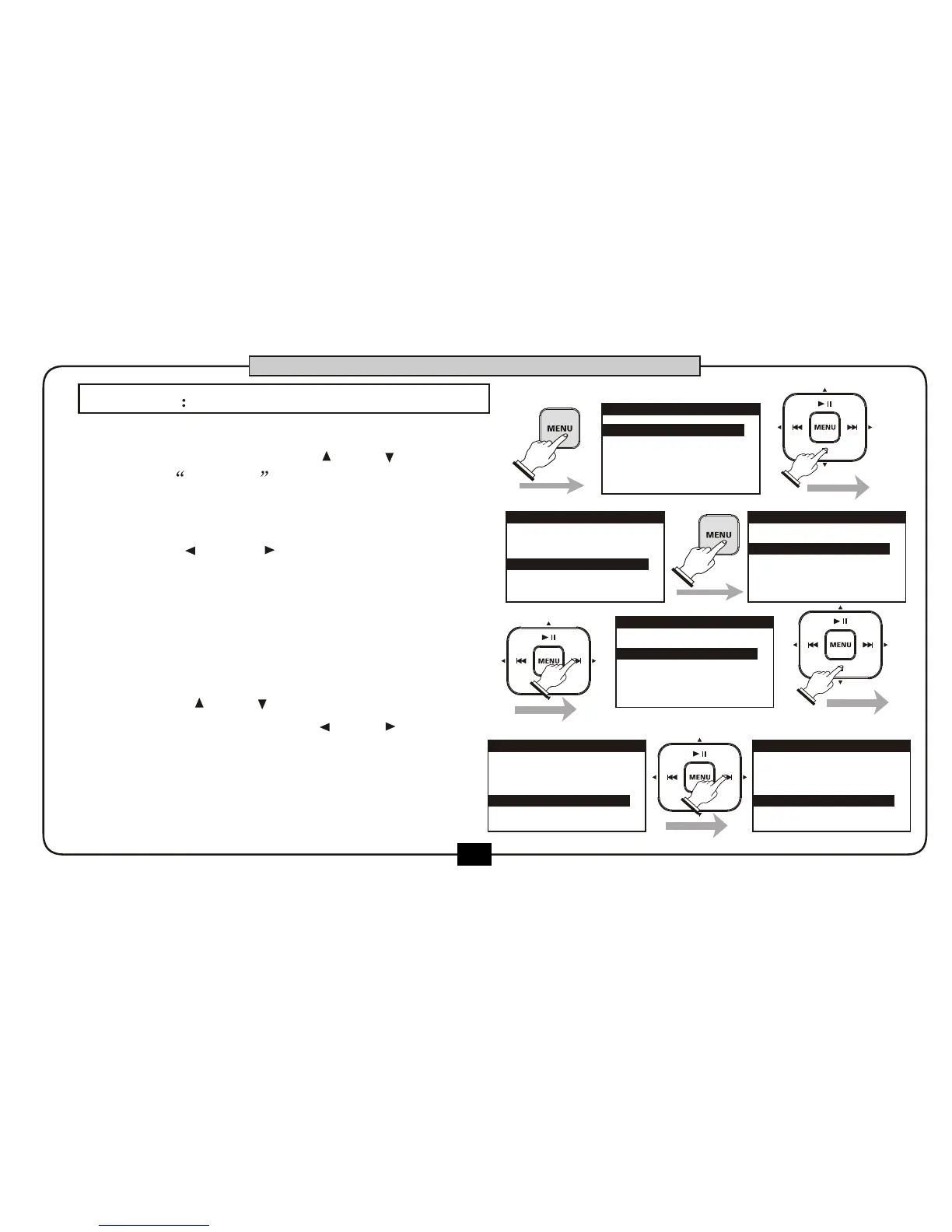
In home screen ,press [MENU] button to go
into the main menu, use [ ] or [ ] button
to select EFFECT and press [MENU]
button to enter the effect type .
The corresponding parameters of the
effect will change to follow the effect
type.Press[ ] or [ ]button to select
effect parameter . Press[ ] or [ ]
button to adjust the value for in the
selected parameter .
Press [BACK/CANCEL] button can back
to the home screen.
1.RECORD SETUP
2.PLAY SETUP
4.FILE
5.UTILITY
3.EFFECT
MENU
1.RECORD SETUP
2.PLAY SETUP
3.EFFECT
4.FILE
5.UTILITY
MENU
EFFECT EDIT
EFFECT TYPE
OFF
EFFECT EDIT
EFFECT TYPE
ROOM
TIME
LEVEL
20
20
Press the [ ] and [ ] for effect type
change , including OFF ,ROOM, HALL ,
CHORUS ,PITCH SHIFT, DELAY .The default
is OFF.
EFFECT EDIT
EFFECT TYPE
TIME
20
LEVEL
20
ROOM
EFFECT EDIT
EFFECT TYPE
ROOM
TIME
LEVEL
20
21
BASIC OPERATION
1.
2.
3.


 To Next Page