23
This product supports playback files of MP3 and WAV .
PLAYBACK
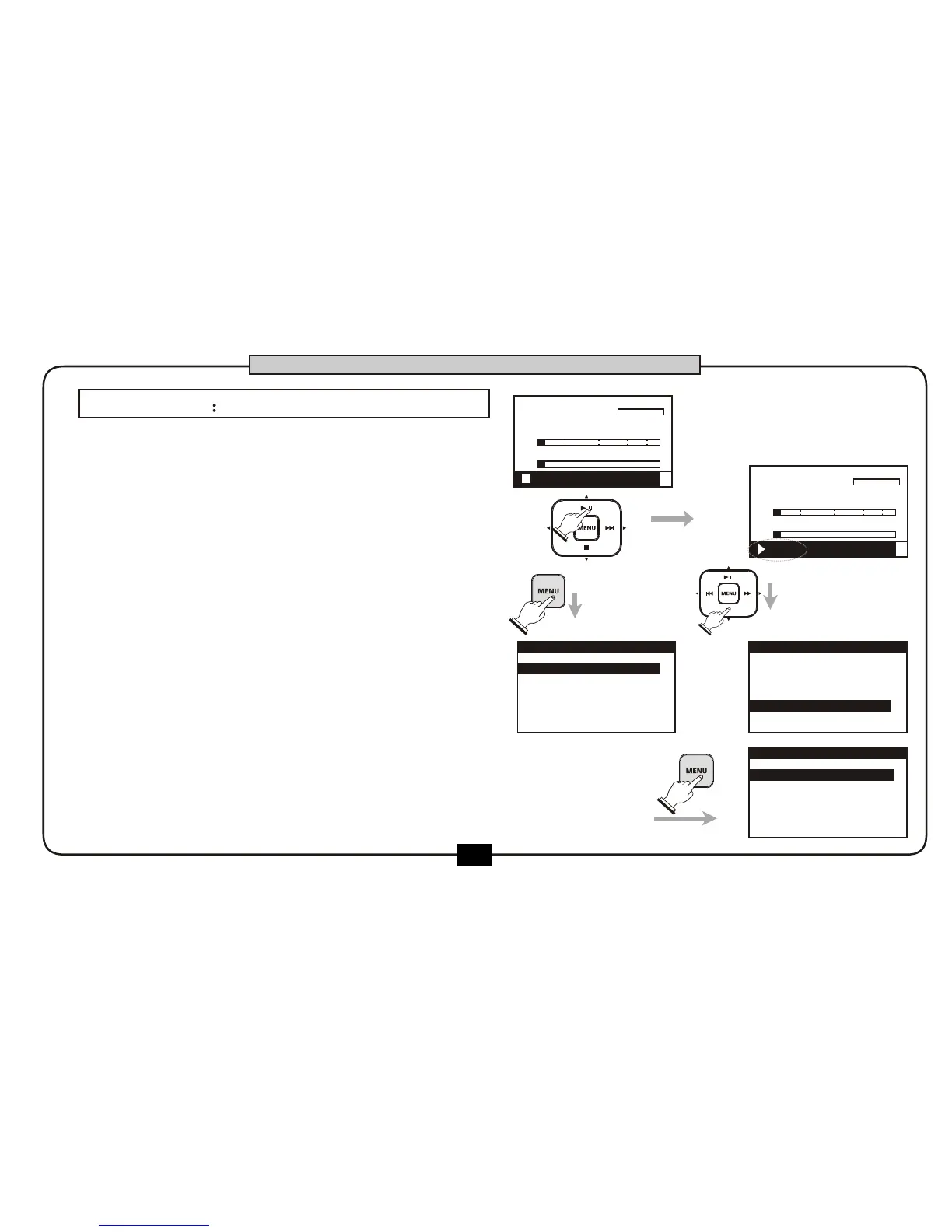
At the home screen, you can use [PLAY/PAUSE]
button to start playing the file , press [PLAY/
PAUSE] button for the second time to pause the
playing , press [PLAY/PAUSE] button for the third
time to continue playing. The recorder playback the
current song according to the playback setup
(ONCE, LOOP, LOOP ALL).
Press [STOP] button to stop the current playing.
You can also playback the file by this way .
go into the file manage screen (MENU-
FILE), select the file you need and press the
[MENU] button.
00:00:00
00:02:22
DR2-0001.mp3
R
L
-48 0-6-12-24-36
00:01:18
00:02:22
DR2-0001.mp3
R
L
-48 0-6-12-24-36
1.RECORD SETUP
2.PLAY SETUP
3.EFFECT
5.UTILITY
4.FILE
MENU
1.RECORD SETUP
2.PLAY SETUP
3.EFFECT
4.FILE
5.UTILITY
MENU
DR2-xxx1.MP3
DR2-xxx2.
3
MP3
DR2-xxx3.MP
FILE LIST
BASIC OPERATION
1.
2.
3.
4.
STOP FX:off
PLAY FX:off


 To Next Page